
Introduzione
This manual provides instructions for the setup, operation, and maintenance of your Logitech Wingman Force Joystick, model 963155-0403. This device is designed to enhance your PC gaming experience with force feedback technology and programmable controls.
Contenuto della confezione
Verifica che il pacco contenga i seguenti articoli:
- Logitech Wingman Force Joystick
- Adattatore di alimentazione
- Cavo USB (integrato o separato)
- Software CD (if applicable, for WingMan Software)
- Manuale dell'utente (questo documento)
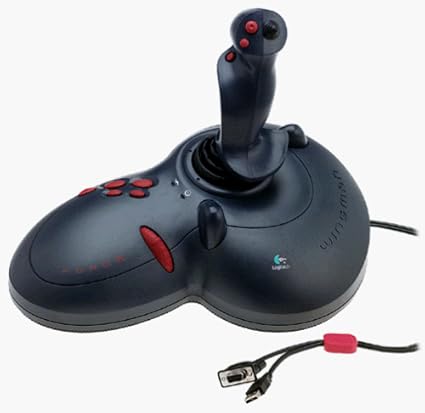
Figure 1: The Logitech Wingman Force Joystick packaging, showing the joystick and its features.
Impostare
- Connetti alimentazione: Plug the power adapter into the joystick and then into a standard electrical outlet.
- Connetti al PC: Connect the joystick's USB cable to an available USB port on your computer. The joystick also supports serial interfaces.
- Installa il software: Insert the WingMan Software CD (if provided) into your computer's CD-ROM drive and follow the on-screen instructions to install the drivers and WingMan Software. If no CD is provided, drivers may be automatically installed by your operating system or available for download from the Logitech support websito.
- Requisiti di sistema: Ensure your computer runs a compatible Windows operating system.
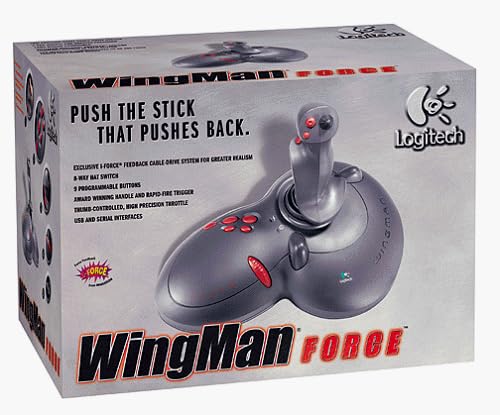
Figure 2: The Logitech Wingman Force Joystick, illustrating its ergonomic design and button layout.
Istruzioni per l'uso
Controlli finitiview
- Joystick Handle: Provides precise control for in-game movement.
- 9 pulsanti programmabili: Customize these buttons using the WingMan Software for various in-game actions.
- 8-Way Hat Switch: Located on top of the joystick, this switch allows for quick camera views or directional commands.
- Thumb-Controlled Throttle: Adjust speed or thrust with the integrated throttle control.
Force Feedback Technology
The Wingman Force Joystick utilizes Logitech's exclusive I-Force force feedback technology with a cable-drive system. This system provides realistic tactile feedback, such as vibrations from impacts, recoil from weapons, and resistance during maneuvers, enhancing immersion in compatible games.
Using WingMan Software
The WingMan Software allows you to:
- Program the 9 buttons for specific game functions.
- Crea e salva più profiles per diversi giochi.
- Adjust force feedback intensity settings.
- Calibrate the joystick for optimal performance.
Refer to the WingMan Software's help documentation for detailed instructions on customization and profile gestione.
Manutenzione
To ensure the longevity and optimal performance of your joystick:
- Pulizia: Use a soft, dry cloth to wipe the surface of the joystick. Avoid using abrasive cleaners or solvents.
- Magazzinaggio: Store the joystick in a clean, dry environment away from extreme temperatures and direct sunlight.
- Cura del cavo: Avoid bending or crimping the cables excessively.
Risoluzione dei problemi
- Problem: Joystick not recognized by computer.
- Soluzione:
- Ensure the USB cable is securely connected to both the joystick and the computer.
- Prova a connetterti a una porta USB diversa.
- Verify that the power adapter is properly connected and the joystick is receiving power.
- Reinstall the WingMan Software drivers.
- Problem: Inconsistent or absent force feedback.
- Soluzione:
- Check the force feedback settings within the WingMan Software and ensure they are set to an appropriate level.
- Assicurati che il gioco a cui stai giocando supporti il force feedback e che questa funzione sia abilitata nelle impostazioni del gioco.
- Restart your computer and the game.
- Verifica che tutte le connessioni siano sicure.
- Problem: Buttons or controls are unresponsive.
- Soluzione:
- Calibrate the joystick using the WingMan Software.
- Ensure the joystick drivers are up to date.
- Test the joystick in a different game or application to determine if the issue is game-specific.
Specifiche
| Caratteristica | Dettaglio |
|---|---|
| Numero di modello | 963155-0403 |
| Marca | Logitech |
| Tipo di controllore | Leva di comando |
| Tecnologia di connettività | USB, Seriale |
| Dispositivi compatibili | PC Windows |
| Dimensioni del prodotto | 13.5 x 9.63 x 9.25 pollici |
| Peso dell'articolo | 4.14 libbre |
| Feedback di forza | I-Force feedback cable-drive system |
| Pulsanti | 9 pulsanti programmabili |
| Interruttore del cappello | Interruttore a cappello a 8 vie |
| Acceleratore | Thumb-controlled, high precision throttle |
Garanzia e supporto
Per informazioni sulla garanzia e supporto tecnico, fare riferimento alla documentazione inclusa con il prodotto o visitare il sito ufficiale del supporto Logitech websito. In genere, lì puoi trovare driver, FAQ e informazioni di contatto per il servizio clienti.
Supporto Logitech Websito: www.logitech.com/support