
Informazioni importanti sulla sicurezza
Please read all safety and operating instructions carefully before using this VCR. Retain this manual for future reference.
- Fonte di energia: Connect the VCR only to the power supply indicated on the label.
- Ventilazione: Assicurare una ventilazione adeguata. Non ostruire le aperture di ventilazione.
- Acqua e umidità: Do not expose the VCR to rain or moisture. Do not place objects filled with liquids on the VCR.
- Pulizia: Unplug the VCR from the wall outlet before cleaning. Use a dry cloth.
- Manutenzione: Non tentare di riparare questo prodotto da soli. Affidare tutte le operazioni di manutenzione a personale di assistenza qualificato.
Prodotto finitoview
The Sharp VC-A422 is a 4-head VCR designed for reliable playback and recording of VHS tapes. It features a user-friendly interface for easy operation.
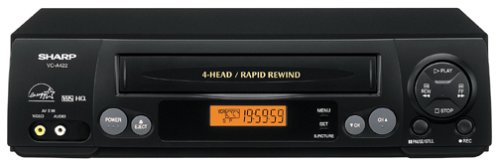
Immagine: Frontale view of the Sharp VC-A422 4-Head VCR, showing the tape slot, display, and control buttons.
Impostare
1. Disimballaggio e posizionamento
- Estrarre con cautela il videoregistratore dalla confezione.
- Place the VCR on a stable, level surface. Ensure there is adequate space around the unit for ventilation.
- Avoid placing the VCR near heat sources, direct sunlight, or areas with high humidity.
2. Collegamento a un televisore
To connect your VCR to a television, you will typically use RCA audio/video cables (red, white, yellow) or a coaxial cable.
- RCA Connection (Recommended for best quality):
- Collegare il jack di uscita video giallo del videoregistratore al jack di ingresso video giallo del televisore.
- Collegare il jack di uscita audio bianco del videoregistratore al jack di ingresso audio bianco del televisore.
- Collegare il jack di uscita audio rosso del videoregistratore al jack di ingresso audio rosso del televisore.
- Select the corresponding AV input on your television (e.g., Video 1, AV1, Input 1).
- Collegamento coassiale:
- Connect a coaxial cable from the "RF Out" or "Antenna Out" jack on the VCR to the "Antenna In" or "RF In" jack on your TV.
- Connect your antenna or cable TV signal to the "RF In" or "Antenna In" jack on the VCR.
- Tune your television to channel 3 or 4 (depending on the VCR's output setting) to receive the VCR signal.
3. Collegamento elettrico
- Collegare il cavo di alimentazione del videoregistratore a una presa elettrica standard.
- The VCR should enter standby mode, indicated by a clock display or power light.
Istruzioni per l'uso
1. Riproduzione di base
- Ensure the VCR is powered on and your TV is set to the correct input.
- Insert a VHS tape into the tape slot. The VCR will automatically load the tape.
- Premere il tasto GIOCARE pulsante sul videoregistratore o sul telecomando.
- Per interrompere la riproduzione, premere il pulsante FERMARE pulsante.
- Per mettere in pausa la riproduzione, premere il tasto PAUSA pulsante. Premere di nuovo per riprendere.
- Per avanzare o riavvolgere velocemente, premere il tasto FF (Avanti veloce) o RIVISTA (Rewind) button. Press GIOCARE per riprendere la riproduzione normale.
- Per espellere il nastro, premere il tasto ESPELLERE pulsante.
2. Programmi di registrazione
The Sharp VC-A422 allows for recording television programs. Ensure a blank or recordable VHS tape is inserted and its safety tab is intact.
- Tune the VCR to the desired channel using the VCR's tuner.
- Premere il tasto DOCUMENTAZIONE button. The VCR will begin recording.
- Per interrompere la registrazione, premere il pulsante FERMARE pulsante.
- For timed recordings, refer to the VCR's on-screen programming guide (if available) or consult the full manual for detailed timer recording instructions.
Manutenzione
Una corretta manutenzione garantisce la longevità e le prestazioni ottimali del videoregistratore.
- Pulizia esterna: Pulire l'esterno del videoregistratore con un panno morbido e asciutto. Non utilizzare detergenti liquidi o materiali abrasivi.
- Pulizia della testina: If picture quality degrades (e.g., snowy picture, lines), the video heads may be dirty. Use a dry-type VCR head cleaning cassette sparingly. Excessive use can wear down the heads.
- Cura del nastro: Store VHS tapes in their cases, away from dust, direct sunlight, and strong magnetic fields. Avoid exposing tapes to extreme temperatures.
- Ventilazione: Keep the VCR's ventilation slots clear of obstructions to prevent overheating.
Risoluzione dei problemi
If you encounter issues with your Sharp VC-A422 VCR, refer to the following common problems and solutions:
| Problema | Possibile causa | Soluzione |
|---|---|---|
| Nessun potere | Cavo di alimentazione scollegato; presa di corrente non attiva. | Controllare il collegamento del cavo di alimentazione. Testare la presa con un altro dispositivo. |
| Nessuna immagine o suono | È stato selezionato un ingresso TV errato; cavi A/V allentati o collegati in modo errato. | Select correct TV input (e.g., AV1, Video 1). Ensure A/V cables are securely connected to matching color ports. |
| Snowy or distorted picture | Dirty video heads; poor tape quality; incorrect channel for coaxial connection. | Use a VCR head cleaning cassette. Try a different tape. If using coaxial, ensure TV is on channel 3 or 4. |
| Il nastro non viene espulso | Power failure; mechanical issue. | Ensure VCR is powered on. If problem persists, seek professional service. |
| Impossibile registrare | Tape's safety tab removed; VCR not tuned to a channel. | Check if the safety tab on the VHS tape is intact (cover the notch with tape if removed). Ensure VCR tuner is set to the desired channel. |
Specifiche
- Marca: Affilato
- Modello: Modello VC-A422
- Teste: 4-Head (Video)
- Peso dell'articolo: 6 libbre
- Dimensioni della confezione: 15.55 x 11.02 x 5.24 pollici
- ASIN: B00005LABU
- Data prima disponibilità: 4 settembre 1999
Nota: le specifiche sono soggette a modifiche senza preavviso.
Informazioni sulla garanzia
This Sharp product is covered by a limited warranty. For specific details regarding warranty coverage, duration, and terms, please refer to the warranty card included with your purchase or visit the official Sharp websito. Conservare la prova d'acquisto per eventuali reclami in garanzia.
Assistenza clienti
For further assistance, technical support, or service inquiries, please contact Sharp customer support. You can find contact information on the official Sharp websito o nella documentazione fornita con il prodotto.
Visit the official Sharp store for more information: Sharp Official Store
Disclaimer legale
AVVISO AI CONSUMATORI: Questo ricevitore televisivo è dotato solo di un sintonizzatore analogico e, a partire dal 17 febbraio 2009, richiederà un convertitore per ricevere le trasmissioni via etere tramite antenna, a causa della transizione degli Stati Uniti alla trasmissione digitale. I televisori esclusivamente analogici dovrebbero continuare a funzionare come prima con servizi TV via cavo e satellitari, console di gioco, videoregistratori, lettori DVD e prodotti simili. Per ulteriori informazioni, chiamare la Federal Communications Commission al numero 1-888-225-5322 (TTY: 1-888-835-5322) o visitare il sito web della commissione dedicato alla televisione digitale. Web sito a: www.dtv.gov.