
1. Introduzione
Grazie per l'acquistoasing the JVC RX-5000R AV Receiver. This manual provides detailed instructions for the proper setup, operation, and maintenance of your receiver. Please read this manual thoroughly before using the unit to ensure optimal performance and safety.
The JVC RX-5000R is an advanced audio/video receiver designed to deliver high-quality sound for your home entertainment system. It features Dolby Surround Pro Logic compatibility, providing 100 watts of output power per channel across five channels. With its 5 separate power amplificatore stages and 5.1-channel analog input, it supports multi-channel audio formats like Dolby Digital. The integrated RDS tuner allows for convenient radio listening with memory for up to 30 FM and 15 MW/LW stations. The receiver also includes a subwoofer output and 5 audio inputs for connecting various devices. A remote control is included for ease of use.
2. Informazioni importanti sulla sicurezza
Always follow these basic safety precautions when using your JVC RX-5000R AV Receiver to reduce the risk of fire, electric shock, and injury:
- Fonte di energia: Collegare l'unità solo a una presa CA del volumetage specificato sul pannello posteriore.
- Ventilazione: Assicurare un'adeguata ventilazione. Non ostruire le aperture di ventilazione. Lasciare spazio sufficiente attorno all'unità per un corretto flusso d'aria.
- Acqua e umidità: Non esporre l'unità a pioggia o umidità. Non posizionare oggetti contenenti liquidi, come vasi, sull'unità.
- Calore: Tenere l'unità lontana da fonti di calore quali radiatori, bocchette di riscaldamento, stufe o altri apparecchi (inclusi amplificatori) che producono calore.
- Pulizia: Scollegare l'unità dalla presa a muro prima di pulirla. Utilizzare un panno asciutto per la pulizia.
- Manutenzione: Non tentare di riparare questo prodotto da soli. Affidare tutte le operazioni di manutenzione a personale di assistenza qualificato.
- Fulmine: Scollegare l'unità durante i temporali o quando non viene utilizzata per lunghi periodi.
3. Configurazione e connessioni
This section guides you through connecting your JVC RX-5000R AV Receiver to your speakers, audio sources, and power supply.
3.1 Disimballaggio
Carefully remove the receiver and all accessories from the packaging. Verify that all components are present:
- JVC RX-5000R AV Receiver
- Telecomando
- Antenna FM
- Antenna ad anello AM
- Cavo di alimentazione
- Manuale di istruzioni (questo documento)
3.2 Collegamenti degli altoparlanti
The RX-5000R supports a 5.1 channel speaker configuration. Connect your speakers as follows:
- Altoparlanti anteriori (sinistro/destro): Collegare ai terminali FRONT L/R.
- Altoparlante centrale: Collegare al terminale CENTRALE.
- Altoparlanti surround (sinistro/destro): Collegare ai terminali SURROUND L/R.
- Subwoofer: Collegare un subwoofer attivo al jack SUBWOOFER PRE OUT.
Nota: Assicurare la corretta polarità (+ con + e - con -) per tutti i collegamenti degli altoparlanti per evitare problemi di fase e garantire una qualità audio ottimale.
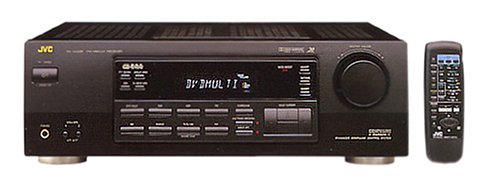
Figure 1: Rear panel of the JVC RX-5000R showing speaker and audio input terminals. This image illustrates the various connection points for speakers and external audio devices.
3.3 Collegamenti della sorgente audio
Connect your audio components (CD player, DVD player, TV, etc.) to the appropriate audio input jacks on the rear panel.
- Ingressi audio analogici: The receiver features 5 analog audio inputs. Use RCA cables to connect your devices to these inputs (e.g., CD, TAPE, VCR, DVD, TV).
- Ingressi audio digitali: The receiver supports Optical and Coaxial digital audio inputs. Connect compatible devices (e.g., DVD player, game console) to these inputs for high-quality digital sound.
- 5.1 Channel Analog Input: For devices with multi-channel analog outputs (e.g., older DVD players with built-in Dolby Digital/DTS decoders), connect to the 5.1 CH INPUT jacks.
3.4 Collegamenti dell'antenna
Collegare le antenne FM e AM in dotazione per la ricezione radio.
- Antenna FM: Connect the FM wire antenna to the FM 75Ω COAXIAL terminal. Extend the wire for best reception.
- Antenna AM: Assemble the AM loop antenna and connect its wires to the AM terminals. Position the antenna for optimal reception.
3.5 Collegamento di alimentazione
After all audio and speaker connections are made, connect the power cord to the AC inlet on the receiver and then to a wall outlet.
4. Funzionamento di base
This section covers the fundamental operations of your JVC RX-5000R AV Receiver.
4.1 Accensione/spegnimento
Premere il tasto ENERGIA pulsante sul pannello frontale o sul telecomando per accendere o spegnere il ricevitore.
4.2 Selezione dell'ingresso
Utilizzare il SELETTORE DI INGRESSO knob on the front panel or the corresponding input buttons (e.g., CD, DVD, TV/VCR) on the remote control to select your desired audio source.
4.3 Controllo del volume
Regolare il volume principale utilizzando il grande VOLUME manopola sul pannello frontale o VOLUME +/- pulsanti sul telecomando.
4.4 Sound Mode Selection
The RX-5000R offers various sound modes, including Dolby Surround Pro Logic. Press the MODALITÀ SUONO button on the remote control or front panel to cycle through available modes and select the one best suited for your content.
4.5 Tuner Operation (RDS)
Ascoltare la radio:
- Selezionare il SINTONIZZATORE ingresso.
- Premere BANDA to select FM or AM.
- Utilizzare il ACCORDATURA +/- buttons to manually tune to a station or SINTONIA AUTOMATICA to scan for stations.
- To store a station, press MEMORIA, quindi utilizzare il PRESET +/- pulsanti per selezionare un numero preimpostato e premere MEMORIA again to confirm. The receiver supports up to 30 FM and 15 MW/LW presets.
- IL RDS (Radio Data System) feature, if available on the broadcast, will display station information such as program type or station name.
5. Manutenzione
Proper care and maintenance will ensure the longevity and optimal performance of your JVC RX-5000R AV Receiver.
- Pulizia dell'unità: Disconnect the power cord before cleaning. Use a soft, dry cloth to wipe the exterior surfaces. Do not use abrasive cleaners, waxes, or solvents as they may damage the finish.
- Ventilazione: Regularly check that the ventilation openings are not obstructed by dust or debris. Blocked vents can lead to overheating.
- Cavo di alimentazione: Inspect the power cord periodically for any signs of damage. If damaged, contact qualified service personnel for replacement.
- Magazzinaggio: Se si conserva l'unità per un periodo prolungato, scollegarla dalla presa di corrente e conservarla in un luogo fresco e asciutto, lontano dalla luce solare diretta e da temperature estreme.
6. Risoluzione Dei Problemi
Before contacting service personnel, please refer to the following table for common issues and their solutions.
| Problema | Possibile causa | Soluzione |
|---|---|---|
| Nessun potere | Cavo di alimentazione non collegato saldamente. La presa di corrente non è attiva. | Ensure the power cord is firmly plugged into the receiver and the wall outlet. Testare la presa con un altro dispositivo. |
| Nessun suono | Selezionato ingresso errato. I cavi degli altoparlanti sono allentati o collegati in modo errato. Il volume è troppo basso o disattivato. Il dispositivo sorgente non riproduce o ha un volume basso. | Seleziona la sorgente di ingresso corretta. Controllare tutti i collegamenti degli altoparlanti per verificarne la corretta polarità e il corretto fissaggio. Increase volume and check if MUTE is active. Ensure the source device is playing and its volume is adequate. |
| Scarsa ricezione radio | Antenna non collegata o posizionata correttamente. Interferenze da altri dispositivi elettronici. | Adjust the position and orientation of the FM and AM antennas. Move the receiver or antennas away from other electronic devices. |
| Il telecomando non funziona | Le batterie sono scariche o inserite in modo errato. Ostruzione tra telecomando e ricevitore. | Sostituire le batterie con batterie nuove, assicurandosi che la polarità sia corretta. Remove any obstacles and ensure the remote is pointed at the receiver's sensor. |
7. Specifiche
Le presenti specifiche sono soggette a modifica senza preavviso.
- Modello: JVC RX-5000R
- Potenza di uscita: 100 Watt per canale (5 canali)
- Canali audio: Suono surround 5.1
- Configurazione audio surround: 5.1
- Modalità di uscita audio: Circondare
- Tecnologia di connettività: Optical, Coaxial, 3.5 mm jack (for audio inputs)
- Ingressi audio: 5 Analog Audio Inputs, 5.1 Channel Analog Input, Digital Optical, Digital Coaxial
- Sintonizzatore: RDS (Radio Data System) compatible FM/AM tuner
- Preimpostazioni del sintonizzatore: 30 FM, 15 MW/LW
- Tipo di controllo: Pulsante, telecomando
- Dispositivi compatibili: Television, CD players, DVD players, etc.
- Produttore: JVC
Note: The listed "Aantal HDMI-poorten: 5" in some product data refers to general input count and not necessarily HDMI video ports for this model. This receiver primarily handles audio and older video signals via analog connections.
8. Garanzia e assistenza clienti
JVC products are manufactured to the highest quality standards. For warranty information, please refer to the separate warranty card included with your product or visit the official JVC websito per la tua regione.
For technical assistance, troubleshooting beyond this manual, or service inquiries, please contact JVC customer support. Contact details can typically be found on the official JVC websito o nella confezione del tuo prodotto.
When contacting support, please have your model number (RX-5000R) and serial number ready.