
VTech T2451
VTech t2451 2.4 GHz Analog Cordless Phone with Answering System and Caller ID User Manual
Modello: T2451
Introduzione
This manual provides comprehensive instructions for the setup, operation, and maintenance of your VTech t2451 2.4 GHz Analog Cordless Phone with Answering System and Caller ID. Please read this manual thoroughly before using your new phone system to ensure proper functionality and to take full advantage delle sue caratteristiche.
Key features of your VTech t2451 include:
- 2.4 GHz analog reception for clear communication.
- Digital answering system with 3 mailboxes and 15 minutes of recording time.
- 50 name/number phonebook directory for easy contact management.
- 99 name/number Caller ID history to review chiamate perse.
- Headset compatibility (2.5 mm jack) for hands-free operation.
- Hold function, page/handset locator, and selectable ring tones.
- Wall-mountable design for flexible placement.
Impostare
Follow these steps to set up your VTech t2451 cordless phone system.
- Disimballaggio: Carefully remove all components from the packaging. Ensure you have the cordless handset, base unit, AC power adapter, telephone line cord, and battery pack.
- Installazione della batteria: Open the battery compartment on the back of the cordless handset. Connect the battery pack connector to the jack inside the compartment, ensuring correct polarity. Place the battery pack into the compartment and close the cover.
- Collegamento dell'unità base:
- Connect one end of the telephone line cord to the TEL LINE jack on the base unit and the other end to a telephone wall jack.
- Connect the small end of the AC power adapter to the DC IN 9V jack on the base unit. Plug the large end of the AC power adapter into a standard electrical outlet.
- Caricare il portatile: Place the cordless handset in the base unit's charging cradle. The charge indicator on the handset should illuminate, indicating that the battery is charging. Allow the handset to charge for at least 12 hours before initial use.
- Montaggio a parete (opzionale): The base unit is designed to be wall-mountable. Refer to the included wall-mount bracket and instructions for secure installation.
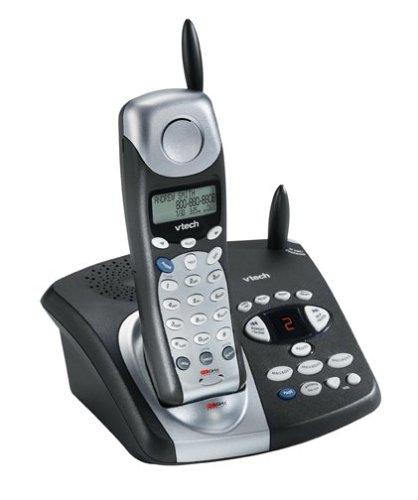
Image: The VTech t2451 cordless phone system, showing the black base unit with the silver and black handset docked in its charging cradle. The base unit features an integrated digital answering system with controls and a display.
Istruzioni per l'uso
Effettuare e ricevere chiamate
- Per effettuare una chiamata: Premere il tasto PARLARE button, wait for a dial tone, then dial the phone number.
- Per ricevere una chiamata: Quando squilla il telefono, premere il tasto PARLARE button or any key on the keypad (Any Key Answer).
- Per terminare una chiamata: Premere il tasto FINE pulsante o rimettere il ricevitore nell'unità base.
- Funzione di attesa: Durante una chiamata, premere il tasto PRESA pulsante per mettere la chiamata in attesa. Premere PARLARE nuovamente per riprendere la chiamata.
Sistema di risposta digitale
Your phone system includes a digital answering system with 3 mailboxes and 15 minutes of recording time.
- Riproduzione dei messaggi: Premere il tasto GIOCARE button on the base unit to listen to new messages.
- Registrazione del messaggio in uscita (OGM): Follow the voice prompts to record a personalized outgoing message.
- Mailbox Management: The system supports up to 3 distinct mailboxes. Refer to the detailed instructions in the full user guide for setting up and accessing individual mailboxes.
Caller ID and Phonebook
- ID chiamante: When subscribed to Caller ID service, the handset display will show the caller's name and number. Press the CID pulsante per riview the 99-name/number Caller ID history.
- Rubrica telefonica: Store up to 50 names and numbers in the phonebook. Use the navigation buttons to scroll through entries and the MENU/SELEZIONA button to add or edit entries.
Altre funzioni
- Page/Handset Locator: Premere il tasto PAGINA button on the base unit to locate a misplaced handset.
- Suonerie: Customize your phone's ringer by selecting from various available tones. Refer to the handset settings menu.
- Utilizzo delle cuffie: Connect a 2.5 mm compatible headset to the headset jack on the side of the handset for hands-free communication.
Manutenzione
Proper care ensures the longevity of your VTech t2451 phone system.
- Pulizia: Pulisci il telefono e l'unità base con un panno morbido eamp stoffa. Non utilizzare prodotti chimici aggressivi o detergenti abrasivi.
- Cura della batteria:
- Always return the handset to the base unit when not in use to ensure it remains charged.
- Se si prevede di non utilizzare il telefono per un periodo prolungato, rimuovere la batteria dal portatile.
- Replace the battery when its performance significantly degrades. Use only the specified replacement battery pack.
- Condizioni ambientali: Evitare di esporre il telefono a temperature estreme, alla luce solare diretta o all'umidità.
Risoluzione dei problemi
If you experience issues with your VTech t2451, try these common troubleshooting steps.
| Problema | Soluzione |
|---|---|
| Nessun segnale di linea. |
|
| Ricezione scarsa o rumore statico. |
|
| Il telefono non si carica. |
|
| La segreteria telefonica non registra i messaggi. |
|
Specifiche
| Caratteristica | Dettaglio |
|---|---|
| Marca | VTech |
| Numero di modello | T2451 |
| Tipo di telefono | Senza fili |
| Frequenza | 2.4 GHz Analog |
| Tipo di sistema di risposta | Digitale |
| Capacità di registrazione | 15 minuti |
| Mailboxes | 3 |
| Elenco telefonico | 50 nomi/numeri |
| Memoria dell'ID chiamante | 99 nomi/numeri |
| Compatibilità delle cuffie | Presa da 2.5 mm |
| Fonte di alimentazione | Elettrico con cavo |
| Dimensioni del prodotto | 7.1 x 8.5 x 5.1 pollici |
| Peso dell'articolo | 2.19 libbre |
| Produttore | Tecnologia virtuale |
Garanzia e supporto
For warranty information, please refer to the warranty card included with your product packaging or visit the official VTech website. VTech provides customer support for product inquiries, technical assistance, and service. Contact information can typically be found on the VTech websito o nella documentazione originale del prodotto.
Produttore: VTech
Ask a question about this manual
Ask about setup, troubleshooting, compatibility, parts, safety, or missing instructions. Manuals+ will review the question and use this page’s manual context to help answer it.