
Introduzione
The Kyocera Finecam L4V is a compact 4-megapixel digital camera designed for capturing high-quality images and video. It features a 3x optical zoom lens, a large 2.5-inch LCD screen, and various shooting modes to suit different photographic situations. This manual provides essential information for setting up, operating, maintaining, and troubleshooting your Finecam L4V camera.
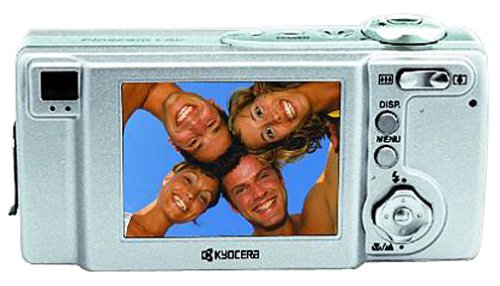
Figura 1: A silver Kyocera Finecam L4V digital camera, viewed from a slight angle, showing the lens, flash, and the 'Finecam L4v' branding on the front, and the battery/card compartment on the side.
Impostare
1. Installazione della batteria
The Finecam L4V operates using a CR-V3 lithium battery (included). For extended use and cost-effectiveness, two AA-sized rechargeable NiMH batteries are recommended as an alternative.
- Locate the battery compartment door on the side of the camera.
- Far scorrere il fermo per aprire il vano.
- Insert the CR-V3 battery or two AA NiMH batteries, ensuring correct polarity (+/-) as indicated inside the compartment.
- Close the compartment door securely until it clicks into place.
2. Installazione della scheda di memoria
The camera uses Secure Digital (SD) or MultiMedia (MMC) memory cards for image and video storage. A 16 MB SD card is included with your camera.
- Open the battery/card compartment door.
- Insert the SD or MMC card into the designated slot with the metal contacts facing the correct direction (usually towards the front of the camera).
- Push the card gently until it locks into place. To remove, push the card in again, and it will spring out.
- Chiudere saldamente la porta dello scomparto.
3. Connessione a un computer
To transfer images and videos, connect your Finecam L4V to a computer using the supplied USB cable.
- Assicurarsi che la fotocamera sia spenta.
- Connect one end of the USB cable to the camera's USB port.
- Connect the other end to an available USB 1.1 port on your Windows or Mac computer.
- Install the imaging software and USB drivers from the included CD-ROM if prompted by your operating system.
Utilizzo della fotocamera
1. Accensione/Spegnimento
Press the power button (usually located on the top of the camera) to turn the camera on or off. The 2.5-inch LCD screen will activate upon power-on.
2. Scattare foto
- Inquadratura: Utilizzare lo schermo LCD da 2.5 pollici o l'ottica viewmirino per comporre lo scatto.
- Ingrandisci: Use the zoom controls (typically a rocker switch near the shutter button) to adjust the 3x optical zoom and 4x digital zoom (for a total 12x zoom).
- Messa a fuoco: The camera features autofocus. Half-press the shutter button to focus, then fully press to capture the image.
- Modalità di scatto: Select from various modes such as macro for close-ups, landscape for wide scenes, and color modes (color, sepia, black & white) via the camera's menu.
- Modalità flash: Adjust flash settings for different lighting conditions: auto flash, red-eye reduction auto flash, fill-in flash, flash-off, or night-time portrait.
3. Registrazione di video
The Finecam L4V supports AVI movie recording with sound for up to 120 seconds.
- Switch the camera to movie mode (refer to your camera's specific button or menu option).
- Premere il pulsante dell'otturatore per avviare la registrazione.
- Premere di nuovo il pulsante di scatto per interrompere la registrazione.
4. Registrazione vocale
You can attach up to a 30-second voice message to each image. Consult the camera's on-screen menu for options to record and attach voice memos.
Manutenzione
- Pulizia della lente: Utilizzare un panno morbido e privo di lanugine, specificamente progettato per gli obiettivi delle fotocamere. Evitare prodotti chimici aggressivi.
- Pulizia dello schermo LCD: Gently wipe the screen with a microfiber cloth.
- Magazzinaggio: When not in use, store the camera in a dry, dust-free environment, away from extreme temperatures. Remove batteries if storing for extended periods.
- Cura della batteria: If using rechargeable NiMH batteries, follow the manufacturer's charging instructions. Avoid overcharging.
Risoluzione dei problemi
Problemi comuni e soluzioni:
- La fotocamera non si accende:
- Assicurarsi che le batterie siano inserite correttamente e con la giusta polarità.
- Check if batteries are fully charged or replace with fresh ones.
- If using a CR-V3 battery, note that it is not rechargeable and will need replacement when depleted. Consider using rechargeable AA NiMH batteries for long-term use.
- Le immagini sono sfocate:
- Assicurati che la lente sia pulita.
- Make sure the camera has focused correctly before fully pressing the shutter button.
- Controllare le condizioni di illuminazione; utilizzare il flash se necessario.
- Errore della scheda di memoria:
- Assicurarsi che la scheda di memoria sia inserita correttamente.
- Try reformatting the card (this will erase all data, so back up first).
- Try a different compatible SD or MMC card.
- Impossibile trasferire le foto sul computer:
- Verificare che il cavo USB sia collegato saldamente sia alla fotocamera che al computer.
- Ensure the camera is powered on when connected.
- Install the necessary drivers from the included CD-ROM.
- Prova una porta USB diversa sul tuo computer.
Specifiche
| Caratteristica | Dettaglio |
|---|---|
| Nome del modello | Finecam L4V |
| Risoluzione fissa efficace | 4 MP |
| Zoom ottico | 3x |
| Digital Zoom | 4x |
| Dimensioni dello schermo | 2.5 pollici |
| Tipo di sensore | CCD |
| Supportato File Formato | Formato JPEG |
| Risoluzione video | 320 x 240 up to 120 sec |
| Tipo di memoria flash | Scheda SD / MMC |
| Tipo di batteria | CR-V3 Lithium (included), AA NiMH (recommended) |
| Tecnologia di connettività | USB 1.1 |
| Peso dell'articolo | 0.49 libbre (circa 222 g) |
| Dimensioni (circa) | 4.4 x 2.1 x 1.4 pollici (11.2 x 5.3 x 3.6 cm) |
| Gamma ISO | Auto, 100, 200, 400 |
| Velocità minima dell'otturatore | 8 secondi |
| Velocità massima dell'otturatore | 1/2000 secondi |
| Modalità di apertura | F2.8-F4.7 |
| Ha l'autoscatto | SÌ |
Garanzia e supporto
For information regarding warranty coverage, technical support, or service for your Kyocera Finecam L4V camera, please refer to the documentation included with your purchase or visit the official Kyocera support websito.
You can also visit the Kyocera brand store for additional product information: Negozio Kyocera su Amazon.