
1. Introduzione
The jWIN JX-MP256FM is a portable digital audio player designed for active lifestyles. It integrates 256MB of internal flash memory, an FM radio tuner, and a voice recording function. Its compact form factor and included detachable armband make it a suitable companion for various physical activities, allowing users to enjoy music or record audio on the go.
2. Caratteristiche del prodotto
- 256 MB Built-in Flash Memory: Provides storage for digital audio files and recorded voice memos.
- USB 2.0 Full Speed Interface: Enables fast data transfer between the player and a computer.
- Audio File Supporto formati: Compatible with MP3, WMA (including DRM-protected files), and ADPCM audio formats.
- Digital Voice Recording: Features a built-in microphone for convenient voice recording.
- Sintonizzatore FM: Integrated FM radio with memory for up to 20 preset stations.
- Compact and Sporty Design: Engineered for portability and active use.
- Blue-Color Backlit LCD Screen: Provides clear visibility of track information, radio frequency, and device status.
- Detachable Armband: Allows for secure and comfortable wear during activities.
3. Contenuto della confezione
Verificare che tutti gli articoli siano presenti nel pacco:
- jWIN JX-MP256FM MP3/Voice Digital Audio Player
- Detachable Armband
- Cavo di collegamento USB
- Manuale dell'utente (questo documento)
4. Impostazione
4.1. Initial Power and Charging
Before first use, ensure the player is adequately charged. Connect the player to a computer's USB port using the provided USB cable. The device's LCD screen may indicate charging status. A full charge is recommended for optimal battery performance.
4.2. Connessione a un computer e trasferimento Files
- Connect the jWIN JX-MP256FM to an available USB 2.0 port on your computer using the USB cable.
- The player will be recognized as a removable storage device (e.g., a USB drive).
- Open the player's drive folder on your computer.
- Drag and drop your desired MP3, WMA, or ADPCM audio filenella cartella musicale del lettore.
- Una volta file Una volta completato il trasferimento, espelli in modo sicuro il dispositivo dal computer prima di scollegare il cavo USB.
4.3. Attaching the Armband
Thread the detachable armband through the designated slots on the back of the MP3 player. Secure the armband around your arm, adjusting for a comfortable and snug fit during physical activity.
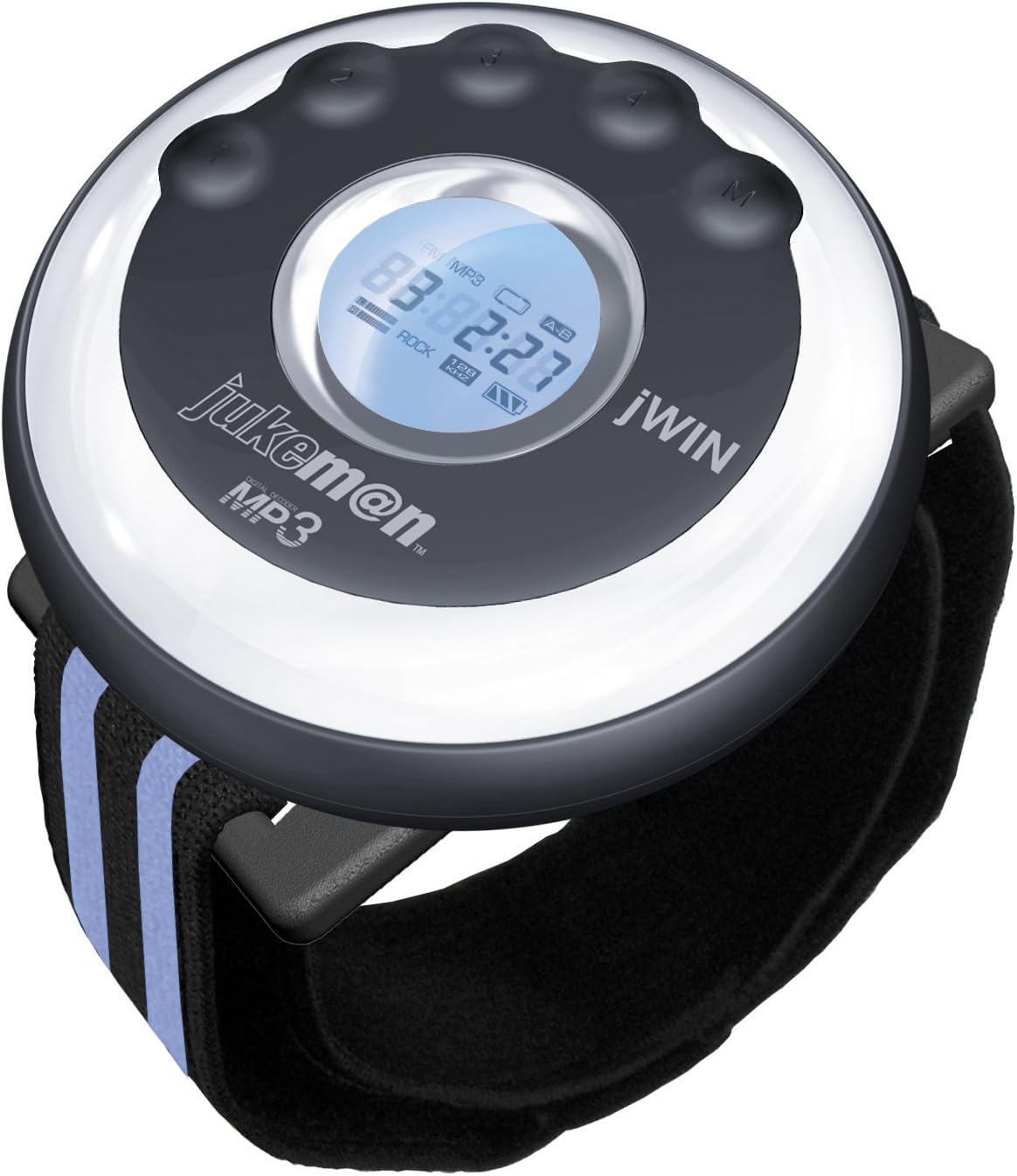
Image of the jWIN JX-MP256FM Sports MP3 Player, showing its circular design, blue backlit LCD screen, control buttons, and the attached black armband with blue stripes.
5. Istruzioni per l'uso
5.1. Accensione/spegnimento
- Per accendere: Premere e tenere premuto il tasto Accensione/Riproduzione/Pausa finché lo schermo LCD non si illumina.
- Per spegnere: Premere e tenere premuto il tasto Accensione/Riproduzione/Pausa finché lo schermo LCD non si spegne.
5.2. Basic Navigation and Volume Control
- Utilizzare il Volume su (+) E Volume basso (-) pulsanti per regolare il livello di uscita audio.
- IL Traccia successiva (>>) E Traccia precedente (<<) buttons are used to skip between songs or navigate menus.
- IL Modalità (M) button cycles through different functions (MP3, FM Radio, Voice Recorder).
5.3. Riproduzione MP3
- Ensure the player is in MP3 mode (indicated on the LCD screen). If not, press the Modalità (M) button until MP3 mode is selected.
- Premere il tasto Riproduci/Pausa pulsante per avviare la riproduzione.
- Premere Riproduci/Pausa di nuovo per mettere in pausa la riproduzione.
- Utilizzo Traccia successiva (>>) or Traccia precedente (<<) to navigate through your music files.
5.4. Funzionamento della radio FM
- Premere il tasto Modalità (M) button until FM Radio mode is selected. The LCD will display the current frequency.
- Scansione automatica: Premere e tenere premuto il tasto Riproduci/Pausa button to initiate an automatic scan for available FM stations. The player will save up to 20 stations.
- Sintonizzazione manuale: Utilizzare il Traccia successiva (>>) or Traccia precedente (<<) pulsanti per sintonizzarsi manualmente sulle frequenze desiderate.
- Selezione dei preset: After an automatic scan, use the Traccia successiva (>>) or Traccia precedente (<<) pulsanti per scorrere le stazioni preimpostate salvate.
5.5. Registrazione vocale
- Premere il tasto Modalità (M) button until Voice Recorder mode is selected.
- Premere il tasto Riproduci/Pausa button to start recording. The LCD will show a recording indicator.
- Per interrompere la registrazione, premere il pulsante Riproduci/Pausa nuovamente il pulsante. La registrazione verrà salvata automaticamente.
- To play back recordings, navigate to the recording filesta usando il Traccia successiva (>>) or Traccia precedente (<<) pulsanti e premere Riproduci/Pausa.
6. Manutenzione
- Pulizia: Use a soft, dry cloth to clean the exterior of the player. Avoid using liquid cleaners or abrasive materials.
- Magazzinaggio: Conservare il lettore in un luogo fresco e asciutto, lontano dalla luce solare diretta e da temperature estreme.
- Cura della batteria: To maintain battery longevity, avoid fully discharging the player frequently. Recharge the device regularly, even if not in constant use.
- Esposizione all'acqua: This device is not waterproof. Avoid exposure to moisture, rain, or submersion in water.
7. Risoluzione Dei Problemi
| Problema | Soluzione |
|---|---|
| Il lettore non si accende. | Ensure the battery is charged. Connect the player to a USB power source and allow it to charge for at least 30 minutes before attempting to power on again. |
| Nessun suono durante la riproduzione. | Check the volume level and ensure it is not set to minimum. Verify that headphones are properly connected. Test with different headphones if available. |
| Impossibile trasferire files al giocatore. | Ensure the USB cable is securely connected to both the player and the computer. Try a different USB port or cable. Verify that the player is recognized as a removable drive by your computer. |
| La ricezione della radio FM è scarsa. | Move to an area with better signal reception. The headphone cable often acts as an antenna; ensure it is fully plugged in. |
| Voice recordings are unclear. | Ensure the microphone is not obstructed. Record in a quiet environment and speak clearly towards the device. |
8. Specifiche
| Caratteristica | Dettaglio |
|---|---|
| Numero di modello | JXMP256FM |
| Memoria interna | Memoria Flash da 256 MB |
| Interfaccia | USB 2.0 ad alta velocità |
| Formati audio supportati | MP3, WMA (with DRM), ADPCM |
| sintonizzatore FM | Sì, con 20 stazioni preimpostate |
| Registratore vocale | Sì, microfono incorporato |
| Display | Blue-color backlit LCD |
| Peso dell'articolo | 10.4 once (circa 295 grammi) |
| Dimensioni del pacco | 8.7 x 7.2 x 3 pollici (circa 22.1 x 18.3 x 7.6 cm) |
9. Garanzia e supporto
For warranty information or technical support, please refer to the documentation included with your purchase or contact jWIN customer service. Specific warranty terms and conditions may vary by region and retailer.
For further assistance, please visit the official jWIN websito o consultare il rivenditore.