
Introduzione
This manual provides instructions for setting up, operating, and maintaining your Logitech Cordless Desktop EX110. This wireless keyboard and mouse combination offers reliable performance and convenience for your desktop or notebook computer. Please read this manual thoroughly before using your new device.
Contenuto della confezione
- Logitech Cordless Keyboard EX110
- Logitech Cordless Mouse EX110
- USB/PS/2 Wireless Receiver
- AA Batteries (for mouse)
- AAA Batteries (for keyboard)
Impostare
1. Installazione della batteria
The Logitech Cordless Desktop EX110 requires batteries for both the keyboard and mouse.
- Per la tastiera: Locate the battery compartment on the underside of the keyboard. Insert two (2) AAA alkaline batteries, ensuring correct polarity (+/-). Close the battery compartment cover.
- Per il topo: Locate the battery compartment on the underside of the mouse. Insert two (2) AA alkaline batteries, ensuring correct polarity (+/-). Close the battery compartment cover.
Nota: For optimal performance and longevity, use high-quality alkaline batteries. Rechargeable NiMH batteries can also be used.
2. Collegamento del ricevitore wireless
The wireless receiver connects both your keyboard and mouse to your computer.
- Connessione USB: Plug the USB connector of the wireless receiver into an available USB port on your computer.
- Connessione PS/2: If your computer has PS/2 ports and you prefer to use them, connect the appropriate PS/2 adapters (if included) to the receiver's connectors, then plug them into the corresponding PS/2 keyboard and mouse ports on your computer.
The system should automatically detect the devices. No additional drivers are typically required for basic functionality.
3. Stabilire la connessione
After connecting the receiver and installing batteries, press the 'Connect' button on the wireless receiver, then press the 'Connect' button on the underside of the keyboard and the mouse. The devices should establish a connection within a few seconds.
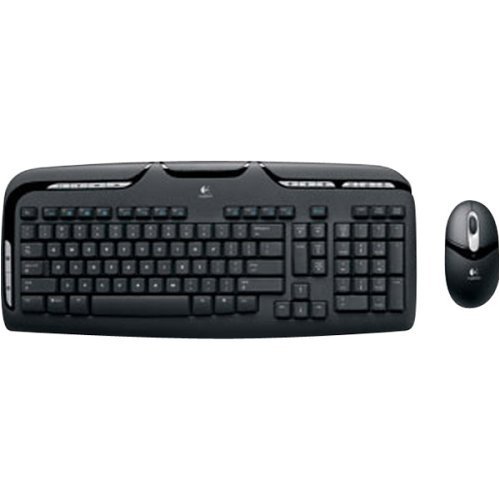
Image: Logitech Cordless Desktop EX110, showing the wireless keyboard, mouse, and USB receiver.
Istruzioni per l'uso
Caratteristiche della tastiera
- Controlli multimediali: Dedicated one-touch buttons allow for quick control of audio and video playback, including volume adjustment and mute functions.
- Programmable F-Keys: Enhanced F-keys provide direct access to common tasks such as launching your internet home page, email client, or the onscreen calculator.
- Design resistente agli schizzi: The keyboard is designed to withstand minor liquid spills, protecting internal components.
Caratteristiche del mouse
- 800-dpi Optical Tracking: Provides precise and responsive cursor control on various surfaces.
- Rotella di scorrimento: Facilitates easy navigation through web pagine e documenti.
- Left-Hand Buttons: Conveniently located buttons on the left side of the mouse allow for quick web navigation (e.g., back/forward) or closing browser windows.
Manutenzione
Pulizia
Per pulire la tastiera e il mouse, utilizzare un panno morbido eamp cloth. Avoid using harsh chemicals or abrasive cleaners. For the keyboard, you may use compressed air to remove debris from between the keys.
Sostituzione della batteria
When the keyboard or mouse performance degrades, or if an indicator light (if present) signals low battery, replace the batteries as described in the 'Battery Installation' section. Dispose of used batteries according to local regulations.
Risoluzione dei problemi
- No response from keyboard or mouse:
- Assicurarsi che le batterie siano installate correttamente e non siano scariche. Sostituirle se necessario.
- Verify the wireless receiver is securely plugged into a functional USB or PS/2 port.
- Press the 'Connect' buttons on the receiver, keyboard, and mouse to re-establish the connection.
- Ensure the devices are within the operational range (approximately 6 feet) of the receiver.
- Lag or intermittent response:
- Wireless interference can affect performance. Avoid placing cordless phones, cell phones, or wireless network antennas too close to the receiver.
- Assicurarsi che non vi siano oggetti metallici di grandi dimensioni tra i dispositivi e il ricevitore che potrebbero bloccare il segnale.
- Mouse cursor erratic or not tracking:
- Pulisci il sensore ottico sul lato inferiore del mouse.
- Use the mouse on a suitable surface; highly reflective or transparent surfaces may cause issues.
Specifiche
| Marca | Logitech |
| Numero di modello | 967561-0403 |
| Tecnologia di connettività | USB / PS/2 |
| Rilevamento del movimento | Ottico (mouse) |
| Disposizione della tastiera | Tastiera QWERTY |
| Numero di chiavi | 110 |
| Tipo di batteria della tastiera | 2 batterie AAA |
| Tipo di batteria del mouse | 2 batterie AA |
| Sistemi operativi compatibili | Windows, macOS, Linux |
| Caratteristiche speciali | One-touch media controls, Convenient left-hand mouse buttons, Spill-resistant keyboard |
Garanzia e supporto
The Logitech Cordless Desktop EX110 is covered by a Garanzia limitata di 5 anno. For detailed warranty information, technical support, or to download additional software (if available), please visit the official Logitech support websito. Conservare la ricevuta d'acquisto come prova d'acquisto per eventuali reclami in garanzia.