
Introduzione
The Altec Lansing VS4221 is a 2.1 speaker system designed to provide enhanced audio for computers, gaming systems, and other compatible devices. This system includes two satellite speakers and one subwoofer, offering a balanced audio experience with clear highs, rich mids, and deep bass. It features a wireless remote for convenient control and multiple input options for versatile connectivity.
Contenuto della confezione
Prima di iniziare la configurazione, verificare che tutti i componenti siano presenti nella confezione:
- One (1) Altec Lansing VS4221 Subwoofer
- Two (2) Altec Lansing VS4221 Satellite Speakers
- Un (1) telecomando wireless
- One (1) Remote Control Caddy
- Audio Input Cables (color-coded)
- Cavo di alimentazione
Istruzioni di installazione
- Posizionamento degli altoparlanti: Place the subwoofer on the floor, ideally near a wall or in a corner for optimal bass response. Position the two satellite speakers on either side of your listening area, such as on a desk or shelf. The satellite speakers feature pivoting stands, allowing you to adjust their angle to direct sound towards your ears.
- Connecting Satellite Speakers to Subwoofer: Collegare i cavi degli altoparlanti satellite ai jack di uscita corrispondenti sul retro del subwoofer. Assicurarsi che il collegamento sia saldo.
- Collegamento a una sorgente audio:
- For computers, MP3 players, or devices with a 3.5mm headphone jack: Use the provided 3.5mm audio cable to connect the audio output of your device to the 3.5mm input jack on the subwoofer.
- For televisions or video gaming systems with RCA outputs: Use RCA cables (not necessarily included, but the system supports them) to connect the audio output of your TV or gaming system to the RCA input jacks on the subwoofer. The cables are color-coded for easy installation (typically red for right, white for left).
- Collegamento all'alimentazione: Collegare il cavo di alimentazione all'ingresso di alimentazione del subwoofer, quindi collegare l'altra estremità a una presa elettrica standard.
- Accensione iniziale: Turn on the speaker system using the power button, which may be located on the subwoofer or controlled via the wireless remote.
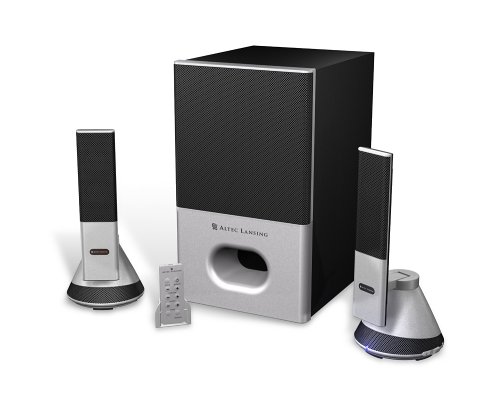
Image: The Altec Lansing VS4221 2.1 Speaker System, showing the subwoofer and two satellite speakers. The satellite speakers are designed with pivoting stands for directional sound.
Istruzioni per l'uso
Utilizzo del telecomando wireless
The VS4221 system includes a wireless remote control for convenient adjustment of audio settings. Place the remote in its caddy when not in use to prevent misplacement.
- Alimentazione/Standby: Press the power button on the remote to turn the system on or put it into standby mode.
- Volume principale: Use the volume up (+) and volume down (-) buttons to adjust the overall sound level.
- Controllo dei bassi: Adjust the bass level to your preference using the dedicated bass control buttons.
- Controllo degli acuti: Adjust the treble level for crisp high frequencies using the dedicated treble control buttons.
- Loudness: Activate or deactivate the loudness feature to enhance bass and treble at lower volumes.
Utilizzo del jack per le cuffie
A headphone jack is integrated into the system, typically on one of the satellite speakers or the remote caddy. Plugging in headphones will mute the speakers, allowing for private listening. Unplugging headphones will restore audio through the speakers.
Manutenzione
- Pulizia: Utilizzare un panno morbido e asciutto per pulire le superfici degli altoparlanti e del subwoofer. Evitare l'uso di detergenti liquidi o materiali abrasivi, poiché potrebbero danneggiare la finitura o i componenti interni.
- Posizionamento: Ensure the speakers are placed on stable surfaces to prevent accidental falls. Avoid placing them in direct sunlight, near heat sources, or in areas with high humidity.
- Gestione dei cavi: Keep cables organized and untangled to prevent damage and ensure proper connectivity.
Risoluzione dei problemi
| Problema | Possibile causa | Soluzione |
|---|---|---|
| Nessun suono dagli altoparlanti. |
|
|
| Suono distorto o poco chiaro. |
|
|
| Il telecomando wireless non risponde. |
|
|
Specifiche
| Caratteristica | Dettaglio |
|---|---|
| Numero di modello | VS4221 |
| Tipo di altoparlante | 2.1 Speaker System (Two Satellite Speakers, One Subwoofer) |
| Modalità di uscita audio | Stereo |
| Potenza massima in uscita dell'altoparlante | 35 Watt |
| Signal-to-Noise Ratio | 80 dB |
| Driver del subwoofer | 3-inch down-firing |
| Driver per altoparlanti satellitari | Micro Drivers (for highs), 3-inch Midrange Driver (concealed) |
| Tecnologia di connettività | Wired (3.5mm, RCA inputs) |
| Metodo di controllo | Wireless Remote Control, Built-in Controls |
| Dispositivi compatibili | Smartphone, Tablet, Laptop, MP3 Player, Desktop, Television, Projector |
| Fonte di alimentazione | AC |
| Peso dell'articolo | 12.3 libbre |
| Colore | Nero |
| Codice UPC | 021986941538 |
Garanzia e supporto
The Altec Lansing VS4221 speaker system comes with a Garanzia limitata. For specific details regarding warranty coverage, duration, and terms, please refer to the warranty card included with your product or visit the official Altec Lansing websito.
For technical support, troubleshooting assistance beyond this manual, or service inquiries, please contact Altec Lansing customer support through their official channels. Keep your purchase receipt and product model number (VS4221) readily available when seeking support.


