
1. Finitaview
The Canon PowerShot SD450 Digital ELPH camera is a compact digital camera designed for ease of use and high-quality imaging. It features a 5.0-megapixel sensor, a 3x optical zoom lens, and a 2.5-inch LCD display. The camera incorporates Canon's DIGIC II processor for efficient image processing and offers various shooting modes to suit different photographic situations.

Figura 1.1: Fronte view of the Canon PowerShot SD450 Digital ELPH camera with its lens retracted.
2. Cosa c'è nella scatola
Verifica che tutti i seguenti elementi siano inclusi nel tuo pacchetto:
- PowerShot SD450 body
- Pacco batteria al litio NB-4L
- Battery charger CB-2LV
- 16 MB SD memory card SDC-16M
- Cinturino da polso WS-600
- CD-ROM di soluzioni per fotocamere digitali
- Cavo di interfaccia USB IFC-400PCU
- Audio-video cable AVC-DC300
3. Impostazione
3.1. Carica della batteria
- Insert the Lithium battery pack NB-4L into the battery charger CB-2LV.
- Collegare il caricabatterie a una presa di corrente. La spia di carica si illuminerà.
- Una volta completata la ricarica, la spia cambierà colore o si spegnerà. Rimuovere la batteria.
3.2. Inserimento della batteria e della scheda SD
- Aprire il coperchio del vano batteria/scheda situato nella parte inferiore della fotocamera.
- Insert the charged battery pack into the compartment, ensuring correct orientation.
- Insert the SD memory card into the card slot until it clicks into place.
- Chiudere saldamente il coperchio del vano.
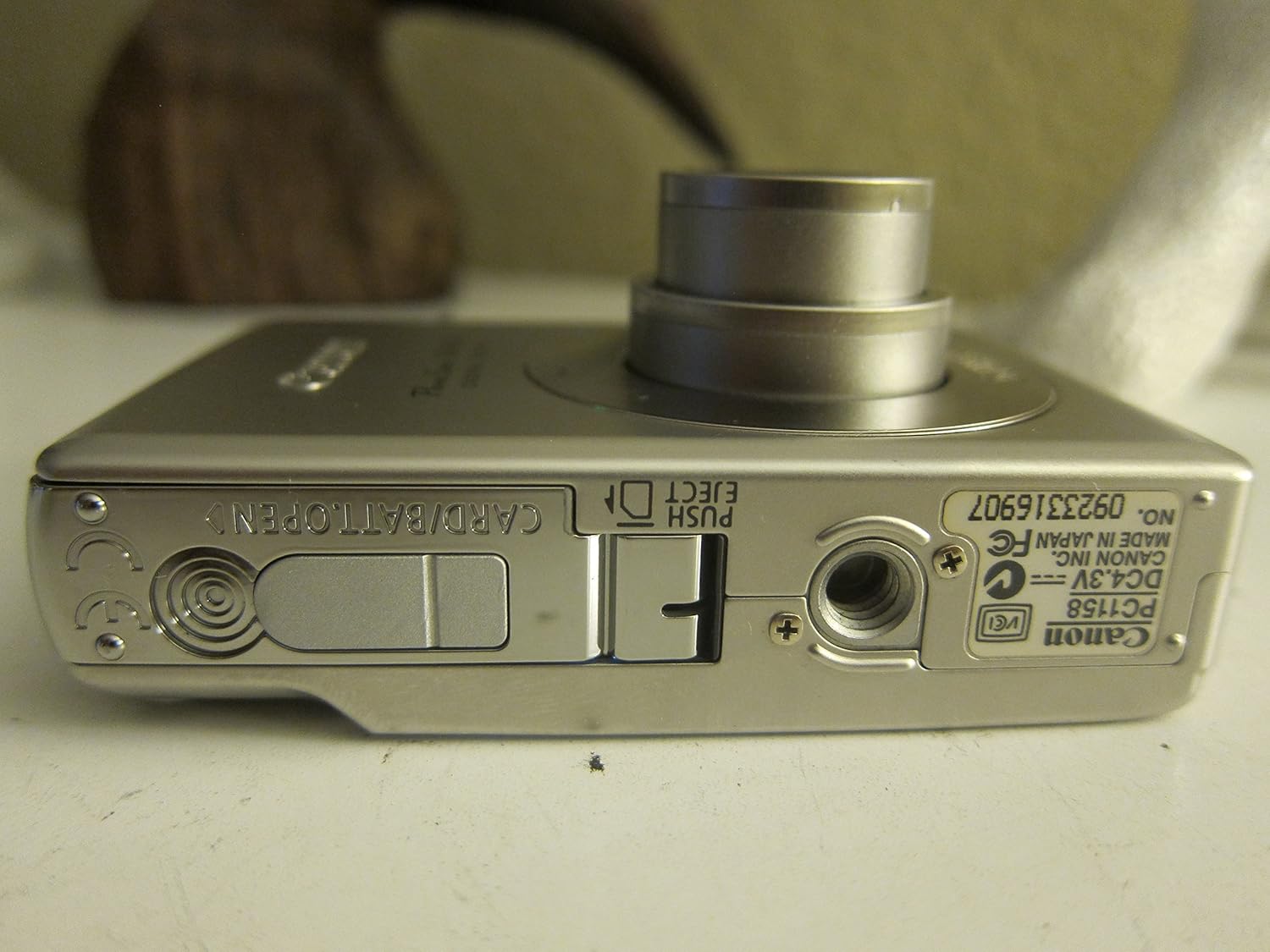
Figura 3.1: In basso view of the camera, illustrating the battery and SD card compartment.
3.3. Accensione iniziale e impostazioni di base
- Premere il tasto ACCESO/SPENTO pulsante per accendere la fotocamera.
- Seguire le istruzioni sullo schermo per impostare data, ora e lingua.

Figura 3.2: in alto view della fotocamera, evidenziando il pulsante di accensione e quello di scatto.
4. Utilizzo della fotocamera
4.1. Fotografia di base
- Accensione/spegnimento: Premere il tasto ACCESO/SPENTO pulsante.
- Scattare una foto: Premere a metà il pulsante di scatto per mettere a fuoco, quindi premerlo completamente per catturare l'immagine.
- Ingrandisci: Utilizzare la leva dello zoom attorno al pulsante di scatto per regolare lo zoom ottico 3x.

Figura 4.1: Fronte view of the camera with the optical zoom lens extended.
4.2. Modalità di scatto
The PowerShot SD450 offers various shooting modes to optimize settings for different scenes. Rotate the mode dial to select:
- Auto: Camera automatically sets optimal exposure and focus.
- Manuale: Allows for more control over settings like white balance and color tones (black and white, sepia, vivid, neutral).
- Ritratto: Sfoca lo sfondo per mettere in risalto il soggetto.
- Paesaggio: Ensures sharp focus on distant subjects.
- Istantanea notturna: Per riprese in condizioni di scarsa illuminazione.
- Modalità scena: Includes specific settings for Kids & Pets, Foliage, Fireworks, Snow, Underwater, Beach, and Indoor.
- I miei colori: Apply special effects like Color Swap or Custom Color directly in-camera.
4.3. Focusing and Exposure
- AiAF: The 9-point Artificial Intelligence Auto Focus system automatically focuses on subjects, even if off-center.
- Controllo dell'esposizione: Select from Evaluative, Center-weighted, or Spot metering.
- Sensibilità ISO: Adjustable to Auto, 50, 100, 200, or 400 to control light sensitivity.
4.4. Registrazione video
The camera can record high-quality movies:
- Risoluzioni: VGA (640x480) or QVGA (320x240) at 30 or 15 frames per second.
- Modalità filmato con frequenza fotogrammi veloce: Records at 60 frames per second for slow-motion playback.
- Compact Movie Mode (QQVGA): 160x120 at 15 frames per second, suitable for email sharing.
- Continuous filming is available until the file size reaches 1 GB or 60 minutes.
4.5. Riproduzione e riview
per riview le tue foto e i tuoi video:
- Premere il tasto Riproduzione pulsante.
- Use the directional pad to navigate through images and videos.
- Intelligent Orientation Sensor: Automatically rotates stored images for correct playback when the camera is rotated.
- Slideshow Functions: Create impressive slideshows with transition effects directly on the camera.

Figura 4.2: Posteriore view of the camera, showing the LCD display during image playback.
4.6. Stampa delle immagini
The PowerShot SD450 supports direct printing:
- PictBridge: Connect directly to PictBridge-compatible printers (e.g., Canon PIXMA printers) for printing without a PC.
- Pulsante Stampa/Condividi: Simplifies direct printing and image uploading to Windows XP or Mac OS X.
5. Manutenzione
5.1. Pulizia della fotocamera
- Per pulire il corpo della fotocamera, utilizzare un panno morbido e asciutto.
- For the lens and LCD screen, use a lens cleaning cloth and specialized cleaning solution if necessary. Avoid harsh chemicals.
5.2. Cura della batteria
- Conservare le batterie in un luogo fresco e asciutto quando non vengono utilizzate.
- Evitare di scaricare completamente la batteria frequentemente per prolungarne la durata.
- Recharge the battery using only the provided Canon charger.
5.3. Conservazione
- Se si conserva la fotocamera per lunghi periodi, rimuovere la batteria.
- Store the camera in a protective case to prevent dust and scratches.
6. Risoluzione Dei Problemi
| Problema | Soluzione |
|---|---|
| "Memory Error" message appears. |
|
| Le immagini sono sfocate. |
|
| Flash is too strong or washes out subjects. |
|
| La batteria si scarica rapidamente. |
|
| La fotocamera non si accende. |
|
7. Specifiche
| Marca | Canone |
| Nome del modello | Fotocamera Canon PowerShot SD450 |
| Risoluzione fissa efficace | 5 Megapixel |
| Zoom ottico | 3x |
| Dimensioni dello schermo | 2.5 pollici |
| Stabilizzazione dell'immagine | Digitale, Ottico |
| Gamma ISO | Automatico, 50, 100, 200, 400 |
| Velocità minima dell'otturatore | 15 secondi |
| Velocità massima dell'otturatore | 1/1500 secondi |
| Risoluzione di acquisizione video | SD VGA 480p |
| Formato di acquisizione video | AVI |
| File Formato | JPEG, GREZZO |
| Dimensioni (L x P x A) | 3.39 x 0.87 x 2.13 pollici |
| Peso dell'articolo | 5.44 once |
| Colore | Argento |
| Ha l'autoscatto | SÌ |
| Livello di resistenza all'acqua | Non resistente all'acqua |
8. Garanzia e supporto
Per informazioni dettagliate sulla garanzia, fare riferimento alla scheda di garanzia inclusa con il prodotto o visitare il sito ufficiale Canon website. The camera comes bundled with Canon software (ZoomBrowser EX 5.5, PhotoRecord 2.2, ImageBrowser 5.5, PhotoStitch 3.1, Movie Edit Task) for image management and editing. Purchasers are also eligible for membership to Canon iMAGE Gateway for additional support and services.
For technical support, driver downloads, or service inquiries, please visit the official Canon support websito o contattare il servizio clienti Canon.