
1. Introduzione
This manual provides comprehensive instructions for the installation, programming, operation, and maintenance of your LiftMaster Chamberlain 377LM Wireless Keypad. Please read these instructions carefully before use to ensure proper functionality and safety.
The LiftMaster Chamberlain 377LM Wireless Keypad offers convenient access to your garage without the need for a remote control or key. It features Security+ rolling code technology for enhanced security and a backlit keypad for visibility in low light conditions.
2. Compatibilità
The 377LM Wireless Keypad is compatible with LiftMaster Security+ garage door openers and Chamberlain radio control receivers that operate on a Frequenza 315 MHz. It is essential that your garage door opener has a pulsante viola di apprendimento located under the light cover of the motor head.
Importante: This keypad will not work with garage door openers that have red, orange, green, or yellow learn buttons, or with openers operating on different frequencies.
3 Caratteristiche
- Security+ Rolling Code Technology: Ensures a new code is sent every time the keypad is used, preventing code duplication.
- Temporary Password Option: Allows creation of temporary access codes for guests or service personnel, which can be set to expire after a specified number of openings or hours.
- Completamente wireless: Powered by a single 9-volt battery (included), offering flexible mounting options.
- Weatherproof Flip-Up Protective Cover: Protects the keypad from environmental elements.
- Tastiera retroilluminata: Numbers are illuminated for easy visibility in the dark.
- One-Button-to-Close Feature: Simplifies closing the garage door with a single press after entering the code.
4. Configurazione e installazione
4.1. Contenuto della confezione
- LiftMaster Chamberlain 377LM Wireless Keypad
- One 9-volt battery
- Viti di montaggio (2)
4.2. Installazione della batteria
The 9-volt battery is typically pre-installed. If not, remove the battery cover on the back of the keypad and insert the 9-volt battery, ensuring correct polarity. Replace the cover.
4.3. Programmazione della tastiera
Before mounting, program the keypad to your garage door opener.
- Individuare il pulsante viola di apprendimento on your garage door opener motor head. This button is usually found under the light cover.
- Press and immediately release the purple learn button. The LED indicator on the opener will light up.
- Within 30 seconds, go to your 377LM keypad and enter your desired 4-digit Personal Identification Number (PIN).
- Press and hold the ENTER button on the keypad until the garage door opener lights flash or two clicks are heard. This indicates successful programming.
- Test the keypad by entering your PIN and pressing ENTER. The garage door should activate.
Attenzione: Do not press and hold the learn button for more than a few seconds, as this may erase all existing remote codes from your opener, requiring all remotes to be reprogrammed.
4.4. Montaggio della tastiera
Choose a convenient location near your garage door, out of reach of small children. Ensure the keypad is easily accessible from outside the garage.
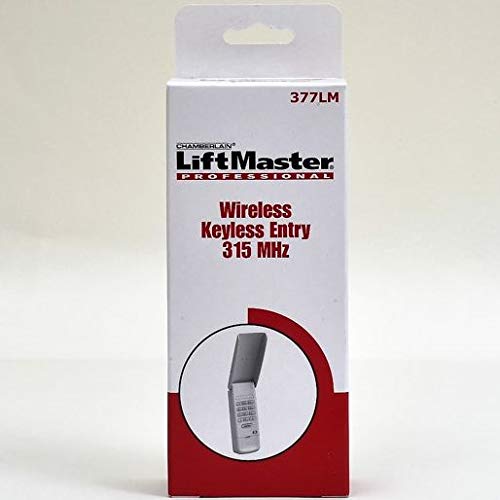
Image 1: LiftMaster Chamberlain 377LM Wireless Keypad. This image shows the front view of the gray wireless keypad with its flip-up cover closed.
- Preparare la superficie di montaggio: For wood surfaces, a Philips screwdriver is sufficient. For aluminum/plastic siding, a small drill bit or punch may be needed to create pilot holes. For concrete/brick, appropriate masonry anchors and drill bits will be required (not included).
- Install Top Screw: Drive one of the provided screws into the desired mounting location, leaving a small gap (approximately 1/8 to 1/4 inch) between the screw head and the surface.
- Hang the Keypad: Align the slotted hole on the back of the keypad with the installed screw head. Slide the keypad down to secure it. Adjust the screw tightness if needed for a snug fit.
- Install Bottom Screw: Open the keypad's flip-up cover. Remove the battery cover (and temporarily the battery if it obstructs the screw hole). Drive the second screw through the bottom mounting hole on the keypad. Tighten this screw firmly but do not overtighten to avoid cracking the plastic.
- Replace Battery and Cover: Reinsert the battery if removed and replace the battery cover. Close the flip-up protective cover.
- Prova finale: Test the keypad again to ensure it operates correctly after mounting.
5. Funzionamento
5.1. Apertura/chiusura della porta del garage
- Flip up the protective cover.
- Inserisci il tuo PIN a 4 cifre.
- Press the ENTER button. The garage door will activate.
The keypad features a backlit display that illuminates when a button is pressed, making it easy to use in the dark.
5.2. Using the One-Button-to-Close Feature
After successfully opening the garage door with your PIN, you can close it by simply pressing the ENTER button again without re-entering the PIN.
5.3. Setting a Temporary Password
The temporary password feature allows you to grant limited access to others without sharing your primary PIN. Refer to your garage door opener's main manual for detailed instructions on setting temporary passwords, as this process is typically managed through the opener's programming.
6. Manutenzione
6.1. Sostituzione della batteria
The 377LM keypad is powered by one 9-volt battery. Battery life can vary depending on usage and environmental conditions. It is recommended to replace the battery annually, or every 6 months if used frequently or in extreme temperatures, to ensure reliable operation.
- Flip up the protective cover.
- Rimuovere il coperchio della batteria sul retro della tastiera.
- Rimuovere la vecchia batteria da 9 volt e smaltirla correttamente.
- Insert a new 9-volt alkaline battery, observing correct polarity.
- Replace the battery cover and close the protective cover.
6.2. Pulizia
Pulisci la superficie della tastiera con un panno morbido eamp panno. Non utilizzare detergenti abrasivi o solventi, poiché potrebbero danneggiare la plastica e i componenti elettronici.
7. Risoluzione Dei Problemi
- La tastiera non risponde: Check the 9-volt battery. Replace if necessary. Ensure the protective cover is fully open when entering the code.
- La porta del garage non si attiva: Verify that your garage door opener has a purple learn button and operates on 315 MHz. Re-program the keypad following the steps in Section 4.3. Ensure you are within range of the garage door opener.
- Keypad light not working: This indicates a low or dead battery. Replace the 9-volt battery.
- Keypad erases codes: If you held the learn button on the opener for too long during programming, all existing codes might have been erased. You will need to reprogram all remotes and the keypad.
8. Specifiche
| Numero di modello | 377LM |
| Frequenza | 315 MHz |
| Fonte di alimentazione | 1 x 9-volt battery (included) |
| Dimensioni | 2.5 x 1 x 6 pollici |
| Peso | 2.08 once |
| Materiale | Plastica |
| Caratteristiche speciali | Backlit keypad, Weatherproof |
9. Garanzia e supporto
For warranty information and technical support, please refer to the documentation provided with your original purchase or visit the official LiftMaster website. You may also contact LiftMaster customer service directly for assistance with product-related inquiries.


