
Introduzione
Grazie per l'acquistoasing the Jamo I300 2.1 Channel Speaker System. This manual provides essential information for the safe and efficient use of your new audio system. Please read these instructions carefully before installation and operation, and retain them for future reference.
The Jamo I300 is a high-performance 2.1 channel speaker system designed to deliver rich, dynamic audio. It features a powerful subwoofer for deep bass and two satellite speakers for clear mid-range and treble. With Bluetooth connectivity, you can easily stream audio wirelessly from compatible devices. A remote control is included for convenient system management.
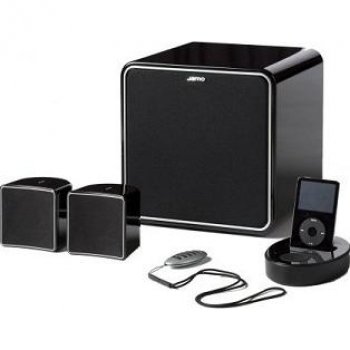
Image: The Jamo I300 2.1 Channel Speaker System, showcasing il subwoofer e due altoparlanti satellitari.
Contenuto della confezione
Si prega di verificare che tutti gli articoli siano presenti nel pacco:
- 1 x Jamo I300 Subwoofer
- 2 x Jamo I300 Satellite Speakers
- 1 x telecomando
- 1 x cavo di alimentazione
- Audio Connection Cables (e.g., RCA to 3.5mm, speaker wires)
- Questo manuale di istruzioni
Impostare
1. Disimballaggio
Rimuovere con cautela tutti i componenti dall'imballaggio. Conservare il materiale di imballaggio per eventuali trasporti o stoccaggio futuri.
2. Posizionamento
Optimal placement is crucial for sound quality. The Jamo I300 system can be placed on the floor or on a table, depending on your room layout and preference.
- Subwoofer: Place the subwoofer on the floor, ideally in a corner or near a wall for enhanced bass response. Experiment with placement to find the best sound for your room.
- Altoparlanti satellitari: Position the satellite speakers equidistant from your primary listening position. For stereo imaging, place them at ear level or slightly above, angled towards the listener.
3. Connessioni
- Collegare gli altoparlanti satellitari: Connect the satellite speakers to the corresponding outputs on the subwoofer using the provided speaker wires. Ensure correct polarity (positive to positive, negative to negative).
- Collega la sorgente audio: Connect your audio source (e.g., TV, computer, smartphone) to the subwoofer's input using the appropriate audio cable (e.g., RCA or 3.5mm jack).
- Connetti alimentazione: Plug the power cable into the subwoofer's power input, then connect the other end to a suitable wall outlet.
Istruzioni per l'uso
1. Accensione/Spegnimento
- To power on the system, press the power button on the subwoofer or the remote control. The power indicator will illuminate.
- Per spegnere, premere nuovamente il pulsante di accensione.
2. Controllo del volume
- Adjust the master volume using the volume controls on the subwoofer or the remote control.
- Some models may feature separate bass/treble controls for fine-tuning the sound.
3. Selezione della sorgente
Use the 'Source' or 'Input' button on the subwoofer or remote control to switch between connected audio sources (e.g., Line In, Bluetooth).
4. Accoppiamento Bluetooth
- Ensure the speaker system is powered on and set to Bluetooth input mode. The Bluetooth indicator will typically flash, indicating it's in pairing mode.
- Sul tuo dispositivo abilitato Bluetooth (ad esempio, smartphone, tablet), vai alle impostazioni Bluetooth e cerca i dispositivi disponibili.
- Select "Jamo I300" from the list of devices.
- Once paired, the Bluetooth indicator on the speaker system will become solid, and you can now stream audio wirelessly.
Manutenzione
1. Pulizia
- Scollegare sempre il cavo di alimentazione prima della pulizia.
- Use a soft, dry cloth to wipe the surfaces of the speakers and subwoofer.
- Do not use liquid cleaners, aerosols, or abrasive materials, as these can damage the finish or internal components.
2. Conservazione
If storing the system for an extended period, ensure it is powered off and disconnected from the mains. Store it in a cool, dry place, away from direct sunlight and extreme temperatures.
Risoluzione dei problemi
Per i problemi più comuni e le relative soluzioni, fare riferimento alla tabella sottostante.
| Problema | Possibile causa | Soluzione |
|---|---|---|
| Nessun potere | Cavo di alimentazione non collegato; presa di corrente difettosa | Controllare il collegamento del cavo di alimentazione; provare una presa di corrente diversa |
| Nessun suono | Incorrect input source; Volume too low; Audio cables loose/faulty | Select correct input source; Increase volume; Check all audio cable connections |
| Bluetooth non associato | Altoparlante non in modalità di associazione; Dispositivo troppo lontano; Interferenza | Ensure speaker is in pairing mode; Move device closer; Restart both devices |
| Suono distorto | Volume troppo alto; scarsa qualità della sorgente audio; posizionamento degli altoparlanti | Reduce volume; Use a higher quality audio source; Adjust speaker placement |
Specifiche
The following are the technical specifications for the Jamo I300 2.1 Channel Speaker System:
| Caratteristica | Specificazione |
|---|---|
| Numero di modello | I300B |
| Canali audio | 2.1 canali |
| Potenza RMS totale | 300 L |
| Potenza RMS del subwoofer | 150 L |
| Potenza degli altoparlanti satellitari | 75 W per speaker (estimated) |
| Gamma di frequenza | 45 - 20000 Hz |
| Sensibilità | 86 dB |
| Impedenza | 6 Ohm |
| Colore | Nero |
| Dimensioni (subwoofer) | 9.09 x 9.09 x 9.19 cm (circa, in base alle dimensioni del prodotto) |
| Peso | 12 kg (totale) |
| Tecnologia senza fili | Bluetooth |
| Tipo di controllo | Telecomando |
| Tipo di montaggio | Floor, Table Mount |
Garanzia e supporto
Jamo products are manufactured to the highest quality standards. This product is covered by a limited warranty. For detailed warranty terms and conditions, please refer to the warranty card included with your product or visit the official Jamo websito.
For technical support, service, or further assistance, please contact your local Jamo dealer or authorized service center. Contact information can typically be found on the official Jamo websito o nella documentazione del prodotto.