
1. Introduzione
The Behringer Minimix Mix800 is an ultra-compact karaoke machine designed for studio and stage applications. It features a revolutionary Voice Canceller, an integrated digital echo/reverb processor, two independent microphone channels, and a dedicated 2-band EQ for vocal enhancement.
2. Istruzioni di sicurezza
- Alimentazione elettrica: Utilizzare solo l'adattatore di alimentazione specificato. Vol erratotagCiò può danneggiare l'unità e invalidare la garanzia.
- Umidità: Do not expose the unit to rain or moisture. Avoid placing liquids near the device.
- Ventilazione: Assicurare una ventilazione adeguata. Non ostruire le aperture di ventilazione.
- Manutenzione: Non tentare di riparare l'unità da soli. Affidare qualsiasi intervento di manutenzione a personale qualificato.
- Pulizia: Pulire solo con un panno asciutto.
3. Controlli e connettori
3.1 Pannello frontale

Figura 1: Pannello frontale sopraview of the Minimix Mix800
- MIC LEVEL 1 & 2: Rotary controls to adjust the input level for Microphone Input 1 and 2.
- Indicatori CLIP: Red LEDs that illuminate when the input signal is too high, indicating potential clipping. Reduce the MIC LEVEL if these light up.
- MIC INPUT 1 & 2: 1/4-inch TS jack inputs for connecting microphones.
- EQ HIGH: Adjusts the high-frequency content of the microphone signals.
- EQUALIZZAZIONE BASSA: Adjusts the low-frequency content of the microphone signals.
- LIVELLO FX: Controls the amount of echo/reverb effect applied to the microphone signals.
- ECHO/REVERB Button: Activates or deactivates the integrated digital effects processor.
- 24 BIT Indicator: Lights up when the 24-bit digital effects processor is active.
- VOICE CANCELLER Button: Activates or deactivates the voice canceller function.
- IN/OUT Indicator: Lights up when the main output is active.
- LIVELLO DI USCITA: Rotary control to adjust the overall output volume of the Mix800.
- CLIP Meter: LED meter displaying the output signal level. Aim for levels around 0 dB for optimal performance without clipping.
- Pulsante di accensione: Accende o spegne l'unità.
3.2 Pannello posteriore
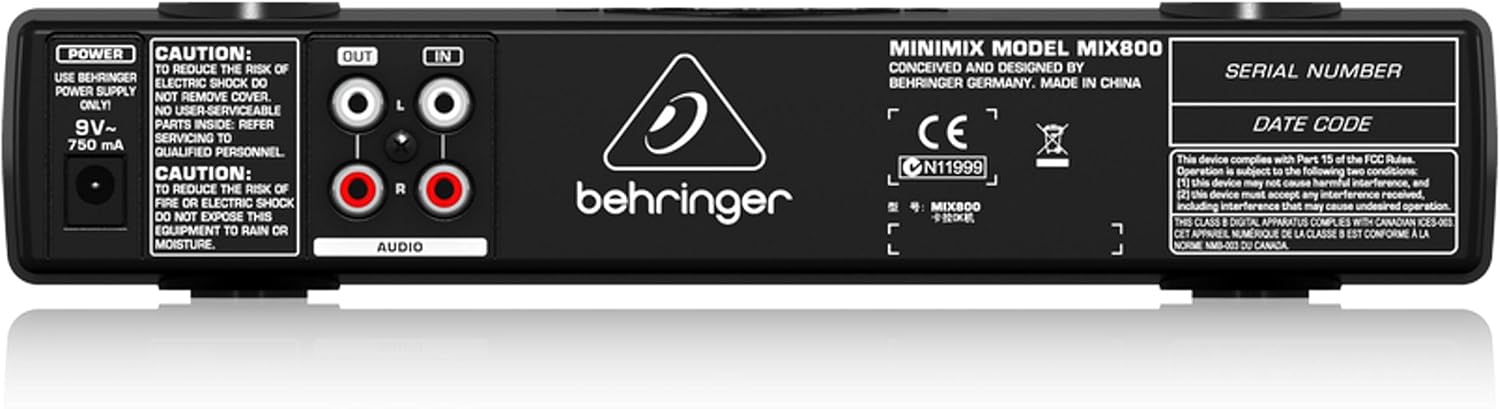
Figura 2: Pannello posteriore sopraview of the Minimix Mix800
- Ingresso POTENZA: Connection for the external 9V~ 750mA power adapter.
- USCITA AUDIO (L/R): RCA outputs for connecting the Mix800 to an amplifier, powered speakers, or a recording device.
- INGRESSO AUDIO (S/D): RCA inputs for connecting an external audio source, such as a CD player, media player, or computer.
4. Impostazione
Follow these steps to set up your Behringer Minimix Mix800:
- Collega la sorgente audio: Connect your external audio source (e.g., CD player, computer, smartphone) to the INGRESSO AUDIO (S/D) RCA inputs on the rear panel using appropriate RCA cables.
- Uscita di connessione: Collegare il USCITA AUDIO (L/R) RCA outputs on the rear panel to your amplifier, powered speakers, or sound system using RCA cables.
- Collegare i microfoni: Collega i tuoi microfoni al INGRESSO MICROFONO 1 E INGRESSO MICROFONO 2 1/4-inch jacks on the front panel.
- Connetti alimentazione: Connect the supplied 9V~ 750mA power adapter to the ENERGIA input on the rear panel, then plug the adapter into a suitable power outlet.
- Accensione: Premere il tasto ENERGIA button on the front panel to turn on the Mix800.
5. Istruzioni per l'uso
Once set up, you can begin using your Minimix Mix800:
- Adjust Microphone Levels: Speak into your microphones and slowly turn up the MIC LEVEL 1 E MIC LEVEL 2 controls. Adjust until the sound is clear and loud, but ensure the CLIP indicators do not light up consistently. Occasional flashes are acceptable.
- Regola EQ: Utilizzare il EQ HIGH E EQ LOW controls to shape the tone of your vocals. Increase EQ HIGH for brighter vocals, and EQ LOW for more warmth or bass.
- Applica effetti: Premere il tasto ECHO/REVERB button to activate the digital effects. Adjust the LIVELLO FX knob to control the amount of echo or reverb added to your vocals.
- Use Voice Canceller: Premere il tasto CANCELLATORE VOCALE button to attempt to remove vocals from the incoming stereo audio source. Note that the effectiveness of this feature can vary depending on the original audio track.
- Set Output Level: Regolare il LIVELLO DI USCITA knob to control the overall volume sent to your sound system. Monitor the CLIP Meter per evitare distorsioni.
6. Manutenzione
- Pulizia: Disconnect the power before cleaning. Use a soft, dry cloth to wipe the exterior of the unit. Do not use liquid cleaners or solvents.
- Magazzinaggio: Quando non si utilizza l'unità per lunghi periodi, conservarla in un ambiente asciutto e privo di polvere.
- Cura del cavo: Ensure all cables are free from kinks or damage. Avoid pulling cables forcefully from their connectors.
7. Risoluzione Dei Problemi
| Problema | Possibile causa | Soluzione |
|---|---|---|
| Nessuna uscita audio | Power off; incorrect connections; output level too low; amplificatore spento. | Check power, all cable connections (input/output), increase OUTPUT LEVEL, ensure ampil lificatore è acceso. |
| Il microfono non funziona | Mic level too low; faulty microphone/cable; mic not fully inserted. | Increase MIC LEVEL, test with another microphone/cable, ensure mic cable is fully inserted and making proper contact. |
| Suono distorto | Input/output levels too high (clipping). | Reduce MIC LEVEL or OUTPUT LEVEL until CLIP indicators/meter no longer show consistent clipping. |
| Voice Canceller ineffective | Original audio track not suitable for voice cancellation. | The effectiveness varies greatly with the source material. This is a characteristic of the technology. |
8. Specifiche
| Caratteristica | Dettaglio |
|---|---|
| Nome del modello | MINIMIX MIX800 |
| Dimensioni articolo (L x P x A) | 9.55" x 4.72" x 1.89" |
| Peso dell'articolo | 1.3 libbre |
| Ingressi microfono | 2 x 1/4" TS Jacks |
| Ingressi audio | RCA (sinistra/destra) |
| Uscite audio | RCA (sinistra/destra) |
| Effetti | Digital Echo/Reverb (24-bit) |
| Equalizzazione | 2 bande (Alto, Basso) |
| Alimentazione elettrica | 9V~ 750mA (external adapter) |
9. Video ufficiale del prodotto
Video 1: Manufacturer's overview of the Behringer Minimix Mix800, demonstrating its features and capabilities.
10. Garanzia e supporto
For detailed warranty information, please refer to the official Behringer websito: http://www.music-group.com/warranty.aspx. For technical support or service inquiries, please contact Behringer customer service.