
Marchio
Behringer ULTRATONE K3000FX User Manual
Ultra-Flexible 300 Watt 4 Channel PA System/Keyboard Amplifier con FX e FBQ Feedback Detection
Introduzione
The Behringer ULTRATONE K3000FX is a versatile 300-Watt, 4-channel PA system and keyboard amplifier designed for robust sound reproduction. It features a powerful 15-inch BUGERA woofer and a custom-made 1-inch driver, an integrated digital effects processor, and the FBQ Feedback Detection System. This manual provides essential information for the proper setup, operation, and maintenance of your K3000FX amppiù vivace.
Importanti istruzioni di sicurezza
- Leggere attentamente queste istruzioni prima di utilizzare l'unità.
- Conservare queste istruzioni per riferimento futuro.
- Prestare attenzione a tutte le avvertenze riportate sul prodotto e nel presente manuale.
- Seguire tutte le istruzioni per un funzionamento sicuro.
- Non utilizzare questo apparecchio vicino all'acqua o inamp ambienti.
- Pulire solo con un panno asciutto.
- Non ostruire le aperture di ventilazione. Installare secondo le istruzioni del produttore.
- Non installare vicino a fonti di calore come radiatori, bocchette di riscaldamento, stufe o altri apparecchi (inclusi amplificatori) che producono calore.
- Non vanificare lo scopo di sicurezza della spina polarizzata o di tipo con messa a terra. Una spina polarizzata ha due lame, una più larga dell'altra. Una spina di tipo con messa a terra ha due lame e un terzo polo di messa a terra. La lama larga o il terzo polo sono forniti per la tua sicurezza. Se la spina fornita non si adatta alla tua presa, consulta un elettricista per la sostituzione della presa obsoleta.
- Proteggere il cavo di alimentazione per evitare che venga calpestato o schiacciato, in particolare in corrispondenza delle spine, delle prese di corrente e del punto in cui esce dall'apparecchio.
- Utilizzare solo accessori/componenti specificati dal produttore.
- Utilizzare solo con il carrello, il supporto, il treppiede, la staffa o il tavolo specificati dal produttore o venduti con l'apparecchio. Quando si utilizza un carrello, prestare attenzione quando si sposta la combinazione carrello/apparecchio per evitare lesioni da ribaltamento.
- Scollegare l'apparecchio durante i temporali o quando non viene utilizzato per lunghi periodi di tempo.
- Affidare tutti gli interventi di assistenza a personale di assistenza qualificato. L'assistenza è richiesta quando l'apparecchio è stato danneggiato in qualsiasi modo, ad esempio se il cavo di alimentazione o la spina sono danneggiati, se è stato versato del liquido o sono caduti degli oggetti nell'apparecchio, se l'apparecchio è stato esposto a pioggia o umidità, se non funziona normalmente o se è caduto.
Impostare
Disimballaggio e ispezione
Carefully unpack your K3000FX amplifier. Inspect the unit for any signs of damage that may have occurred during transit. If damage is found, contact your dealer immediately. Retain the original packing materials for future shipping or storage.
Posizionamento
Posizionare il amplifier on a stable, level surface. Ensure adequate ventilation around the unit. Avoid placing it in direct sunlight or near heat sources. The K3000FX also features an integrated 35-mm pole socket for stand mounting, allowing it to be used as a PA system.

Figura 1: Fronte view of the K3000FX amppiù vivace.
Connessioni
The K3000FX offers multiple input and output options for various applications.
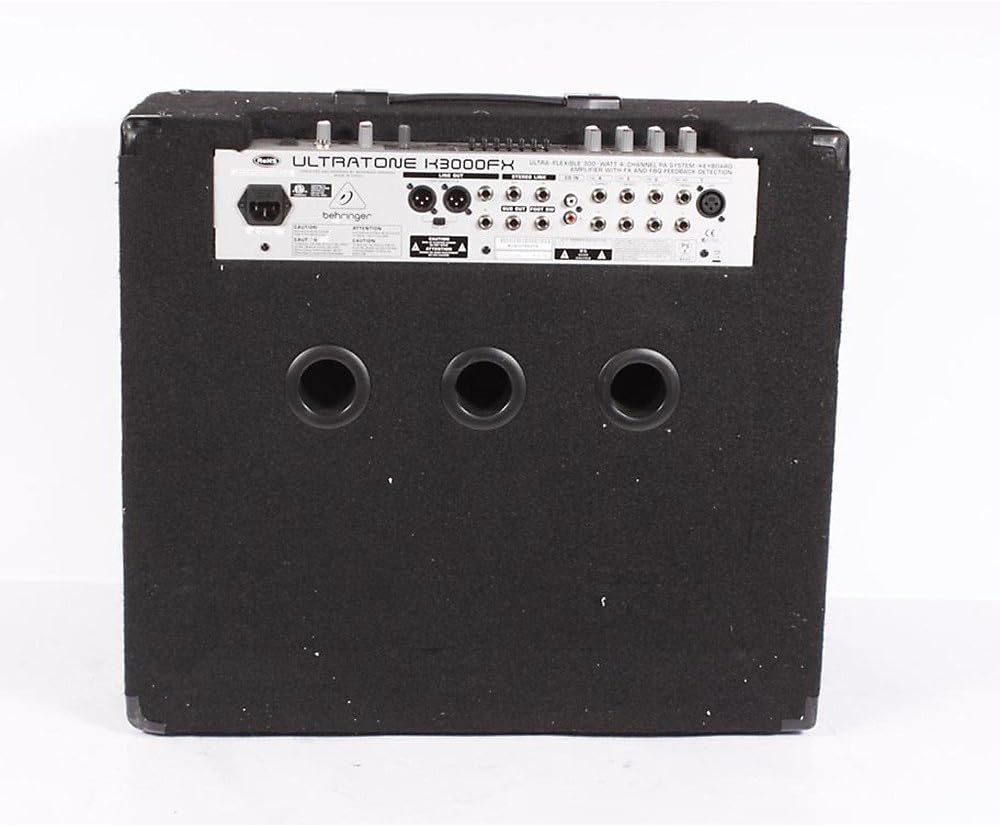
Figure 2: Rear panel connections of the K3000FX amppiù vivace.
- Collegamento elettrico: Collegare il cavo di alimentazione in dotazione alla presa CA sul pannello posteriore e quindi a una presa di corrente idonea.
- Channel Inputs (1-4): Each channel features 1/4" stereo inputs. Channel 1 also includes an additional XLR microphone input for direct connection of dynamic microphones.
- Ingresso CD: Use the RCA (phono) inputs to connect an external audio source like a CD player or MP3 player for playback or practicing along.
- Uscita cuffie: Connect headphones to the dedicated 1/4" stereo headphone jack for quiet practicing.
- Uscita DI: The balanced stereo XLR DI output with a Ground Lift switch allows for direct connection to a mixing console or external PA system.
- Uscita collegamento: Connect this output to a slave amplifier (e.g., another K3000FX) for true stereo operation or to expand your sound system.
- Uscita subwoofer: Connect an active subwoofer to this output for enhanced low-end power.
Istruzioni per l'uso
Accensione/spegnimento
Ensure all connections are secure before powering on. Turn the MASTER VOLUME control to its minimum setting. Press the POWER switch to turn on the unit. Wait a few seconds for the amplifier to stabilize before increasing the volume. To power off, reverse this procedure.
Funzionamento del canale
The K3000FX features four independent stereo channels, each with dedicated controls:
- Controllo del volume: Regola il livello di ingresso per ciascun canale.
- FX Send Control: Determines the amount of signal sent from each channel to the internal digital effects processor.
- Channel 1 XLR Input: For connecting dynamic microphones.
Processore di effetti digitali
The integrated 24-bit digital FX processor offers 100 presets, including reverb, chorus, flanger, delay, pitch shifter, and various multi-effects. Use the FX program selector to choose your desired effect. The FX RETURN level in the Main section controls the overall wet/dry mix of the effects.
Sistema di rilevamento feedback FBQ
The revolutionary FBQ Feedback Detection System instantly reveals critical frequencies that cause feedback. When feedback occurs, the corresponding LED on the 7-band graphic EQ will illuminate, indicating which frequency band needs adjustment to eliminate the feedback.
EQ grafico banda 7
Use the dedicated 7-band graphic equalizer to shape your sound. Adjust the sliders for each frequency band to boost or cut specific frequencies, optimizing the amplifier's output for your instrument and acoustic environment. The FBQ system works in conjunction with this EQ.
Main Section Controls
- Livello di ritorno FX: Controls the overall level of the effects returned to the main mix.
- Volume principale: Regola il volume di uscita complessivo del amppiù vivace.
- Livello telefoni: Controlla il volume dell'uscita cuffie.
- Interruttore di forma: Engages a specific equalization curve for a quick tonal adjustment.
Manutenzione
Pulizia
Pulisci il amplifier's exterior with a soft, dry cloth. Do not use abrasive cleaners, solvents, or waxes, as these can damage the finish. Ensure no liquids enter the unit.
Magazzinaggio
Se si memorizza il amplifier for an extended period, ensure it is in a dry, dust-free environment. It is recommended to use the original packaging for protection.
Risoluzione dei problemi
| Problema | Possibile causa | Soluzione |
|---|---|---|
| Nessuna uscita audio. |
|
|
| Suono distorto. |
|
|
| Feedback (suono ululante). |
|
|
Specifiche
| Caratteristica | Dettaglio |
|---|---|
| Uscita Wattage | 300 Watt |
| Configurazione degli altoparlanti | 15-inch BUGERA Woofer, 1-inch Custom Driver |
| Canali | 4 Stereo Channels |
| Digital FX Processor | 24-bit, 100 Presets (Reverb, Chorus, Flanger, Delay, Pitch Shifter, Multi-effects) |
| Equalizzatore | 7-band Graphic EQ with FBQ Feedback Detection System |
| Ingressi | 1/4" Stereo (Channels 1-4), XLR Mic (Channel 1), RCA (CD Input) |
| Risultati | Balanced Stereo XLR DI, 1/4" Headphone, Link, Subwoofer |
| Fonte di alimentazione | Elettrico con cavo |
| Dimensioni (A x L x P) | 26.77 x 19.49 x 24.02 pollici (circa) |
| Peso | 70.11 libbre (circa) |
| Tipo di montaggio | Pole Mount (35mm socket) |
Garanzia e supporto
For detailed warranty information and terms, please refer to the warranty card included with your product or visit the official Behringer website. For technical support, service, or spare parts, please contact Behringer customer service through their official channels. Ensure you have your product model number (K3000FX) and serial number ready when contacting support.
Produttore: Behringer USA
Numero modello: K3000 FX
Ask a question about this manual
Ask about setup, troubleshooting, compatibility, parts, safety, or missing instructions. Manuals+ will review the question and use this page’s manual context to help answer it.