
Introduzione
The Nikon D40x is a compact and user-friendly digital SLR camera designed to deliver exceptional image quality. Featuring a 10.2-effective megapixel CCD image sensor and Nikon’s exclusive image processing engine, it produces stunning sharpness and color, suitable for large prints and creative cropping. This manual provides essential information for setting up, operating, and maintaining your D40x camera to help you capture crisp and detailed photographs.
Impostare
1. Collegamento dell'obiettivo
Align the mounting mark on the lens with the lens mount mark on the camera body. Rotate the lens counter-clockwise until it clicks into place. Ensure the lens is securely attached before use.

Figura 1: Fronte view of the Nikon D40x with the 18-55mm lens attached.
2. Inserimento della batteria
Open the battery chamber cover located at the bottom of the camera. Insert the supplied EN-EL9 rechargeable battery, ensuring the correct orientation. Close the cover securely.

Figura 2: In basso view of the Nikon D40x, illustrating the battery compartment.
3. Inserimento di una scheda di memoria
Open the memory card slot cover on the side of the camera. Insert a compatible SD or SDHC memory card with the contacts facing the correct direction. Close the cover until it clicks.
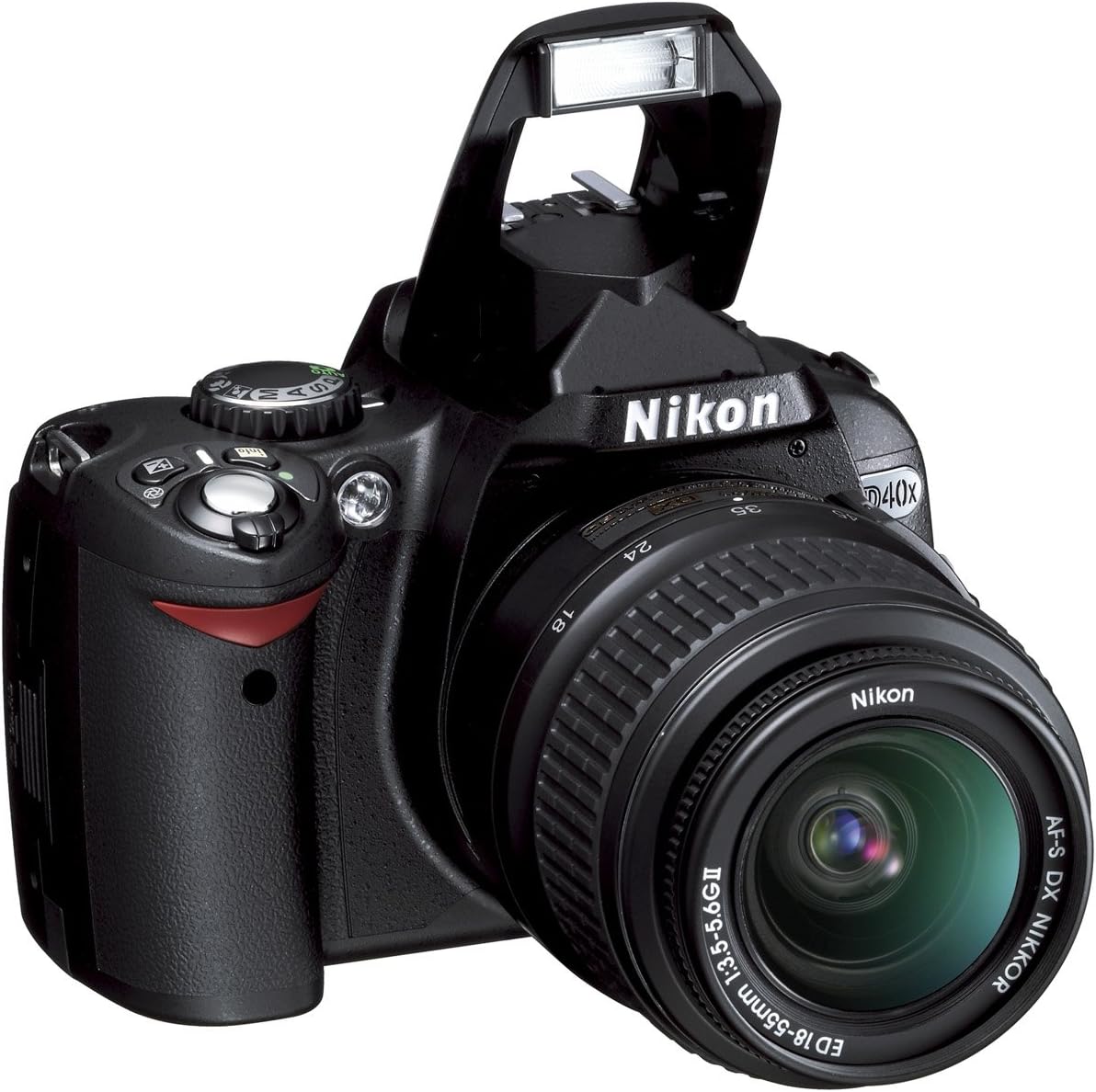
Figura 3: lato view of the Nikon D40x, highlighting the memory card slot.
Utilizzo della fotocamera
1. Accensione/spegnimento
To turn the camera on or off, rotate the power switch located near the shutter-release button.

Figura 4: in alto view of the Nikon D40x, indicating the power switch and mode dial.
2. Modalità di scatto di base
The D40x features a mode dial for selecting various shooting modes. For beginners, the AUTO mode is recommended as the camera automatically adjusts settings for optimal results. Other Digital-Vari Program Modes include:
- Auto Flash-OFF: For situations where flash is not desired.
- Ritratto: Optimizes settings for flattering portraits.
- Paesaggio: Enhances colors and sharpness for scenic views.
- Bambino: Freezes motion for active subjects.
- Sport: Uses faster shutter speeds to capture fast-moving action.
- Close Up: Ideal for shooting close-up subjects like flowers or insects.
- Night Portrait: Balances flash and ambient light for night portraits.
3. Utilizzo del flash incorporato
The built-in Speedlight with i-TTL automatic flash control provides balanced flash exposure. In low-light or backlit conditions, the flash can be used to add illumination. The flash can be manually raised or will pop up automatically in certain modes.

Figura 5: Fronte view of the Nikon D40x with the built-in flash in the raised position.
4. LCD Monitor and Navigation
The 2.5-inch, 230,000-pixel color LCD monitor allows for easy image review and menu navigation. Use the multi-selector (OK button in the center) to navigate menus and select options. The monitor also features 3 colorful display options: Classic, Graphic, and Wallpaper.

Figura 6: Posteriore view of the Nikon D40x, displaying the LCD monitor and various control buttons.
5. In-Camera Editing Functions
The D40x offers versatile in-camera editing features through the Retouch Menu. These include Nikon D-Lighting, Red-Eye Correction, Image Trim, Image Overlay, Monochrome (Black and White, Sepia, Cyanotype), Skylight, Warm Tone, and Color Balance filter effects. This allows for creative adjustments without needing a computer.
Manutenzione
1. Pulizia della fotocamera e dell'obiettivo
Use a soft, lint-free cloth to clean the camera body. For the lens and LCD screen, use a specialized lens cleaning cloth and solution. Avoid touching the lens or sensor directly with your fingers. Keep lens caps on when not in use to prevent dust and scratches.
2. Cura della batteria
Always use the supplied EN-EL9 rechargeable battery and charger. Charge the battery fully before use. Store the battery in a cool, dry place when not in use. Avoid exposing the battery to extreme temperatures.
3. Gestione della scheda di memoria
Format new memory cards in the camera before first use. Always turn off the camera before inserting or removing a memory card to prevent data corruption. Store memory cards in a protective case.
Risoluzione dei problemi
1. La fotocamera non si accende
Assicurarsi che la batteria sia completamente carica e inserita correttamente. Verificare che l'interruttore di alimentazione sia in posizione "ON".
2. Immagini sfocate
Check the focus mode (Autofocus or Manual). Ensure sufficient lighting. If using the 18-55mm VR lens, ensure Vibration Reduction (VR) is enabled in low light or when shooting handheld. Clean the lens if smudges are present.
3. Il flash non si attiva
Verify that the flash is raised. Check the shooting mode; some modes (e.g., Auto Flash-OFF) disable the flash. Ensure the battery has sufficient charge.
4. "Memory Full" Message
Delete unwanted images or insert a new, empty memory card. Transfer images to a computer to free up space.
5. Using the HELP Menu
The D40x features an advanced HELP Menu system with "Assist Images." If a Question Mark icon (?) appears, press the HELP button beside the LCD monitor for context-sensitive assistance.
Specifiche
| Nome del modello | Nikon D40x |
| Risoluzione fissa efficace | 10.2 MP |
| Tecnologia del sensore fotografico | CCD |
| Tipo di lente | 18-55mm f/3.5-5.6G ED II AF-S DX Zoom-Nikkor lens |
| Zoom ottico | 3x |
| Stabilizzazione dell'immagine | Doppio |
| Dimensioni dello schermo | 2.5 pollici |
| Gamma ISO | 100-1600, ISO auto |
| Scatto continuo | 2.5 fotogrammi al secondo |
| Supportato File Formato | JPEG, GREZZO |
| Tecnologia di connettività | Cablato |
| Tipo di memoria flash | SD; SDHC |
Garanzia e supporto
For warranty information and technical support, please refer to the documentation included with your product or visit the official Nikon websito. Contattare il servizio clienti per assistenza su qualsiasi problema non trattato in questo manuale.