
1. Introduzione
Grazie per l'acquistoasing the jWin JXCD462 AM/FM Portable CD Boombox with Cassette Playback. This manual provides detailed instructions for the proper setup, operation, and maintenance of your new audio system. Please read this manual thoroughly before use and retain it for future reference.
2. Caratteristiche principali
- Integrated AM/FM Stereo Radio for diverse listening options.
- Top-loading CD Player with 20-track programmable memory.
- CD functions including Repeat Track One/All and Skip & Search.
- 2-Digit LED Display for track and radio frequency indication.
- Cassette Player with Auto Stop Mechanism for tape protection.
- Automatic Level Control (ALC) for consistent recording levels.
- 1-Touch Recording from CD or Radio to cassette tape.
- Portable design with a convenient carrying handle.
3. Contenuto della confezione
Si prega di verificare che tutti gli elementi siano presenti:
- jWin JXCD462 Boombox Unit
- Cavo di alimentazione CA
- Manuale dell'utente (questo documento)
4. Controlli e indicatori
Familiarize yourself with the controls and indicators on your boombox:
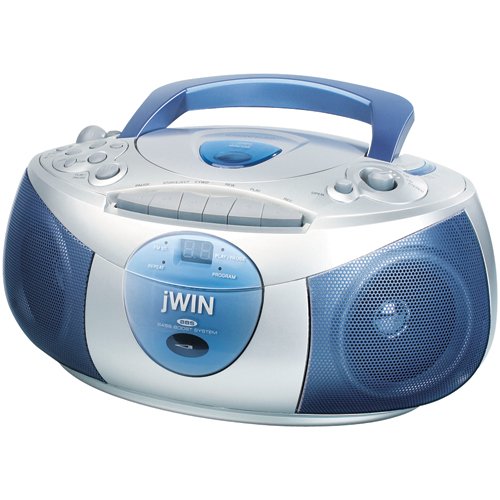
Figura 1: Davanti view of the jWin JXCD462 AM/FM Portable CD Boombox. This image displays the unit's overall design, including the top-loading CD compartment, the cassette deck on the front, the two circular speakers with blue grilles, the central LED display, and various control buttons and knobs. A blue carrying handle is visible at the top.
- Scomparto CD: Situato nella parte superiore, per l'inserimento di CD audio.
- Registratore a cassette: Scomparto a caricamento frontale per cassette.
- Display a LED: Shows CD track number or radio frequency.
- Selettore di funzioni: Switch between CD, Radio, Tape, and Off modes.
- Controllo del volume: Manopola rotante per regolare il livello di uscita audio.
- Manopola di sintonia: For selecting AM or FM radio stations.
- Pulsanti di controllo CD: Play/Pause, Stop, Skip/Search (forward/backward), Program, Repeat.
- Pulsanti di controllo della cassetta: Play, Stop/Eject, Rewind, Fast Forward, Record.
- Selettore di banda AM/FM: Passa dalla banda radio AM a quella FM.
- Antenna telescopica: Estendi per una migliore ricezione radio FM.
- Ingresso alimentazione CA: Located at the rear for connecting the AC power cord.
- Vano batteria: Located at the bottom for battery operation.
5. Impostazione
5.1 Alimentazione dell'unità
Il tuo boombox può essere alimentato tramite corrente alternata o batterie.
Funzionamento con alimentazione CA:
- Ensure the unit is switched OFF using the Function Selector.
- Collegare il cavo di alimentazione CA in dotazione alla presa di ingresso di alimentazione CA sul retro dell'unità.
- Collegare l'altra estremità del cavo di alimentazione CA a una presa a muro CA standard (120 V/60 Hz).
Note: When operating on AC power, batteries (if installed) are automatically disconnected.
Funzionamento a batteria:
- Assicurarsi che l'unità sia SPENTA.
- Aprire il coperchio del vano batterie situato nella parte inferiore dell'unità.
- Insert 8 x 'C' size batteries (not included), observing the correct polarity (+/-) as indicated inside the compartment.
- Chiudere saldamente il coperchio del vano batterie.
Nota: rimuovere le batterie se l'unità non verrà utilizzata per un periodo prolungato per evitare perdite.
6. Istruzioni per l'uso
6.1 Operating the CD Player
- Lift the CD compartment door located on the top of the unit.
- Place an audio CD onto the center spindle with the label side facing up.
- Chiudere bene lo sportello del vano CD.
- Set the Function Selector to the 'CD' position. The LED display will show '--' then the total number of tracks.
- Premere il tasto RIPRODUCI/PAUSA per avviare la riproduzione. Il numero della traccia apparirà sul display LED.
- Per mettere in pausa la riproduzione, premere RIPRODUCI/PAUSA di nuovo. Premerlo ancora una volta per riprendere.
- Per interrompere la riproduzione, premere il pulsante FERMARE pulsante.
- Per passare alla traccia successiva, premere il tasto SALTA/RICERCA AVANTI button (▶▶I).
- Per tornare all'inizio della traccia corrente o delle tracce precedenti, premere il tasto SKIP/SEARCH BACKWARD button (I◀◀).
- To search rapidly within a track, press and hold the SALTA/CERCA pulsanti durante la riproduzione.
Programmazione tracce CD:
- In modalità STOP, premere il tasto PROGRAMMA button. '01' will flash on the LED display.
- Utilizzare il SALTA/CERCA buttons to select the desired first track.
- Premere PROGRAMMA again to confirm. '02' will flash.
- Ripetere i passaggi 2 e 3 per programmare fino a 20 brani.
- After programming the last track, press RIPRODUCI/PAUSA to start playback of the programmed sequence.
Funzione di ripetizione:
- Durante la riproduzione del CD, premere il tasto RIPETERE button once to repeat the current track (indicated by 'REP' on display).
- Premere RIPETERE a second time to repeat all tracks on the CD (indicated by 'ALL' on display).
- Premere RIPETERE a third time to cancel the repeat function.
6.2 Operating the AM/FM Radio
- Extend the telescopic antenna for optimal FM reception. For AM reception, the unit has a built-in antenna, so adjust the unit's position for best signal.
- Set the Function Selector to the 'RADIO' position.
- Select the desired band (AM or FM) using the AM/FM Band Selector switch.
- Ruotare il ACCORDATURA knob to search for your desired radio station.
- Regolare il VOLUME manopola sul livello di ascolto preferito.
6.3 Operating the Cassette Player/Recorder
Riproduzione cassetta:
- Set the Function Selector to the 'TAPE' position.
- Premere il tasto STOP/ESPULSIONE button to open the cassette deck door.
- Insert a recorded cassette tape with the exposed tape facing downwards.
- Chiudere lo sportello del mangianastri.
- Premere il tasto GIOCARE pulsante per avviare la riproduzione.
- Utilizzare il RIAVVOLGERE E AVANTI VELOCE pulsanti per navigare nel nastro.
- Premere il tasto STOP/ESPULSIONE per interrompere la riproduzione.
Cassette Recording (1-Touch Recording):
- Inserire una cassetta vuota nel mangianastri.
- Select the source you wish to record from (CD or RADIO) using the Function Selector.
- Start playback of the CD or tune to the desired radio station.
- Premere il tasto DOCUMENTAZIONE pulsante sul registratore a cassette. Il GIOCARE button will also engage automatically.
- Recording will begin. The Automatic Level Control (ALC) will adjust the recording volume automatically.
- Per interrompere la registrazione, premere il pulsante STOP/ESPULSIONE pulsante.
7. Manutenzione
Proper care will ensure long-lasting performance from your boombox.
- Pulizia dell'unità: Pulire l'esterno con un panno morbido e asciutto. Non utilizzare detergenti abrasivi o solventi.
- Pulizia della lente del CD: If CD playback becomes erratic, the lens may be dirty. Use a commercially available CD lens cleaner disc.
- Pulizia delle testine delle cassette: Over time, tape heads, pinch rollers, and capstans can accumulate oxide. Use a cotton swab lightly moistened with isopropyl alcohol to gently clean these components after every 10-20 hours of use.
- Cura della batteria: Remove batteries if the unit is not used for extended periods to prevent corrosion.
- Magazzinaggio: Conservare l'unità in un luogo fresco e asciutto, lontano dalla luce solare diretta e da temperature estreme.
8. Risoluzione Dei Problemi
If you experience issues with your boombox, please consult the following table before seeking service.
| Problema | Possibile causa | Soluzione |
|---|---|---|
| Nessun potere | Cavo CA non collegato; batterie scariche o inserite in modo errato. | Assicurarsi che il cavo CA sia collegato saldamente; sostituire le batterie o controllare la polarità. |
| Nessun suono | Volume too low; Incorrect function selected. | Increase volume; Select correct function (CD, Radio, Tape). |
| Il CD non viene riprodotto / salta | CD inserito in modo errato; CD sporco o graffiato; scomparto CD non chiuso. | Re-insert CD label side up; Clean CD with a soft cloth; Close CD compartment firmly. |
| Poor radio reception / Static | Antenna non estesa; posizione dell'unità. | Extend FM telescopic antenna; Adjust unit's position for AM reception. |
| Cassette tape not playing / Poor sound | Tape incorrectly inserted; Tape heads dirty. | Re-insert tape correctly; Clean tape heads, pinch roller, and capstan. |
9. Specifiche
- Marca: jVINCERE
- Modello: JXCD462
- Tipo di altoparlante: Stereo
- Colore: Blu, Argento
- Dimensioni del prodotto (L x P x A): Dimensioni: 17.27 x 33.78 x 22.61 cm
- Peso dell'articolo: 2.49 kg
- Lettore CD: Top-loading, 20-track programmable, Repeat (one/all), Skip & Search
- Display: LED a 2 cifre
- Radio: Integrated AM/FM Stereo Tuner
- Lettore di cassette: Front-loading, Auto Stop Mechanism, Automatic Level Control (ALC), 1-Touch Recording (from CD/Radio)
- Fonte di energia: AC 120V/60Hz or 8 x 'C' size batteries (not included)
10. Informazioni sulla garanzia
This product is covered by a limited warranty. Please refer to the warranty card included with your purchase or contact your retailer for specific terms and conditions. Keep your purchase receipt as proof of purchase.
11. Assistenza clienti
For technical assistance or customer service inquiries, please contact the retailer where you purchased this product or refer to the contact information provided on the product packaging or jWin's official website. Please have your model number (JXCD462) and purchase details ready when contacting support.