
Introduzione
The AT&T 1070 is a versatile 4-line expandable corded phone system designed for small business environments. It features Caller ID, Call Waiting, and a speakerphone for hands-free communication. This system supports up to four telephone lines and can be expanded to include up to 16 stations when used with compatible AT&T models 1040 and 1080.
Le caratteristiche principali includono:
- 4-line operation, compatible with 1 to 4 telephone lines.
- 32 Speed Dial and 16 Intercom locations for quick access.
- 3-Party Conferencing capability.
- Integrated Speakerphone for hands-free calls.
- Adjustable volume for handset, speaker, headset, and ringer.
- Caller ID and Call Waiting functionality.
- Compatibility with AT&T 1040 and AT&T 1080 models for system expansion.

Image: The AT&T 1070 4-Line Expandable Corded Phone System, showing the handset, keypad, display, and line buttons.
Impostare
Follow these steps to set up your AT&T 1070 phone system.
1. Collegamento elettrico
Connect the power adapter to the phone and then to a standard electrical outlet. Ensure the connection is secure.
2. Collegamento della linea telefonica
Connect your telephone lines to the corresponding LINE 1, LINE 2, LINE 3, and LINE 4 jacks on the back of the phone. Use standard RJ11 telephone cords.
Nota: If you are a DSL subscriber, you may need to use a DSL filter for each telephone line to prevent interference. This product does not work on a digital line.
3. Handset and Headset Connection
- Connect the coiled handset cord to the handset and the designated handset jack on the phone base.
- For hands-free operation, you can connect a 2.5-millimeter headset to the headset jack.
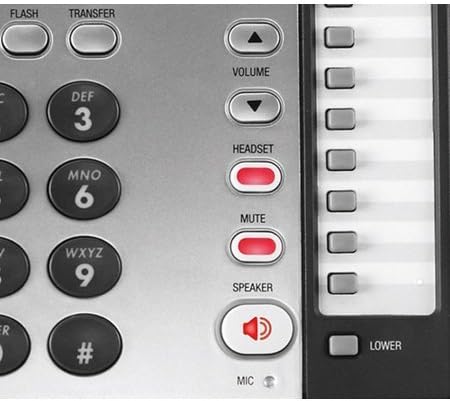
Immagine: dall'alto verso il basso view of the AT&T 1070 phone, highlighting the handset and overall layout.
4. Battery Installation (for memory backup)
The phone requires 4 AA batteries (included) for memory loss protection. Install these batteries into the compartment located on the underside of the phone base, observing correct polarity.
5. Espansione del sistema
The AT&T 1070 system can be expanded to up to 16 stations using compatible AT&T models 1040 and 1080. Refer to the manuals of those specific models for detailed expansion instructions.
Istruzioni per l'uso
Effettuare e ricevere chiamate
- Per effettuare una chiamata: Sollevare il ricevitore o premere il tasto ORATORE button. Select an available line (LINE 1-4) if not automatically selected. Dial the desired number.
- Per ricevere una chiamata: Sollevare il ricevitore o premere il tasto ORATORE button when the phone rings. The corresponding line indicator will flash.
- Automatic Line Selection: When the phone rings, picking up the handset or pressing SPEAKER will automatically connect you to the ringing line.
Immagine: Primo piano view of the AT&T 1070 keypad and function buttons, including DO NOT DISTURB, REDIAL, FLASH, and TRANSFER.
Speakerphone Usage
Premere il tasto ORATORE button to activate the speakerphone function. Press it again to end the call or lift the handset to switch to handset mode.
ID chiamante e avviso di chiamata
- The large display shows incoming caller information (name and number) if you subscribe to Caller ID service.
- With Call Waiting service, you will see who is calling even if you are already on another line.
- The phone stores a 200-name-and-number Caller ID history. Numbers can be dialed directly from this history.
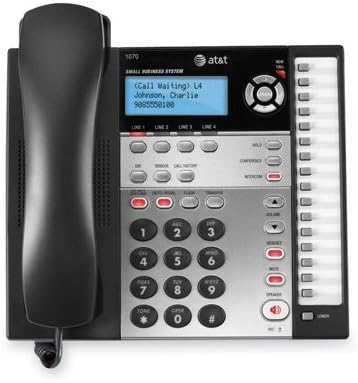
Image: Close-up of the AT&T 1070 display showing "Call Waiting" and caller information, along with line indicators.
3-Party Conferencing
To initiate a 3-party conference call, establish a call on one line, then use the CONFERENZA button to add another party from a different line. Refer to the full user manual for detailed steps.
Intercom and Paging
If your system is expanded with compatible AT&T 1040 or 1080 models, you can use the intercom feature to communicate between stations and page other users. The phone has 16 intercom number locations.
Chiamata rapida
The phone supports 32 speed dial locations for frequently called numbers. Consult the detailed manual for programming instructions.
Controllo del volume
Utilizzare il VOLUME up/down buttons to adjust the listening volume for the handset, speakerphone, or connected headset. Ringer volume can also be adjusted.
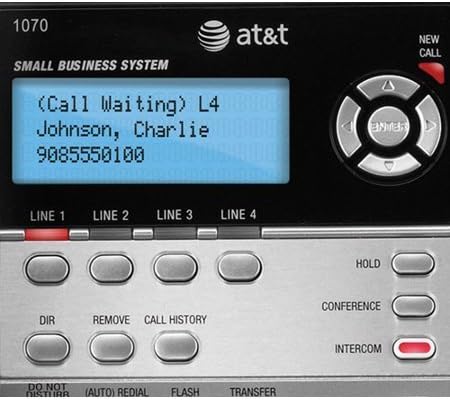
Image: Close-up of the right-side control panel of the AT&T 1070, showing the VOLUME, HEADSET, MUTE, and SPEAKER buttons.
Voicemail Indicator
If you subscribe to a voicemail service, a red light will blink on the phone when you have new voicemail messages.
Manutenzione
- Pulizia: Pulisci l'esterno del telefono con un panno morbido e leggermente abrasivo.amp stoffa. Non utilizzare prodotti chimici aggressivi o detergenti abrasivi.
- Sostituzione della batteria: Replace the 4 AA batteries annually or as needed to ensure memory backup functionality.
- Gestione del cavo: Ensure all cords are free from kinks or excessive tension to prevent damage.
Risoluzione dei problemi
| Problema | Soluzione |
|---|---|
| Nessun segnale di linea. |
|
| L'ID chiamante non viene visualizzato. |
|
| Interference or static on the line. |
|
| Memory settings lost after power outage. |
|
Specifiche
| Caratteristica | Dettaglio |
|---|---|
| Marca | AT&T |
| Numero di modello | 1070 |
| Tipo di telefono | filo |
| Numero di linee | 4 |
| Colore | Nero/Argento |
| Fonte di alimentazione | Elettrico con cavo |
| Batterie richieste | 4 AA batteries (included, for memory backup) |
| Dimensioni articolo (L x P x A) | 8 x 5 x 10 pollici |
| Peso dell'articolo | 3 libbre |
| ID chiamante | SÌ |
| Capacità di teleconferenza | 3 vie |
| Speed Dial Locations | 32 |
| Intercom Locations | 16 |
| Dispositivi compatibili | AT&T Models 1040, 1070, and 1080 |
Informazioni sulla garanzia
The AT&T 1070 4-Line Expandable Corded Phone System comes with a Garanzia limitata di 1 anni. Please retain your proof of purchase for warranty claims. For specific terms and conditions, refer to the warranty card included with your product or visit the official AT&T support websito.
Supporto
For further assistance, technical support, or to inquire about replacement parts, please visit the official AT&T support website or contact their customer service department. Contact information can typically be found on the AT&T websito o nei materiali di imballaggio.
Supporto online: www.att.com/support