
1. Introduzione
The Jung AUT238DWW is an LCD display cover designed for the Jung UT 238 E programmable thermostat mechanism. This unit provides a user interface for precise control over your heating system, featuring a clear display and intuitive buttons for programming and adjustments. It integrates a weekly timer to manage heating schedules efficiently, ensuring comfort and energy savings.
Le caratteristiche principali includono:
- Three adjustable temperature settings: Comfort, Setback (night/economy), and Frost Protection.
- Automatic summer/winter time switching.
- Temperature detection via internal and/or external sensor.
- Additional energy-saving button for reduced temperature mode.
- "Party" mode to extend comfort temperature for selected periods.
- Power reserve for settings retention during power outages.
- Cooling function for passive cooling systems.
2. Istruzioni di sicurezza
Please read these instructions carefully before installation and operation. Keep this manual for future reference.
- Installation should only be performed by a qualified electrician in accordance with local regulations.
- Prima di qualsiasi intervento di installazione o manutenzione, assicurarsi che l'alimentazione elettrica sia scollegata.
- Non esporre il dispositivo a umidità, temperature estreme o luce solare diretta.
- Non aprire o tentare di riparare il dispositivo autonomamente. Per qualsiasi intervento di assistenza, rivolgersi a personale qualificato.
3. Componenti del prodotto e oltreview
The Jung AUT238DWW display cover consists of an LCD screen and several control buttons. Refer to the image below for a visual guide to the main components.
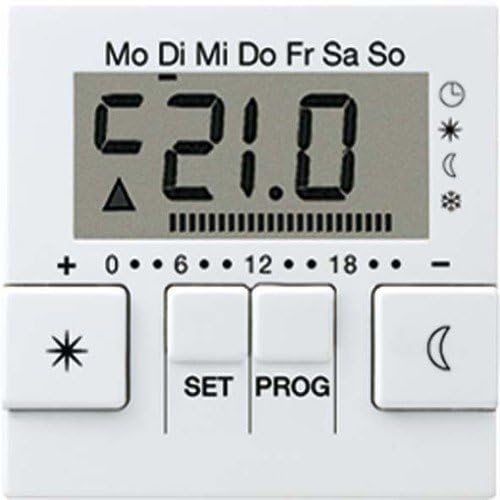
Controlli chiave:
- Schermo LCD: Shows current temperature, time, day of the week, and active mode icons.
- Pulsanti '+' e '-': Used to adjust values such as time or temperature.
- Pulsante IMPOSTA: Confirms set values. If not pressed within 1 minute after adjustment, the display returns to normal mode without saving changes.
- Pulsante PROG: Allows access to programming functions and returns to the normal time program.
- Star/Snowflake Button: (Left button) Likely for quick access to Comfort or Frost Protection modes.
- Moon Button: (Right button) Likely for quick access to Setback (night) mode.
4. Installazione e configurazione iniziale
This AUT238DWW unit is a display cover designed to be mounted onto the Jung UT 238 E programmable thermostat mechanism. Ensure the UT 238 E mechanism is correctly installed and wired according to its specific instructions before attaching this display cover.
4.1 Attaching the Display Cover
- Ensure the power supply to the thermostat mechanism is completely disconnected at the main circuit breaker.
- Carefully align the AUT238DWW display cover with the UT 238 E thermostat mechanism.
- Gently press the cover into place until it clicks securely. Do not force it.
- Restore power to the thermostat mechanism. The display should illuminate.
4.2 Impostazione iniziale di ora e data
Alla prima accensione o dopo uno spegnimento prolungatotage (beyond the power reserve), you may need to set the current time and date. Refer to the "Operating Instructions" section for detailed steps on using the +, -, E IMPOSTATO buttons to adjust these values.
5. Istruzioni per l'uso
5.1 Funzionamento di base
To adjust values such as time or temperature, use the + or - buttons. Confirm your settings by pressing the IMPOSTATO pulsante. Se la IMPOSTATO button is not pressed within 1 minute after the last button press, the display will automatically revert to the normal display mode, and any unsaved changes will be lost.
Premendo il PROG button allows you to navigate through programming menus or return to the normal time program.
5.2 Understanding Thermostat Modes
The thermostat operates by controlling the heating system based on three adjustable temperature settings at specific times:
- Temperatura di comfort: Typically used during the day or periods of presence.
- Setback Temperature (Economy/Night): Usually applied during the night or periods of absence to save energy.
- Temperatura di protezione dal gelo: Used during extended periods of absence (e.g., holidays) to prevent the heating system from freezing. This temperature is set just high enough to protect the system.
5.3 Weekly Timer Programming
The integrated weekly timer allows for time-controlled temperature management for a single room or floor heating. You can set up to 32 individual switching times throughout the week. For each switching time, you define the start time, end time, and the desired temperature mode (Comfort, Setback, or Frost Protection).
- Premere il tasto PROG pulsante per accedere al menu di programmazione.
- Utilizzare il + or - buttons to navigate through the program slots (e.g., P1, P2, etc.).
- Premere IMPOSTATO to select a program slot.
- Utilizzo + or - to set the start time, then press IMPOSTATO.
- Utilizzo + or - to set the end time, then press IMPOSTATO.
- Utilizzo + or - to select the desired temperature mode (Comfort, Setback, Frost Protection) for this period, then press IMPOSTATO.
- Repeat for all desired switching times. Press PROG to exit the programming menu.
The system includes heating optimization, which means it will activate heating in advance to ensure the desired temperature is reached precisely at the programmed time.
5.4 Funzioni speciali
- Pulsante di risparmio energetico: An additional button allows for quick switching to the reduced (setback) temperature.
- "Party" Mode: Activates the comfort temperature for a selectable period of 1 to 4 hours, overriding the current program. This is useful for temporary extensions of comfort.
- Funzione di raffreddamento: The thermostat supports a simple cooling function for passive cooling systems (e.g., via geothermal exchangers). Refer to the UT 238 E mechanism manual for activation details.
6. Manutenzione e cura
The Jung AUT238DWW display cover requires minimal maintenance.
- Pulizia: Pulisci il display e i pulsanti con un panno morbido, asciutto o leggermente asciutto.amp panno. Non utilizzare detergenti abrasivi, solventi o spray chimici, poiché potrebbero danneggiare la superficie.
- Battery (Power Reserve): The device features a power reserve (capacitor, not a battery) that retains settings for up to 4 hours during power interruptions and programming for up to 10 years. No user maintenance is required for this feature.
7. Risoluzione Dei Problemi
If you encounter issues with your Jung AUT238DWW display cover or the connected thermostat mechanism, consider the following:
- Il display è vuoto: Check the power supply to the thermostat mechanism. Ensure it is correctly installed and receiving power.
- Impostazioni non salvate: Assicurati di premere il tasto IMPOSTATO button to confirm changes after adjusting values. If you wait too long (over 1 minute), changes will not be saved.
- Letture di temperatura errate: Verify that the temperature sensor (internal or external, depending on configuration) is not obstructed and is functioning correctly.
- Il riscaldamento non risponde: Check the programming schedule to ensure the thermostat is set to a heating mode and desired temperature. Verify the UT 238 E mechanism is correctly wired to your heating system.
For persistent issues, consult the full manual for the Jung UT 238 E thermostat mechanism or contact Jung customer support.
8. Specifiche tecniche
| Caratteristica | Specificazione |
|---|---|
| Marca | Giovane |
| Numero di modello | AUT238DWW |
| Colore | Alpine White |
| Voltage | 230 Volt |
| Fonte di alimentazione | Powered by mechanism (UT 238 E) |
| Retroilluminazione | SÌ |
| Dimensioni (confezione) | Dimensioni: 23.4 x 15.6 x 6 cm |
| Peso dell'articolo | 240 grammi |
| Materiale | Termoplastico |
| Tipo di timer | Electronic with weekly program, automatic summer/winter time switching |
| Differenziale di temperatura | ± 0.1 ... ± 1.3 K, adjustable (0.1 K steps) |
| Program Slots | 32, assignable over the week (10-minute steps) |
| Riserva di carica | Minimum 4 hours (capacitor), settings retained up to 10 years |
| Tempo minimo di commutazione | 20 seconds to 500 seconds (10-second steps) |
| Blockade Protection | After 7 days of no relay actuation, activates at 10:00 AM the next day |
| Connessione | Morsetti a vite |
| Modalità di azione | 1.C (no limiting operation) |
| Vita elettrica | At least 5 x 10⁴ cicli di commutazione |
| Intervalli di temperatura |
|
9. Garanzia e supporto
9.1 Informazioni sulla garanzia
Specific warranty details for the Jung AUT238DWW are typically provided with the product packaging or can be found on the official Jung websito. Conservare la prova d'acquisto per eventuali reclami in garanzia.
9.2 Assistenza clienti
For technical assistance, troubleshooting, or further information regarding your Jung AUT238DWW display cover or the UT 238 E thermostat mechanism, please contact Jung customer support through their official websito o i dettagli di contatto forniti nella documentazione del prodotto.
Di solito puoi trovare informazioni di supporto su Jung official websito.