
1. Introduzione
This manual provides essential information for the installation, operation, and maintenance of your Legrand Bticino LT Terraneo Sprint 2-Wire Black/White Video Intercom, Model 344342. This video intercom system is designed for reliable communication and access control, offering a clear black and white video display and a handset for audio communication. Please read this manual thoroughly before installation and use to ensure proper function and safety.
2. Informazioni sulla sicurezza
- Scollegare sempre l'alimentazione prima di eseguire qualsiasi installazione o manutenzione.
- L'installazione deve essere eseguita da personale qualificato in conformità con le normative elettriche locali.
- Non esporre l'unità a umidità, pioggia o temperature estreme.
- Evitare di posizionare l'unità vicino a fonti di calore o alla luce diretta del sole.
- Use only original accessories and spare parts provided or approved by Legrand.
- Non tentare di aprire o riparare l'unità da soli. Per qualsiasi intervento di assistenza, rivolgersi a personale qualificato.
3. Contenuto della confezione
Verificare che tutti gli articoli siano presenti nel pacco:
- Legrand Bticino LT Terraneo Sprint Indoor Video Intercom Unit (Model 344342)
- Cornetta con cavo a spirale
- Mounting bracket/plate
- Viti di montaggio e tasselli
- Manuale dell'utente (questo documento)
- Connection terminals (if not pre-installed)
4. Prodotto finitoview
The Legrand Bticino LT Terraneo Sprint video intercom features a compact design with essential controls for convenient use. The unit includes a black and white display for clear visitor identification and a traditional handset for private conversations.
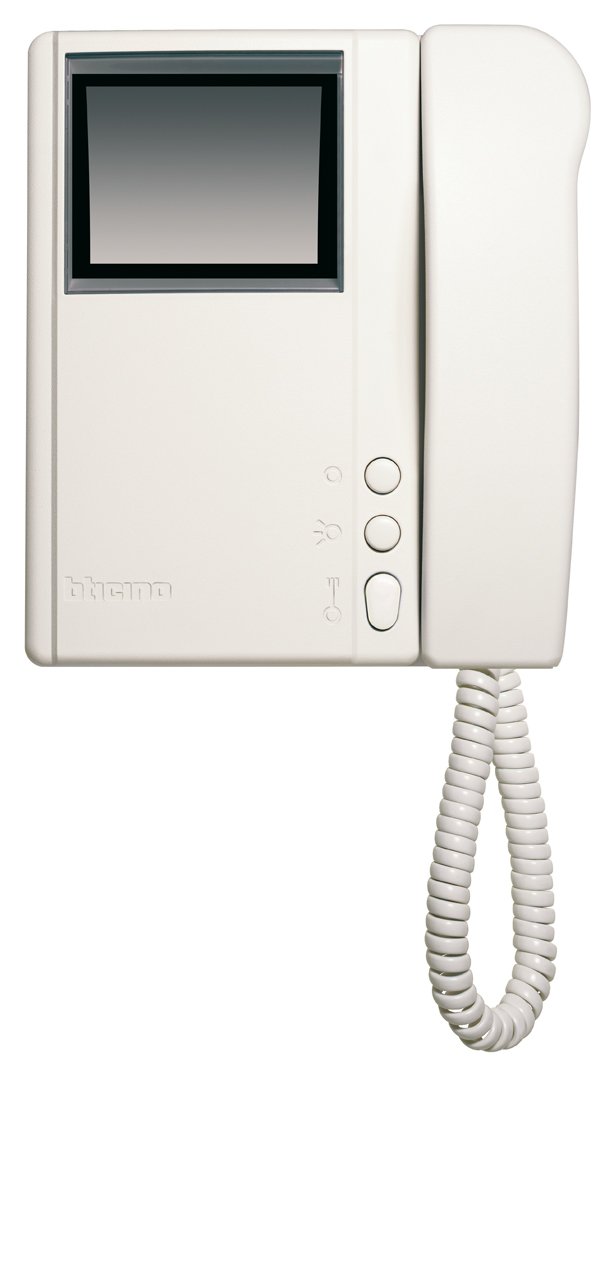
Figura 4.1: Fronte view of the Legrand Bticino LT Terraneo Sprint Video Intercom Unit.
4.1. Componenti principali
- Visualizzazione video: Black and white screen for viewvisitatori.
- portatile: Per la comunicazione audio con l'unità esterna.
- Pulsante di apertura della porta: Activates the electric lock to open the door.
- Answer/Call Button: Initiates or ends a call.
- Pulsante Monitor: Activates the camera on the outdoor unit to view l'ingresso.
- Controllo del volume: Adjusts the ringtone and communication volume.
4.2. Product Details and 360-Degree View
Observe the detailed features and a complete 360-degree view of the video intercom unit to familiarize yourself with its design and connections.
Video 4.1: Dettagliato suview of the Legrand Bticino LT Terraneo Sprint Video Intercom. This video demonstrates the product's features and components.
Video 4.2: 360 gradi view of the Legrand Bticino LT Terraneo Sprint Video Intercom. This video provides a comprehensive visual inspection of the unit from all angles.
5. Configurazione e installazione
The Legrand Bticino LT Terraneo Sprint video intercom operates on a 2-wire system, simplifying installation. Ensure power is disconnected before beginning.
5.1. Montaggio dell'unità interna
- Choose a suitable location indoors, away from direct sunlight, heat sources, and moisture. The ideal height is typically 150-160 cm from the floor.
- Secure the mounting bracket to the wall using the provided screws and wall plugs. Ensure it is level.
- Connect the 2-wire bus cable and any other necessary connections (e.g., floor call, auxiliary services) to the terminals on the back of the indoor unit. Refer to the wiring diagram specific to your system.
- Carefully attach the indoor unit to the mounting bracket, ensuring it clicks securely into place.
- Connect the coiled cord from the handset to the designated port on the main unit.
5.2. Accensione iniziale
Once all connections are made and the unit is securely mounted, restore power to the system. The unit should power on, and the display may show a startup sequence. If the system does not power on, check all connections and the power supply.
6. Istruzioni per l'uso
6.1. Rispondere a una chiamata
When a visitor presses the call button on the outdoor unit, the indoor unit will ring, and the video display will activate, showing the visitor. To answer the call, lift the handset or press the 'Answer' button (if available).
6.2. Apertura della porta
During a call or while monitoring, press the 'Door Release' button to activate the electric lock and allow the visitor entry.
6.3. Monitoraggio dell'ingresso
A view the entrance area without an incoming call, press the 'Monitor' button. The video display will activate, showing the view from the outdoor unit's camera. The monitoring duration may be limited.
6.4. Regolazione del volume
Use the volume control knob or buttons on the unit to adjust the ringtone volume and the audio level during a conversation.
7. Manutenzione
7.1. Pulizia
To clean the unit, gently wipe the surfaces with a soft, dry cloth. For stubborn marks, a slightly damp cloth with mild soap can be used, followed by a dry cloth. Do not use abrasive cleaners, solvents, or chemical sprays, as these can damage the unit's finish and electronic components.
7.2. Controlli regolari
Periodically check the coiled cord of the handset for any signs of wear or damage. Ensure all buttons respond correctly. If any issues arise, refer to the troubleshooting section or contact technical support.
8. Risoluzione Dei Problemi
If you encounter problems with your video intercom, consult the following table before contacting technical support.
| Problema | Possibile causa | Soluzione |
|---|---|---|
| Nessuna alimentazione all'unità interna. | Alimentazione scollegata o difettosa. | Check the main power supply and all connections. Ensure the circuit breaker is on. |
| Nessun video visualizzato. | Outdoor unit camera issue or wiring problem. | Check the wiring between the indoor and outdoor units. Ensure the outdoor unit camera is clean and unobstructed. |
| Nessun audio durante la conversazione. | Handset not properly connected or volume too low. | Ensure the handset cord is securely plugged in. Adjust the volume control. |
| L'apertura della porta non funziona. | Wiring to electric lock faulty or lock mechanism issue. | Verify the wiring to the electric lock. Check the lock mechanism for any obstructions or damage. |
9. Specifiche
| Caratteristica | Dettaglio |
|---|---|
| Marca | Legrand |
| Numero di modello | 344342 |
| Tipo di prodotto | 2-Wire Black/White Video Intercom |
| Dimensioni (imballaggio) | Dimensioni: 8 x 8 x 8 cm |
| Peso dell'articolo | 4.54 grammi |
| Batterie incluse | NO |
| Batterie richieste | NO |
| ASIN | B001ZWERK6 |
| Prima data disponibile | 24 aprile 2013 |
10. Garanzia e supporto
Per informazioni sulla garanzia, fare riferimento alla scheda di garanzia inclusa con il prodotto o visitare il sito ufficiale Legrand website. For technical support, service, or to purchase spare parts, please contact your local Legrand distributor or authorized service center. Keep your purchase receipt as proof of purchase for warranty claims.