
Introduzione
The Allen & Heath GL2400/16 is a 16-channel professional mixer designed for a wide range of audio applications, including Front-of-House (FOH) mixing, monitor mixing, live recording, and studio use. Building on a legacy of innovative mixer design, the GL2400 offers superior performance, functionality, and robust build quality. This 4-bus, dual-function console provides versatile solutions for demanding audio environments.
Its design emphasizes dual functionality, ensuring that all controls are relevant and operational whether used for FOH or monitor mixing. Key features include a high-headroom mic preamp, responsive 4-band EQ, and flexible routing options, making it a reliable tool for audio professionals.

Figura 1: Fronte view of the Allen & Heath GL2400/16 Professional Mixer, showing all channels, faders, and control sections.
Impostare
Proper setup is crucial for optimal performance of your GL2400/16 mixer. Follow these steps to connect your mixer:
- Disimballaggio: Carefully remove the mixer from its packaging. Inspect for any signs of damage during transit.
- Posizionamento: Position the mixer on a stable, flat surface, ensuring adequate ventilation around the unit.
- Collegamento elettrico: Connect the provided power cord to the mixer's AC inlet on the rear panel and then to a suitable grounded power outlet. The GL2400 operates on a corded electric power source. Ensure the power switch is in the OFF position before connecting.
- Connessioni di ingresso: Connect your microphones and line-level sources to the respective XLR (Mic In) and 1/4-inch (Line In) input jacks on the rear panel. The mixer features 16 mic/line inputs.
- Connessioni di uscita: Connect your main outputs (LR, M), auxiliary sends, and group outputs to your amplifiers, powered speakers, or recording devices using balanced XLR cables. The mixer provides 6 auxiliary sends and a 7x4 mix matrix for flexible routing.
- Monitoraggio: Connect your studio monitors or headphones to the appropriate monitor outputs.
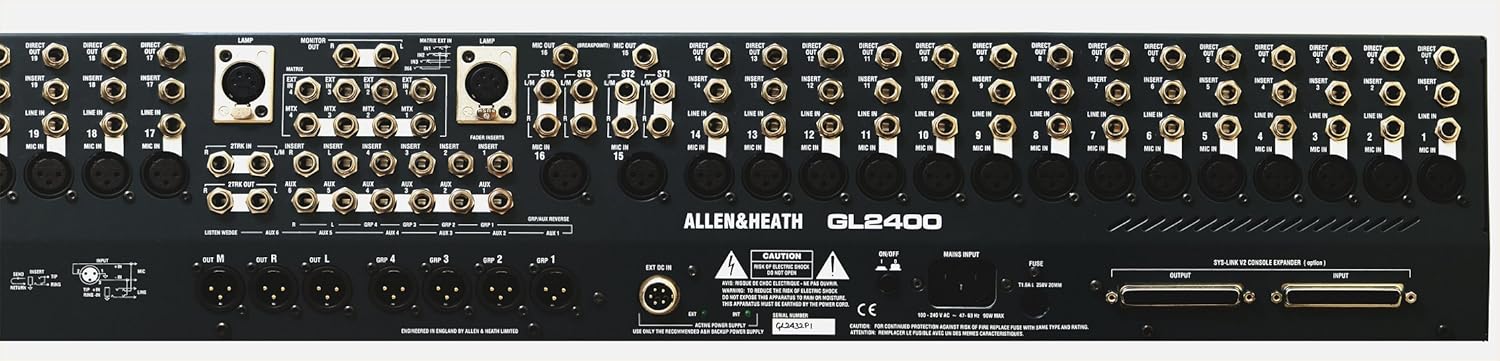
Figure 2: Rear panel of the Allen & Heath GL2400/16 Professional Mixer, illustrating input and output connections, including mic/line inputs, auxiliary sends, and main outputs.
Istruzioni per l'uso
The GL2400/16 is designed for intuitive operation, offering comprehensive control over your audio. This section outlines key operational aspects.
Channel Strip Controls
- Ingressi microfono/linea: Each of the 16 channels features a high-quality mic preamp with an extended 74dB gain range, capable of handling signals up to +34dBu. Adjust the GAIN knob to set the input level.
- Equalizzatore a 4 bande: Each channel includes a responsive 4-band equalizer with sweepable mids (High Mid and Low Mid) for precise tonal shaping.
- Invii ausiliari: The mixer provides 6 auxiliary sends per channel. These can be configured pre-fader or post-fader, allowing for flexible routing to monitor mixes, effects processors, or other destinations. When mixing FOH, monitors can be set pre-insert and pre-EQ.
- Fader: 100mm professional faders provide smooth and accurate level control for each channel.
Master Section and Outputs
- Main LR Outputs: The primary stereo mix outputs.
- M Fader: This configurable master fader can be used to create a mono fill, an engineer's monitor wedge feed, or a dedicated center or sub-bass speaker mix from Aux 6. Each of L, R, and M outputs features dedicated meters, mute, AFL, and balanced XLR outputs.
- Gruppi: The mixer includes group outputs for sub-mixing multiple channels.
- Matrice: A 7x4 mix matrix is available for specialized routing, useful for corporate AV, recording, broadcast feeds, and personal monitoring. External inputs can be added to the matrix, and cross-patching from stereo channel mic breakpoints allows for adding room ambience to recordings and IEM feeds.
- Dual Stereo Channels: These channels offer mic and two stereo line inputs each. They can function as mic inputs with independent routing to LR, combine stereo sources like backing tracks, or provide additional returns.

Figura 3: primo piano view of the Allen & Heath GL2400/16 mixer's control surface, highlighting channel strips, EQ, auxiliary sends, and master section controls.
Manutenzione
Regular maintenance ensures the longevity and reliable performance of your GL2400/16 mixer.
- Pulizia: Use a soft, dry, lint-free cloth to clean the exterior surfaces. For stubborn dirt, a slightly damp È possibile utilizzare un panno imbevuto di sapone neutro, assicurandosi che non penetri liquido nell'unità. Evitare detergenti abrasivi o solventi.
- Protezione dalla polvere: When not in use, cover the mixer with a dust cover to prevent dust and debris from accumulating on faders, knobs, and switches.
- Condizioni ambientali: Operate and store the mixer in a clean, dry environment, away from extreme temperatures, humidity, and direct sunlight.
- Ispezione dei cavi: Periodically inspect all cables for wear and tear. Replace damaged cables to prevent signal loss or electrical hazards.
Risoluzione dei problemi
This section provides solutions to common issues you might encounter with your GL2400/16 mixer.
- Nessun potere:
- Ensure the power cord is securely connected to both the mixer and a working power outlet.
- Check the power switch on the mixer.
- Verificare che la presa di corrente funzioni collegandovi un altro dispositivo.
- Nessuna uscita audio:
- Controllare tutti i collegamenti dei cavi di ingresso e di uscita.
- Ensure channel faders, group faders, and master LR faders are raised.
- Verify that no MUTE buttons are engaged on channels, groups, or master outputs.
- Check the gain settings for input channels and ensure signals are present at the input.
- Confirm that external amplifiers or powered speakers are turned on and functioning correctly.
- Suono distorto:
- Reduce input GAIN levels if the channel PEAK indicator is frequently lighting.
- Check output levels to ensure they are not overdriving connected ampdispositivi o dispositivi.
- Ispezionare i cavi per verificare che non siano danneggiati o che non presentino collegamenti difettosi.
- Ronzio o rumore:
- Assicurarsi che tutte le apparecchiature siano adeguatamente messe a terra.
- Use balanced cables for longer runs and critical connections.
- Separare i cavi audio da quelli di alimentazione per evitare interferenze.
- Controllare che non vi siano cavi o connettori difettosi.
Specifiche
| Numero di modello | AH-GL2400/16 |
| Marca | Allen e Heath |
| Numero di canali | 16 |
| Peso dell'articolo | 42 libbre (19.05 kg) |
| Dimensioni del prodotto | 29.9 x 11.4 x 28.3 pollici (75.9 x 29 x 71.9 cm) |
| Fonte di alimentazione | Elettrico con cavo |
| Tecnologia di connettività | Ausiliario |
| Equalizzatore | 4-Band with sweepable mids |
| Invii ausiliari | 6 per canale |
| Matrice mista | 7x4 |
Informazioni sulla garanzia
Allen & Heath products are manufactured to high standards and are designed for reliability. For specific warranty terms and conditions applicable to your GL2400/16 mixer, please refer to the warranty card included with your product or visit the official Allen & Heath websito. La copertura della garanzia in genere include difetti di materiali e di fabbricazione in condizioni di normale utilizzo.
Si prega di conservare la prova d'acquisto per eventuali reclami in garanzia.
Assistenza clienti
Should you require technical assistance, service, or have questions regarding your Allen & Heath GL2400/16 mixer, please contact Allen & Heath customer support. You can find contact information, FAQs, and additional resources on the official Allen & Heath websito:
When contacting support, please have your product model number (AH-GL2400/16) and serial number ready.