
1. Introduzione
This manual provides detailed instructions for the proper setup, operation, and maintenance of your Veho VMS-004 Discovery Deluxe USB Microscope. Please read this manual thoroughly before using the device to ensure optimal performance and longevity.
The Veho VMS-004 is a versatile USB microscope designed for detailed observation and digital capture of magnified images and videos. It features up to 400x magnification, a 2.0 Megapixel CMOS lens, and adjustable LED illumination, making it suitable for various applications including educational, hobbyist, and professional use.
2. Informazioni sulla sicurezza
- Non smontare: Attempting to disassemble or modify the microscope may cause damage and void the warranty.
- Evitare la luce solare diretta: Non esporre il microscopio alla luce solare diretta o a temperature elevate.
- Maneggiare con cura: The lens and internal components are delicate. Avoid dropping or subjecting the device to strong impacts.
- Mantenere asciutto: Questo dispositivo non è impermeabile. Evitare l'esposizione all'acqua o a umidità elevata.
- Fonte di energia: Use only the specified USB power source.
- Bambini: Keep out of reach of small children. Adult supervision is recommended during use.
3. Contenuto della confezione
Verifica che tutti gli articoli siano presenti nel tuo pacco:
- Veho VMS-004 Discovery Deluxe USB Microscope
- Flexi Alloy Stand
- Software CD (for drivers and application)
- Manuale dell'utente (questo documento)
4. Prodotto finitoview
Familiarize yourself with the main components of the Veho VMS-004 microscope.

Figure 4.1: The Veho VMS-004 Discovery Deluxe USB Microscope mounted on its flexi alloy stand.
- Corpo del microscopio: Contains the lens, CMOS sensor, and illumination LEDs.
- Ruota di messa a fuoco: Located on the microscope body, used to adjust the focus for clear images.
- Pulsante Istantanea: A button on the microscope body for capturing still images.
- LED Illumination Control: A small wheel or dial to adjust the brightness of the built-in LEDs.
- Cavo USB: For connecting the microscope to your computer.
- Flexi Alloy Stand: Provides a stable base and adjustable positioning for the microscope.

Figura 4.2: primo piano view of the focus wheel and magnification markings on the microscope body.

Figura 4.3: Fronte view of the microscope lens, showing the integrated LED illumination ring.
5. Impostazione
5.1 Montaggio del supporto
The flexi alloy stand provides stability and allows for precise positioning of the microscope.
- Attach the microscope holder to the flexible arm of the stand.
- Secure the microscope into the holder. Ensure it is firmly seated but not overly tightened to avoid damage.
- Posizionare il supporto su una superficie stabile e piana.
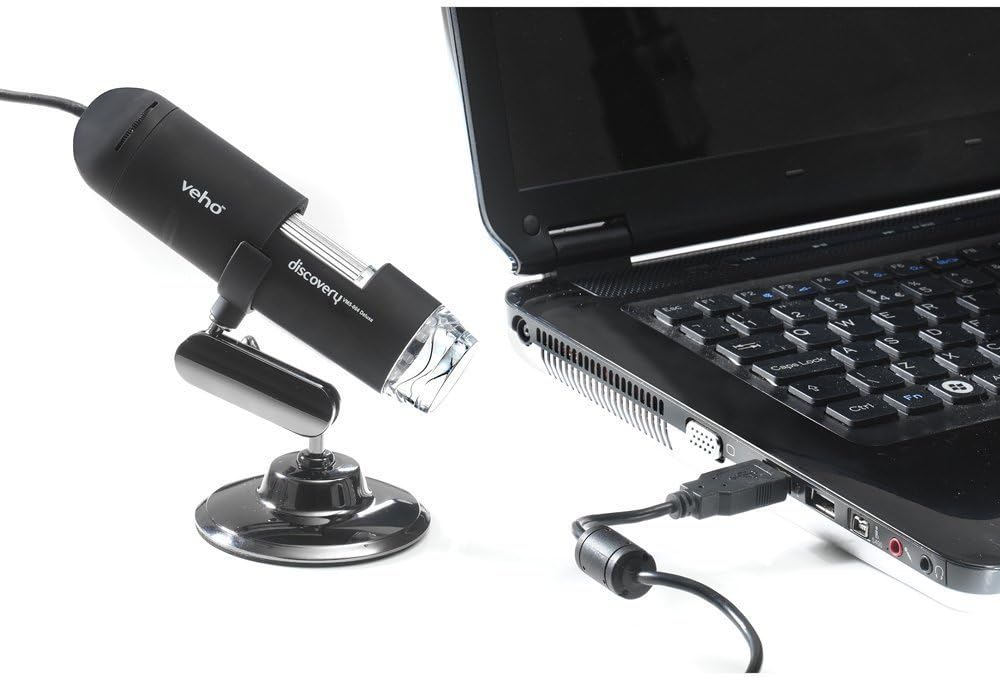
Figure 5.1: The microscope securely mounted on its flexi alloy stand.
5.2 Installazione del software
The Veho VMS-004 requires driver and software installation for full functionality on your computer (PC or Mac compatible).
- Insert the provided software CD into your computer's CD/DVD drive. If your computer does not have a CD drive, please visit the official Veho support website to download the necessary drivers and software.
- Follow the on-screen instructions to install the drivers and the accompanying application.
- Riavviare il computer se richiesto dopo l'installazione.
5.3 Connecting the Microscope
Once the software is installed, connect the microscope to your computer.
- Plug the USB cable of the microscope into an available USB port on your computer.
- The computer should automatically detect the device.
- Launch the installed microscope application. You should see a live feed from the microscope's camera.

Figure 5.2: The USB microscope connected to a laptop, ready for use.
6. Istruzioni per l'uso
6.1 Posizionamento dell'oggetto
Position the object you wish to observe directly beneath the microscope lens. Adjust the flexible stand to bring the lens close to the object.

Figure 6.1: The microscope positioned over a coin for observation.
6.2 Regolazione dell'ingrandimento e della messa a fuoco
The microscope offers up to 400x digital magnification. To achieve a clear image:
- Adjust the distance between the microscope lens and the object using the flexible stand.
- Rotate the focus wheel on the microscope body until the image on your computer screen is sharp and clear.
- Nota: The effective magnification changes with the distance from the object and the focus setting.
6.3 LED Illumination Control
The microscope features built-in LEDs to illuminate your subject. To adjust the brightness:
- Locate the LED illumination control (a small wheel or dial) on the microscope cable or body.
- Rotate the control to increase or decrease the LED brightness as needed for optimal viewing.
6.4 Acquisizione di immagini e video
The included software allows you to capture still images and record videos.
- Still Image: Press the snapshot button on the microscope body or click the capture button within the software interface.
- Registrazione video: Use the record function within the software application to start and stop video capture.
- Catturato files are typically saved to a default folder on your computer, which can usually be configured within the software settings.
6.5 Measurement Software
The accompanying software includes measurement capabilities. Refer to the software's help documentation for detailed instructions on how to calibrate and use the measurement tools. For accurate measurements, it is recommended to use a known reference scale in your image.
7. Manutenzione
- Pulizia della lente: Utilizzare un panno morbido e privo di lanugine, specificamente progettato per lenti ottiche. Non utilizzare detergenti abrasivi o solventi.
- Pulizia del corpo: Pulisci il corpo del microscopio e il supporto con un panno asciutto o leggermente asciutto.amp, panno morbido.
- Magazzinaggio: Quando non in uso, conservare il microscopio in un ambiente pulito, asciutto e privo di polvere.
- Aggiornamenti software: Periodically check the Veho official website for software and driver updates to ensure compatibility and optimal performance.
8. Risoluzione Dei Problemi
| Problema | Possibile causa | Soluzione |
|---|---|---|
| No image on screen / Device not detected |
|
|
| L'immagine è sfocata o fuori fuoco |
|
|
| L'immagine è troppo scura o troppo chiara |
|
|
| Magnification does not appear to be 400x |
|
|
9. Specifiche
| Numero di modello | VMS-004D |
| Ingrandimento | Up to x400 (digital) |
| Lente | CMOS da 2.0 Megapixel |
| Illuminazione | On/Off LEDs (adjustable brightness) |
| Alloggiamento | Tacton Rubber Touch |
| In piedi | Flexi Alloy Stand |
| Connettività | USB |
| Compatibilità | Compatibile con PC e Mac |
| Dimensioni del prodotto | Dimensioni: 13.46 x 10.92 x 22.35 cm |
| Peso dell'articolo | 159 grammi |
| Voltage | 5 Volt (alimentato tramite USB) |
| Tipo di sorgente luminosa | Alogeno |
| Angolo reale di View | 30 gradi |
10. Garanzia e supporto
For warranty information, technical support, or service inquiries, please refer to the warranty card included with your product or visit the official Veho websito. Conservare la prova d'acquisto per eventuali reclami in garanzia.
Veho Official Websito: www.veho-world.com