
Introduzione
Grazie per l'acquistoasing the Snakebyte Wireless Bluetooth Premium PS3 Controller. This manual provides detailed instructions for setting up, operating, maintaining, and troubleshooting your new controller. Please read this manual thoroughly before use to ensure optimal performance and longevity of your device.
Contenuto della confezione
Si prega di verificare che tutti gli articoli siano presenti nel pacco:
- Snakebyte Wireless Bluetooth Premium PS3 Controller
- USB Charging Cable (approximately 3 meters)
- Manuale di istruzioni (questo documento)

Image: The Snakebyte Wireless Bluetooth Premium PS3 Controller shown in its retail blister packaging, indicating the product and included cable.
Impostare
1. Ricarica del controller
Before initial use, fully charge the controller. Connect the supplied USB charging cable to the controller's charging port and the other end to a USB port on your PlayStation 3 console or a compatible USB power adapter. The indicator lights on the controller will show charging status and turn off or change color when fully charged.
2. Connecting to PlayStation 3
To connect the controller wirelessly to your PlayStation 3 console:
- Assicurati che la tua console PlayStation 3 sia accesa.
- Connect the controller to the PS3 console using the supplied USB charging cable. This will register the controller with the console.
- Premere il tasto Pulsante PS (located in the center of the controller) once. The controller will power on and attempt to establish a connection.
- Once the controller is registered and connected, the indicator lights will illuminate, typically assigning a player number.
- You can now disconnect the USB cable for wireless gameplay. If the connection is lost, reconnect the USB cable and press the PS button again.

Immagine: Frontale view of the Snakebyte Wireless Bluetooth Premium PS3 Controller, showing the button layout including the central PS button.
Istruzioni per l'uso
Controller Layout and Functions
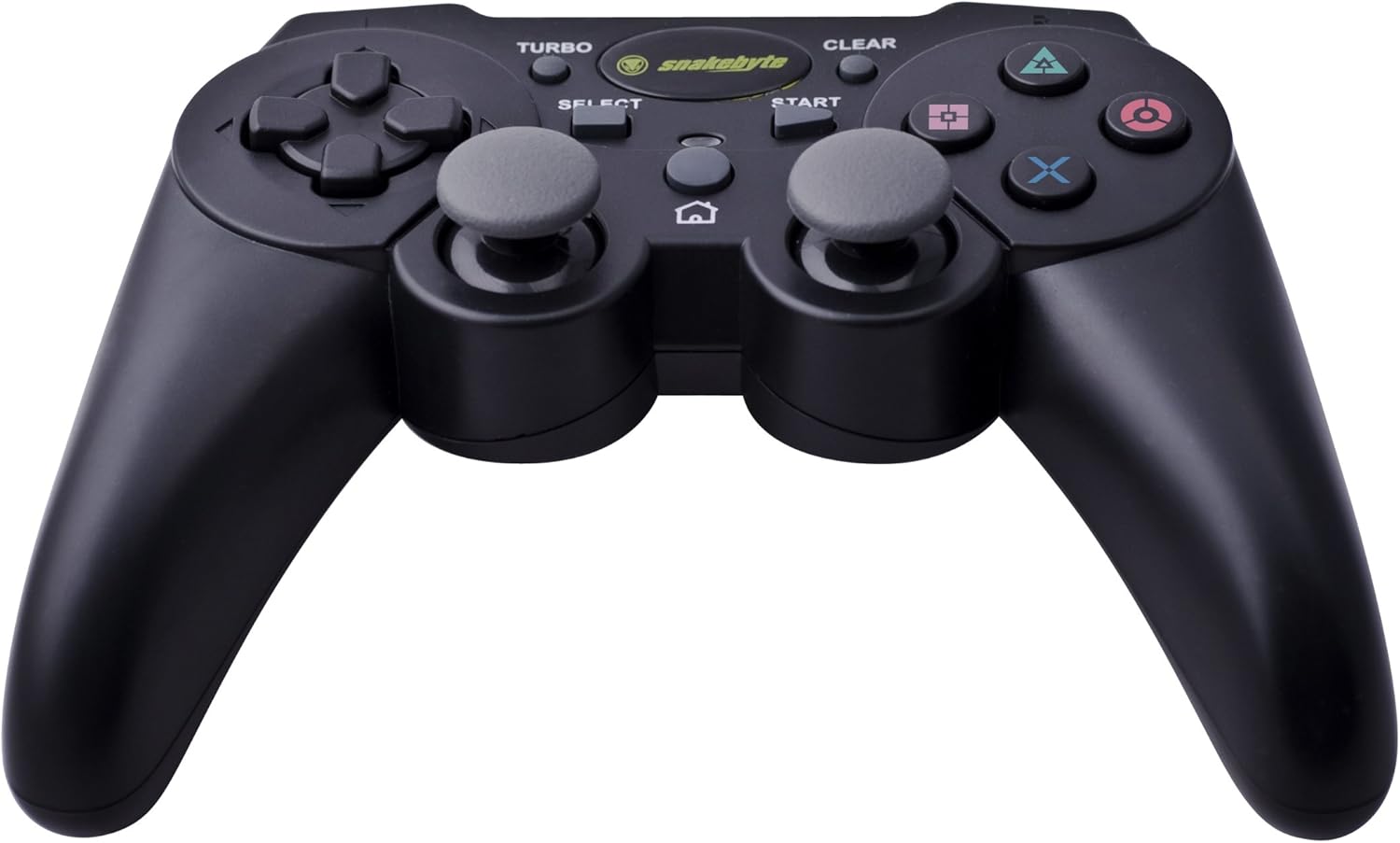
Image: The Snakebyte Wireless Bluetooth Premium PS3 Controller, highlighting the dual analog sticks and various buttons.
- Pad direzionale (D-Pad): For precise directional input in games.
- Levetta analogica sinistra: Controllo primario del movimento.
- Levetta analogica destra: Controllo della telecamera o movimento secondario.
- Pulsanti di azione (triangolo, cerchio, croce, quadrato): Azioni specifiche del gioco.
- Pulsanti L1/R1: Pulsanti dorsali per varie funzioni di gioco.
- Trigger L2/R2: Analog triggers for pressure-sensitive input, often used for acceleration/braking or aiming/firing.
- Pulsante Start: Pauses games or opens menus.
- Pulsante SELEZIONA: Opens in-game maps, inventories, or other menus.
- Pulsante PS: Powers on the controller, accesses the PS3 XMB (Cross Media Bar) menu, or turns off the controller/console.
- Pulsante TURBO: Activates the turbo function for other buttons.
- Pulsante CANCELLA: Deactivates the turbo function.
Funzione Turbo
The controller features a TURBO function, allowing a selected button to register multiple presses rapidly with a single hold. This can be useful for certain game mechanics.
- Per attivare TURBO: tenere premuto il tasto Tasto TURBO, then press the desired action button (e.g., Cross, Square, Circle, Triangle, L1, R1, L2, R2). Release both buttons. The selected button will now have the TURBO function enabled.
- To deactivate TURBO for a specific button: Press and hold the Pulsante CANCELLA, then press the button for which TURBO is currently active. Release both buttons.
- To deactivate all TURBO functions: Press the Pulsante CANCELLA once without holding it down.
Motion Sensing and Vibration Feedback
This controller supports motion sensing capabilities, allowing for intuitive control in compatible games. It also provides vibration feedback to enhance immersion during gameplay, reacting to in-game events such as impacts or explosions.
Accensione e spegnimento
- Per accendere: premere il tasto Pulsante PS.
- To power off: The controller will automatically enter sleep mode after a period of inactivity to conserve battery. Alternatively, you can hold the Pulsante PS for several seconds to bring up the PS3 menu, where you can choose to turn off the controller.
Manutenzione
- Pulizia: Per pulire il controller, utilizzare un panno morbido e asciutto. Non utilizzare detergenti abrasivi o solventi.
- Magazzinaggio: Conservare il controller in un luogo fresco e asciutto, lontano dalla luce solare diretta e da temperature estreme.
- Cura della batteria: Per prolungare la durata della batteria, evitare di scaricare completamente il controller frequentemente. Caricarlo regolarmente, anche se non lo si utilizza costantemente.
- Evitare danni: Do not drop the controller or expose it to excessive force or moisture.
Risoluzione dei problemi
| Problema | Possibile soluzione |
|---|---|
| Il controller non si connette in modalità wireless. |
|
| I pulsanti o gli stick analogici non rispondono. |
|
| Il controller non si carica. |
|
Reimpostazione del controller
If the controller behaves erratically or becomes unresponsive, you can perform a reset. Locate the small reset button on the back of the controller (often in a small hole). Use a thin, pointed object (like a straightened paperclip) to press and hold the reset button for a few seconds. This will restart the controller's internal electronics.
Specifiche
- Marca: Snakebyte
- Numero modello: SB904714
- Piattaforma compatibile: PlayStation 3 di Sony
- Connettività: Wireless (Bluetooth)
- Numero di pulsanti: 16
- Dimensioni (L x P x A): Circa 23.01 x 16.31 x 8.51 cm (9.06 x 6.42 x 3.35 pollici)
- Peso: Circa 419.99 g (0.93 libbre)
- Colore: Nero
Garanzia e supporto
For warranty information and technical support, please refer to the documentation provided with your purchase or contact your retailer. You may also visit the official Snakebyte websito per ulteriore assistenza e informazioni sui prodotti.