1. Prodotto finitoview
The DEGEN DE1125 is a compact and versatile portable device that integrates multiple functionalities into a single unit. It serves as a world-band radio, an MP3 player, a digital recorder, and an ebook reader. Designed for portability, it features a slim profile and lightweight construction, making it ideal for travel and on-the-go use.
Le caratteristiche principali includono:
- Pocket-size world-band radio with built-in speaker and Digital Signal Processing (DSP) technology.
- 4 GB flash memory MP3 player for music playback.
- Digital recorder for radio programs and voice recording, offering up to 150 hours of recording time (at 32 kbps).
- 255 preset memories for radio stations.
- Built-in battery charger.
- LED back-lit display for clear visibility.
- Digital clock, sleep timer, key lock, and numeric volume indicator.
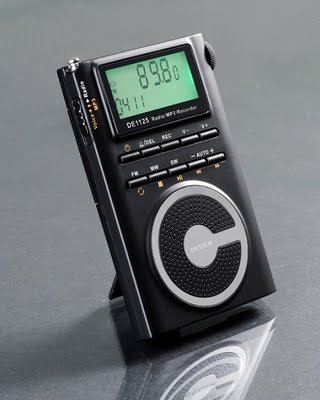
Figure 1.1: The DEGEN DE1125 portable radio and multimedia player, shown standing upright with its integrated kickstand.
2. Guida all'installazione
2.1 Disimballaggio e ispezione iniziale
Rimuovere con attenzione tutti i componenti dall'imballaggio. Verificare che tutti gli articoli elencati di seguito siano presenti e integri:
- DEGEN DE1125 Unit
- Auricolari
- AC Wall Plug (Charger)
- Cavo USB
- Borsa da trasporto
- Batteria ricaricabile
- Manuale dell'utente (questo documento)
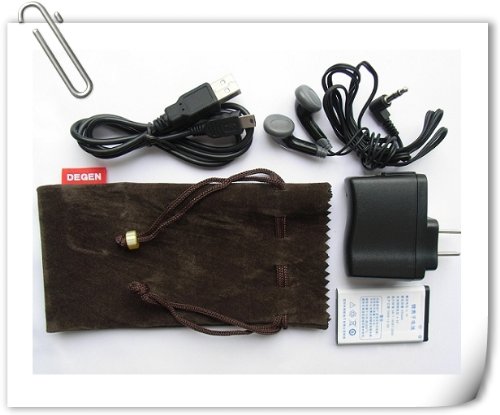
Figure 2.1: All included accessories for the DEGEN DE1125, including earphones, USB cable, AC adapter, carrying pouch, and rechargeable battery.
2.2 Installazione e ricarica della batteria
The DE1125 is powered by a rechargeable lithium battery. Before first use, ensure the battery is properly installed and fully charged.
- Individuare il vano batteria sul retro del dispositivo.
- Insert the rechargeable battery, ensuring correct polarity as indicated inside the compartment.
- Chiudere saldamente il coperchio del vano batterie.
- Connect the small end of the USB cable to the mini-USB port on the side of the DE1125.
- Connect the standard USB end of the cable to the AC wall plug, then plug the AC wall plug into a standard electrical outlet. Alternatively, connect the standard USB end directly to a computer's USB port for charging.
- The display will indicate charging status. Allow the battery to fully charge before initial use.
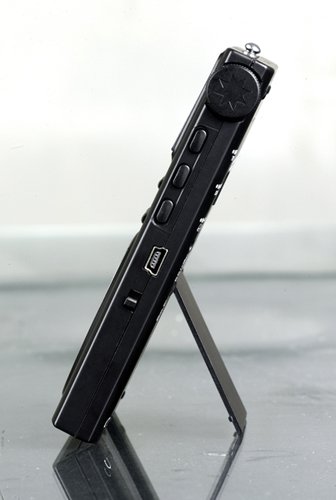
Figura 2.2: lato view of the DEGEN DE1125, highlighting the mini-USB port for charging and data transfer.
3. Istruzioni per l'uso
3.1 Controlli generali
Familiarize yourself with the buttons and display on the DE1125:
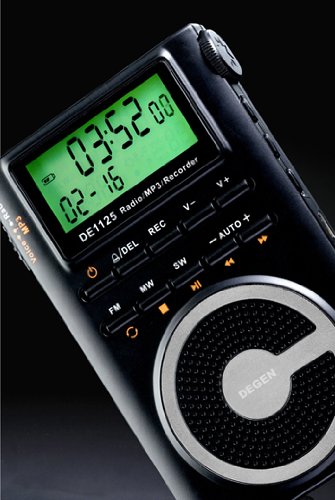
Figura 3.1: primo piano view of the DEGEN DE1125's display and control panel, showing buttons for power, mode selection, tuning, and volume.
- Pulsante di accensione (): Tenere premuto per accendere o spegnere il dispositivo.
- Pulsanti del volume (V+, V-): Regola il livello di uscita audio.
- Pulsante Menu: Access the main menu or settings within a mode.
- Pulsanti di navigazione (, ): Navigate through menus or adjust frequencies/tracks.
- Mode Buttons (FM, MW, SW, MP3, REC): Selezionare la modalità operativa desiderata.
- Pulsante Riproduci/Pausa (): Start or pause playback in MP3 mode, or confirm selections.
3.2 Radio Operation (FM, AM, SW)
The DE1125 supports FM (64.0 - 108.0 MHz), MW (520-1710 KHz), and SW (2.3-23.0 MHz) bands.
- Accendi il dispositivo.
- Press the corresponding mode button (FM, MW, or SW) to select the desired radio band.
- Opzioni di ottimizzazione:
- Scansione automatica: Press and hold the 'AUTO' button to automatically scan and store available stations.
- Sintonizzazione manuale: Utilizzare i pulsanti di navigazione (, ) to fine-tune the frequency step-by-step.
- Sintonizzazione digitale: Enter the desired frequency directly using the numeric keypad (if available, or through menu options).
- ATS (Auto Tuning Storage): Automatically scans and stores strong signals into memory presets.
- Stazioni preimpostate: The device can store up to 255 preset stations. Use the 'M+' and 'M-' buttons to navigate through stored presets.
3.3 Funzione lettore MP3
The DE1125 features 4GB of internal flash memory for MP3 playback.

Figure 3.2: The DEGEN DE1125 display indicating the 'Music' mode, ready for MP3 playback.
- Press the 'MP3' button to enter MP3 player mode.
- Per trasferire musica files from your computer, connect the DE1125 to your computer using the provided USB cable. The device will appear as a removable disk drive. Drag and drop your MP3 filenella memoria del dispositivo.
- Utilizzare i pulsanti di navigazione (, ) to select tracks.
- Premere il pulsante Riproduci / Pausa () to start or pause playback.
3.4 Digital Recorder Function
The DE1125 can record radio programs or function as a voice recorder.

Figure 3.3: The DEGEN DE1125 display showing the 'Record' mode, indicating readiness for audio capture.

Figure 3.4: The DEGEN DE1125 display showing the 'Voice' mode, used for voice recording functions.
- Press the 'REC' button to enter recording mode.
- Select either 'Radio Record' or 'Voice Record' from the menu.
- Press the 'REC' button again to start recording. The display will show recording time.
- Press the 'REC' button again to stop recording. Recorded files are saved to the internal memory.
- To play back recordings, navigate to the 'Recordings' folder in MP3 mode.
3.5 Ebook Reader Function
The DE1125 supports basic ebook reading functionality.

Figure 3.5: The DEGEN DE1125 display showing the 'Ebook' mode, indicating readiness to display text files.
- Connect the DE1125 to your computer via USB.
- Trasferisci testo compatibile files (e.g., .TXT) to the device's internal memory.
- Scollegare il dispositivo dal computer.
- Navigate to the 'Ebook' mode using the menu or mode selection.
- Select the desired ebook file da aprire e leggere.
4. Cura e manutenzione
Proper care ensures the longevity and optimal performance of your DEGEN DE1125.
- Pulizia: Use a soft, dry cloth to clean the exterior of the device. Do not use liquid cleaners, aerosols, or abrasive materials.
- Magazzinaggio: Store the device in a cool, dry place away from direct sunlight, extreme temperatures, and high humidity. Use the provided carrying pouch for protection during transport.
- Cura della batteria: Per preservare la salute della batteria, evitare di scaricarla completamente frequentemente. Se si prevede di non utilizzarla per un periodo prolungato, caricare la batteria fino a circa il 50% e ricaricarla ogni pochi mesi.
- Esposizione all'acqua: Questo dispositivo non è impermeabile. Evitare l'esposizione all'acqua o ad altri liquidi.
- Impatto: Proteggere il dispositivo da cadute e urti che potrebbero danneggiare i componenti interni o lo schermo.
5. Risoluzione Dei Problemi
If you encounter issues with your DEGEN DE1125, refer to the following common problems and solutions:
| Problema | Possibile causa | Soluzione |
|---|---|---|
| Il dispositivo non si accende. | La batteria è scarica o non è installata correttamente. | Caricare la batteria. Assicurarsi che la batteria sia inserita con la polarità corretta. |
| No radio reception or poor signal. | Weak signal area, antenna not extended, interference. | Extend the telescopic antenna fully. Move to an area with better reception. Avoid sources of electronic interference. |
| MP3 filenon sta giocando. | Non supportato file formato, danneggiato file, NO files on device. | Garantire files are in MP3 format. Re-transfer files. Verify files exist in the device's memory. |
| Impossibile registrare l'audio. | Insufficient storage space, incorrect mode. | Elimina vecchio files to free up space. Ensure you are in the correct recording mode (Radio Record or Voice Record). |
| Lo schermo è vuoto o bloccato. | System error, low battery. | Press and hold the power button for 10 seconds to force a restart. Charge the battery. |
6. Specifiche tecniche
| Caratteristica | Specificazione |
|---|---|
| Marca | Degen |
| Modello | DE1125 |
| Dimensioni del prodotto | Dimensioni: 11 x 1.5 x 6.7 cm |
| Peso dell'articolo | 113 grammi |
| Capacità di archiviazione della memoria | 4 GB |
| Interfaccia Hardware | USB |
| Tecnologia sintonizzatore | AM, FM, SO |
| Gamma di frequenza FM | 64.0 - 108.0 MHz |
| Gamma di frequenza MW | 520 - 1710 KHz |
| Gamma di frequenza SW | 2.3 - 23.0 MHz |
| Dispositivi compatibili | Auricolare |
| Tipo di visualizzazione | GUIDATO |
| Dimensioni dello schermo | 0.5 Inches (visible diagonal 1" / 2 cm) |
| Fonte di alimentazione | Alimentato a batteria |
| Tipo di batteria | Ricaricabile al litio |
| Tipo di connettore | USB |
| Tipo di supporto compatibile | MP3 |
| Materiale | Altro |
7. Garanzia e supporto
7.1 Informazioni sulla garanzia
This product is covered by a manufacturer's warranty. Please refer to the warranty policy provided at the time of purchase or contact your retailer for specific details regarding warranty duration and terms. Keep your proof of purchase for warranty claims.
7.2 Assistenza clienti
For technical assistance, troubleshooting beyond this manual, or inquiries about your DEGEN DE1125, please contact the retailer or the manufacturer's customer support. Refer to the contact information provided with your purchase documentation.