
1. Introduzione
The Pantone Reference Library and Color Cue 2.1 system provides a comprehensive solution for color selection, communication, and verification across various applications, from graphic design to print production. This manual outlines the components, setup, operation, and maintenance of your Pantone tools.
IL Pantone Reference Library is a complete collection of essential Pantone color guides and books, designed for easy access and organization in a space-saving storage unit. It includes a wide range of color standards to ensure accuracy and consistency in your projects.
IL Pantone Color Cue 2.1 is a portable, handheld device that allows for instant color measurement and identification. It provides precise color data, including corresponding Pantone colors, ink formulas, and digital values (CMYK, L*a*b*, sRGB, HTML), making it an invaluable tool for on-the-go color matching.
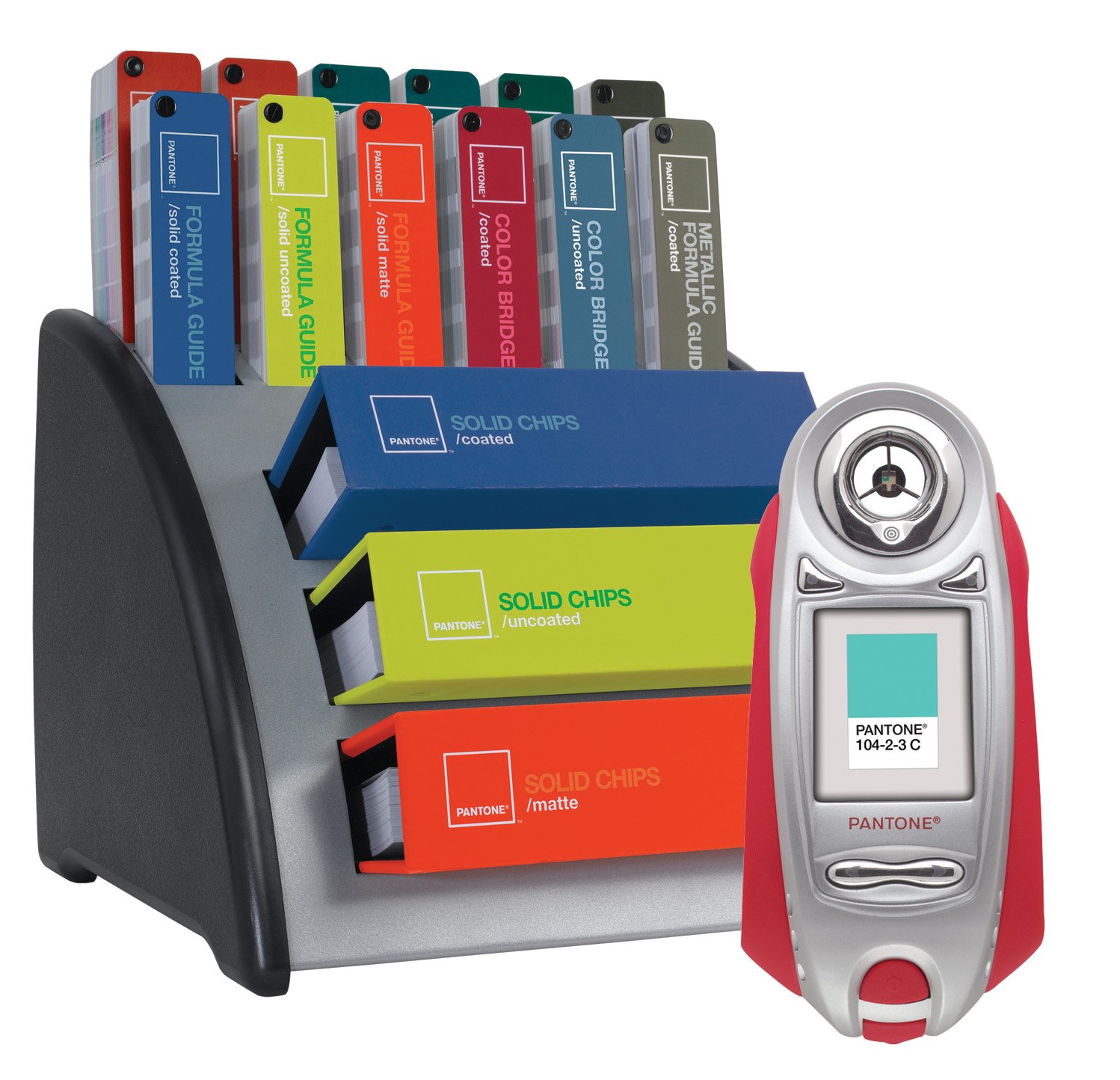
Figure 1: The Pantone Reference Library, including various color guides, and the portable Color Cue 2.1 device.
2. Impostazione
2.1 Pantone Reference Library
The Pantone Reference Library is designed for immediate use. Simply unpack the storage unit and arrange the included color guides as desired. The unit is intended to keep your guides organized and easily accessible.
- Included Guides:
- FORMULA GUIDES (coated, uncoated, matte)
- COLOR BRIDGE (coated, uncoated)
- METALLIC FORMULA GUIDE (coated)
- PASTEL FORMULA GUIDE (coated + uncoated)
- TINTS (four-guide set)
- 4-COLOR PROCESS guides (coated, uncoated)
- SOLID CHIPS (three-book set)
2.2 Pantone Color Cue 2.1
The Color Cue 2.1 requires batteries for operation. Ensure fresh batteries are installed correctly before first use.
- Individuare il vano batteria sul dispositivo.
- Open the compartment and insert the required batteries, observing the correct polarity (+/-).
- Chiudere bene il vano batterie.
- Premere il pulsante di accensione per accendere il dispositivo.
3. Istruzioni per l'uso
3.1 Using the Pantone Reference Library Guides
The fan-format guides are designed for easy color selection and verification. Each guide presents a range of colors with their corresponding Pantone numbers and, where applicable, ink formulations or process values.
- Selezione del colore: Fan through the guides to visually select the desired color.
- Color Verification: Compare a printed sample or material against the corresponding color chip in the guide to ensure accurate reproduction.
- Understanding Substrates: Use the coated, uncoated, and matte guides to understand how colors appear on different paper stocks.
3.2 Using the Pantone Color Cue 2.1
The Color Cue 2.1 simplifies color measurement and identification.
- Accensione: Premere il pulsante di accensione per attivare il dispositivo.
- Posiziona sulla superficie: Position the Color Cue 2.1 directly onto the color you wish to measure. Ensure full contact and no ambient light interference.
- Capture Color: Activate the measurement function (refer to the device's on-screen prompts or dedicated button). The device will take a reading.
- View Risultati: The display will show the closest corresponding Pantone color from various libraries (e.g., PANTONE MATCHING SYSTEM, GoeGuide, FASHION + HOME).
- Access Color Data: Scroll through the device's menu to view detailed color information, including ink formulas, CMYK, L*a*b*, sRGB, and HTML values.
- Store and Recall: The Color Cue 2.1 can store and recall up to 30 color measurements. Use the navigation buttons to save and access stored colors.
- Record Voice Memos: Utilize the built-in microphone to record brief messages associated with each stored color, aiding in project organization.
4. Manutenzione
Proper maintenance ensures the longevity and accuracy of your Pantone tools.
- Guide ai colori:
- Keep guides clean and free from dust, dirt, and fingerprints.
- Avoid exposing guides to direct sunlight or harsh lighting for extended periods, as this can cause color fading.
- Store guides in their protective storage unit when not in use.
- Handle pages carefully to prevent creasing o strappo.
- Color Cue 2.1:
- Pulire il dispositivo con un panno morbido e asciutto. Non utilizzare detergenti abrasivi o solventi.
- Keep the measurement aperture clean and free of debris to ensure accurate readings.
- Per mantenere prestazioni ottimali, sostituire tempestivamente le batterie quando compare l'indicatore di batteria scarica.
- Store the device in its carrying case or a protective environment when not in use.
5. Risoluzione Dei Problemi
If you encounter issues with your Pantone products, consider the following common solutions:
- Inaccurate Color Readings (Color Cue 2.1):
- Ensure the measurement aperture is clean and free of dust or smudges.
- Verify that the device is placed flat and securely on the target surface, preventing light leakage.
- Controllare i livelli della batteria e sostituirla se necessario.
- Color Cue 2.1 Not Powering On:
- Confirm that batteries are correctly installed with proper polarity.
- Sostituire le batterie con batterie nuove.
- Fading Colors in Guides:
- Color guides can fade over time, especially with prolonged exposure to light. For critical color work, consider replacing guides periodically (e.g., every 12-18 months).
- Always store guides in their protective case or away from direct light sources.
6. Specifiche
| Caratteristica | Dettaglio |
|---|---|
| Produttore | Pantone |
| Numero di parte | 2009-030 |
| Numero modello articolo | 2009-030 |
| Peso dell'articolo | 40.7 libbre |
| Dimensioni del prodotto | 16 x 29 x 13.75 pollici |
| Quantità del pacchetto dell'articolo | 1 |
| Batterie incluse? | SÌ |
| Sono necessarie batterie? | SÌ |
| ASIN | B002XIT1I4 |
| Data prima disponibilità | 29 ottobre 2009 |
7. Garanzia e supporto
Informazioni sulla garanzia: The manufacturer's specifications indicate "Warranty Description: No". Please refer to your purchase documentation or retailer for any applicable return policies or extended protection plans.
Assistenza clienti: For further assistance, technical support, or inquiries regarding your Pantone products, please visit the official Pantone website or contact their customer service department directly. You can typically find contact information on the Pantone websito o all'interno della confezione del prodotto.
Nota: le specifiche e le caratteristiche del prodotto sono soggette a modifiche senza preavviso. Fare sempre riferimento alle informazioni più recenti fornite dal produttore.