
1. Introduzione
The TP-Link TL-SG1024 is an unmanaged 24-Port Gigabit Ethernet Switch designed to expand your network capacity efficiently. It facilitates instant transfer of large files, making it suitable for home, office, workgroup, or creative production environments. This switch supports auto MDI/MDIX, eliminating the need for specific cable types, and features innovative energy-efficient technology to reduce power consumption.
This manual provides detailed instructions for setting up, operating, and maintaining your TL-SG1024 switch, along with troubleshooting tips and product specifications.
2. Contenuto della confezione
Verifica che il pacco contenga i seguenti articoli:
- TL-SG1024 24-Port Gigabit Ethernet Switch
- Cavo di alimentazione
- Guida all'installazione
- Kit di montaggio su rack
- Piedini in gomma

Image: The TP-Link TL-SG1024 switch shown alongside its retail packaging, illustrating the product and its box.
3. Prodotto finitoview
The TL-SG1024 is a sturdy metal switch designed for both desktop and rackmount installations. It features 24 Gigabit Ethernet ports on the front panel, along with LED indicators for power, link status, and activity for each port.

Davanti view of the TL-SG1024 switch, showing 24 RJ45 ports and LED indicators.

Angled perspective of the TL-SG1024 switch, highlighting its compact design.
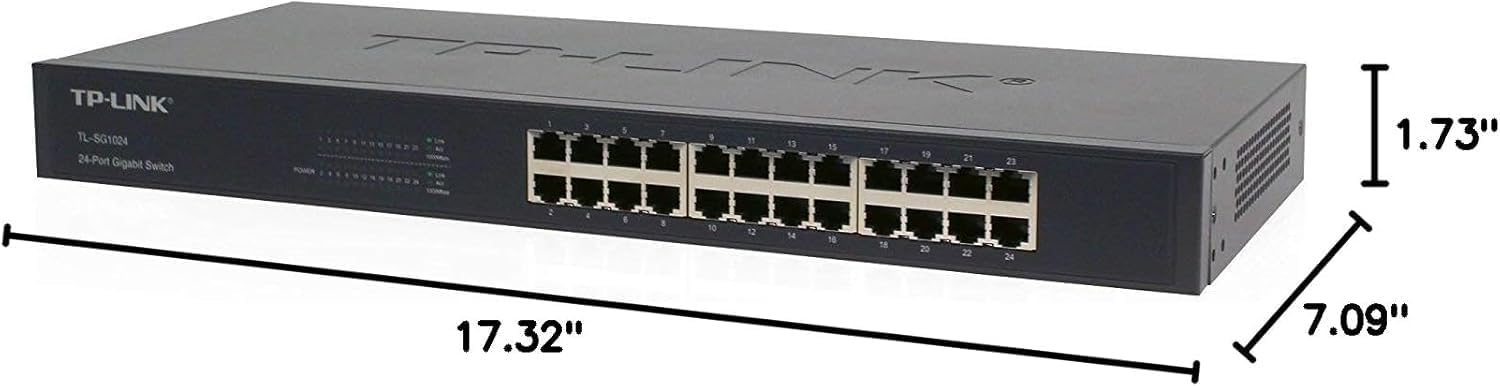
Diagram illustrating the physical dimensions of the TL-SG1024 switch: 17.32"L x 7.09"W x 1.73"H.

Posteriore view of the TL-SG1024 switch, displaying the power input port and ventilation.
4. Impostazione
The TL-SG1024 is a plug-and-play device, requiring no software configuration for basic operation.
4.1 Installazione desktop
- Posizionare l'interruttore su una superficie piana e stabile.
- Attach the included rubber feet to the bottom of the switch to prevent slipping and protect the surface.
4.2 Installazione su rack
- Fissare le staffe per il montaggio su rack fornite ai lati dello switch utilizzando le viti.
- Fissare lo switch in un rack standard da 19 pollici utilizzando le apposite viti per rack (non incluse).
4.3 Collegamento dello switch
- Collegare il cavo di alimentazione alla presa di corrente sul pannello posteriore dello switch e quindi a una presa di corrente.
- Connect your network devices (computers, servers, network printers, etc.) to any of the 24 RJ45 ports on the front panel using standard Ethernet cables. The switch supports auto MDI/MDIX, so crossover cables are not necessary.
- Ensure the Power LED on the front panel illuminates, indicating the switch is receiving power.
- Verify that the Link/Act LEDs for connected ports are lit, indicating a successful connection and network activity.
5. Istruzioni per l'uso
The TL-SG1024 is an unmanaged switch, meaning it operates automatically without requiring user configuration. Once connected, it will facilitate network communication between connected devices.
5.1 Indicatori LED
- LED di potenza:
- Acceso: l'interruttore è acceso.
- Spento: l'interruttore è spento.
- LED Link/Act (per ogni porta):
- Green (1000Mbps): Solid indicates a valid link at 1000Mbps. Flashing indicates data activity.
- Yellow (10/100Mbps): Solid indicates a valid link at 10/100Mbps. Flashing indicates data activity.
- Off: No device is connected to the corresponding port, or the connected device is powered off.
5.2 Caratteristiche principali
- Velocità Gigabit: All 24 ports support 10/100/1000Mbps speeds, enabling fast data transfer for bandwidth-intensive applications.
- Collega e usa: No configuration required, simplifying installation and use.
- Auto MDI/MDIX: Automatically detects the type of Ethernet cable (straight-through or crossover) and adjusts accordingly.
- Tecnologia ad alta efficienza energetica: Automatically adjusts power consumption based on link status and cable length, reducing operational costs.
- Controllo del flusso: Supports IEEE 802.3X flow control for full-duplex mode and back pressure flow control for half-duplex mode to prevent data loss during congestion.
- Design senza ventole: Garantisce un funzionamento silenzioso, adatto ad ambienti silenziosi.
6. Manutenzione
To ensure optimal performance and longevity of your TL-SG1024 switch, consider the following maintenance guidelines:
- Ambiente: Utilizzare l'interruttore entro gli intervalli di temperatura e umidità specificati. Evitare di posizionarlo alla luce diretta del sole o vicino a fonti di calore.
- Ventilazione: Ensure adequate airflow around the switch. Do not block ventilation openings.
- Pulizia: Pulire periodicamente l'esterno dell'interruttore con un panno morbido e asciutto. Non utilizzare detergenti liquidi o spray.
- Gestione dei cavi: Mantenere i cavi di rete in ordine e privi di pieghe o piegature eccessive per evitare il degrado del segnale.
- Alimentazione elettrica: Use only the power adapter provided with the device. In case of power fluctuations, consider using a surge protector.
7. Risoluzione Dei Problemi
Se riscontri problemi con lo switch TL-SG1024, fai riferimento ai seguenti passaggi comuni per la risoluzione dei problemi:
- Nessun potere:
- Assicurarsi che il cavo di alimentazione sia collegato saldamente sia all'interruttore sia a una presa di corrente funzionante.
- Verificare che la presa di corrente funzioni collegandovi un altro dispositivo.
- Nessun collegamento/attività su una porta:
- Verificare che il cavo Ethernet sia collegato saldamente sia alla porta dello switch sia al dispositivo di rete.
- Check the status of the connected network device (e.g., computer is powered on).
- Prova un cavo Ethernet diverso.
- Eseguire il test con una porta diversa sullo switch.
- Ensure the network adapter on the connected device is enabled and functioning correctly.
- Bassa velocità di rete:
- Confirm that all connected devices and cables support Gigabit Ethernet (Cat5e or higher).
- Verificare la presenza di traffico di rete eccessivo o colli di bottiglia su altri dispositivi di rete.
- Assicurarsi che l'interruttore sia posizionato in un'area ben ventilata per evitare il surriscaldamento.
Se i problemi persistono, consultare l'assistenza TP-Link websito o contattare il supporto tecnico per ulteriore assistenza.
8. Specifiche
| Attributo | Valore |
|---|---|
| Numero di modello | TL-SG1024 |
| Numero di porte | 24 |
| Tipo di interfaccia | 24 10/100/1000Mbps RJ45 Ports (Auto Negotiation/Auto MDI/MDIX) |
| Velocità di trasferimento dati | 1000 Megabit al secondo |
| Dimensioni del prodotto | 17.32 cm L x 7.09 cm P x 1.73 cm A |
| Peso dell'articolo | 4.41 libbre (2000 grammi) |
| Materiale della cassa | Acciaio legato |
| Consumo energetico massimo | 6.59 Watt |
| Consumo energetico in modalità accesa | 13.1 watt |
| Voltage | 240 Volt |
| Valutazione attuale | 1 Amps |
| Valutazione della temperatura superiore | 40 gradi Celsius |
| Produttore | TP-Link |
| Colore | NERO |
9. Garanzia e supporto
The TP-Link TL-SG1024 24-Port Gigabit Ethernet Switch comes with a Garanzia del produttore di 3 anno. For warranty claims, technical support, or further product information, please visit the official TP-Link websito o contattare il loro servizio clienti.
Puoi trovare risorse e supporto aggiuntivi su Negozio TP-Link su Amazon.