
Behringer PMP4000
Manuale utente del mixer amplificato Behringer Europower PMP4000
Modello: PMP4000
1. Introduzione
The Behringer Europower PMP4000 is a powerful and versatile 16-channel powered mixer designed for various audio applications, from live sound reinforcement to studio recording. It integrates a high-efficiency Class-D amplifier, a comprehensive 24-bit Multi-FX processor, and a precise FBQ Feedback Detection System to deliver exceptional sound quality and performance.
This manual provides essential information for setting up, operating, maintaining, and troubleshooting your PMP4000 mixer. Please read it thoroughly before use to ensure safe and optimal performance.
2. Importanti istruzioni di sicurezza
Always observe the following basic precautions when using this product:
- Leggere queste istruzioni.
- Conservare queste istruzioni.
- Prestate attenzione a tutti gli avvertimenti.
- Seguire tutte le istruzioni.
- Non utilizzare questo apparecchio vicino all'acqua.
- Pulire solo con un panno asciutto.
- Non bloccare le aperture di ventilazione. Installare secondo le istruzioni del produttore.
- Non installare vicino a fonti di calore come radiatori, bocchette di riscaldamento, stufe o altri apparecchi (inclusi amplificatori) che producono calore.
- Non vanificare lo scopo di sicurezza della spina polarizzata o di tipo con messa a terra. Una spina polarizzata ha due lame, una più larga dell'altra. Una spina di tipo con messa a terra ha due lame e un terzo polo di messa a terra. La lama larga o il terzo polo sono forniti per la tua sicurezza. Se la spina fornita non si adatta alla tua presa, consulta un elettricista per la sostituzione della presa obsoleta.
- Proteggere il cavo di alimentazione da eventuali calpestamenti o schiacciamenti, in particolare in prossimità delle spine, delle prese di corrente e del punto di uscita dall'apparecchio.
- Utilizzare solo accessori/componenti specificati dal produttore.
- Utilizzare solo con il carrello, il supporto, il treppiede, la staffa o il tavolo specificati dal produttore o venduti con l'apparecchio. Quando si utilizza un carrello, prestare attenzione quando si sposta la combinazione carrello/apparecchio per evitare lesioni da ribaltamento.
- Scollegare l'apparecchio durante i temporali o quando non viene utilizzato per lunghi periodi di tempo.
- Affidare tutti gli interventi di assistenza a personale di assistenza qualificato. L'assistenza è richiesta quando l'apparecchio è stato danneggiato in qualsiasi modo, ad esempio se il cavo di alimentazione o la spina sono danneggiati, se è stato versato del liquido o sono caduti degli oggetti nell'apparecchio, se l'apparecchio è stato esposto a pioggia o umidità, se non funziona normalmente o se è caduto.
3. Contenuto della confezione
Upon unpacking your Behringer Europower PMP4000, please ensure all components are present and in good condition:
- Behringer Europower PMP4000 Powered Mixer
- Cavo di alimentazione
- Manuale dell'utente (questo documento)
- Multi-FX Processor and FBQ Feedback Detection System (integrated)
In caso di articoli mancanti o danneggiati, contattare immediatamente il rivenditore.
4. Guida all'installazione
Follow these steps to set up your PMP4000 mixer:
4.1 Disimballaggio e ispezione
Carefully remove the mixer from its packaging. Inspect the unit for any signs of physical damage that may have occurred during transit. Retain the original packaging for future transport or storage.
4.2 Collegamento di alimentazione
Connect the supplied power cable to the mixer's power inlet on the rear panel and then to a suitable AC power outlet. Ensure the mixer's power switch is in the OFF position before connecting to power.
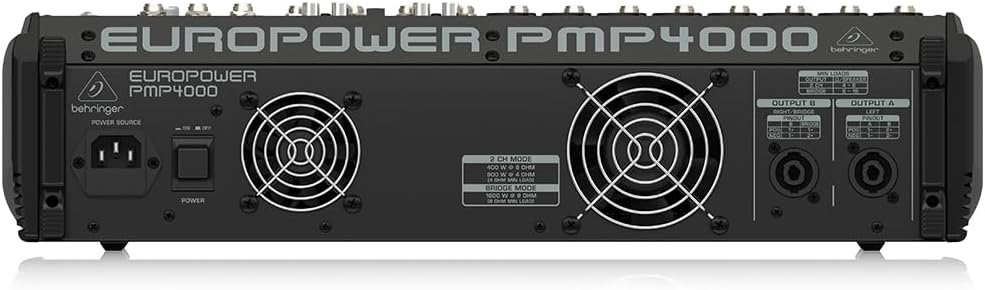
Figure 4.1: Rear panel of the PMP4000, highlighting the power input and speaker outputs.
4.3 Collegamento degli ingressi
The PMP4000 features 8 mono channels with XENYX mic preamps and 4 stereo channels. Connect your microphones, instruments, and line-level sources to the appropriate input jacks.
- Microfoni: Use XLR cables for condenser or dynamic microphones. Activate +48V phantom power for condenser microphones using the dedicated switch.
- Instruments/Line-Level: Use 1/4" TRS or TS cables for instruments (e.g., keyboards, guitars with DI boxes) or other line-level devices.
- Ingresso CD/nastro: Use the dedicated stereo RCA input for connecting external signal sources like CD players or media devices.

Figura 4.2: in alto view of the PMP4000, showing input channels and main controls.
4.4 Collegamento delle uscite
The PMP4000 offers various output options for connecting to speakers and monitors.
- Uscite principali: Connect your main PA speakers to the main L/R speaker outputs using speakON or 1/4" TS cables.
- Uscite monitor: Connetti stage monitors to the monitor outputs.
- Preamp Risultati: Use the multi-functional stereo Preamp outputs for connecting to external power ampdepuratori o dispositivi di registrazione.
4.5 Accensione iniziale
Once all connections are secure, switch the power ON. The power LED will illuminate. Gradually raise the main fader and individual channel faders to a comfortable listening level.
5. Operating the PMP4000
This section details the primary controls and functions of your mixer.
5.1 Channel Controls (Mono Channels 1-8)
- GUADAGNO: Adjusts the input sensitivity for each channel. Set this to achieve a healthy signal level without clipping.
- EQ (ALTO, MEDIO, BASSO): Equalizzatore a 3 bande per modellare il tono di ciascun canale.
- TAGLIO BASSO: Attiva un filtro passa-alto per rimuovere i rumori indesiderati a bassa frequenza.
- INVIO FX: Controlla la quantità di segnale inviata al processore di effetti interno.
- MON SEND: Controls the amount of signal sent to the monitor mix.
- PADELLA: Posiziona il segnale del canale all'interno del campo stereo (da sinistra a destra).
- MUTO: Disattiva il canale.
- PFL (ascolto pre-fader): Sends the channel's signal to the headphones for monitoring before the fader.
- FADER CANALE: Regola il livello di uscita del singolo canale sul mix principale.
- LED CLIP: Illuminates when the input signal is too high, indicating potential distortion. Reduce the GAIN if this LED lights up frequently.
5.2 Channel Controls (Stereo Channels 9/10 - 15/16)
These channels are designed for stereo line-level sources and feature simplified controls suitable for stereo instruments or playback devices.
5.3 Sezione Master
- FADER MIX PRINCIPALE: Controlla il livello di uscita complessivo del mix stereo principale.
- MONITOR FADERS: Adjust the output level for the monitor mixes.
- RITORNO FX: Controls the overall level of the effects processor's output returning to the main mix.
- EQ GRAFICO A 7 BANDE: Allows precise frequency correction for the monitor or main outputs. Use the EQ switch to select which output is affected.
- FBQ Feedback Detection System: This system instantly reveals critical frequencies that are causing feedback, allowing you to cut them using the graphic EQ.
5.4 24-bit Multi-FX Processor
The PMP4000 includes a studio-grade 24-bit stereo FX processor with 100 awesome presets. These include various reverbs, delays, chorus, flanger, pitch shifter, and multi-effects. Use the PROGRAM knob to select the desired effect and the FX SEND controls on individual channels to apply the effect.
5.5 Amplifier Operation Modes
The PMP4000 offers selectable ampmodalità di funzionamento del lifier:
- STEREO (MAIN L/R): Delivers 2 x 800 Watts to separate left and right main speakers.
- DOUBLE MONO (MAIN/MONITOR): Provides 800 Watts to the main output and 800 Watts to the monitor output, allowing for separate mixes.
- PONTE MONO: Combines the power to deliver 1600 Watts into a single, powerful mono output.
5.6 Funzioni speciali
- Cancellatore vocale: Removes the singer's voice from recordings for karaoke applications.
- XPQ 3D Stereo Surround Effect: Enhances the stereo image and adds vitality to the sound.
6. Manutenzione
Proper care and maintenance will extend the life of your PMP4000 mixer.
6.1 Pulizia
Clean the unit regularly with a soft, dry cloth. Do not use liquid cleaners or solvents. Ensure no dust or debris accumulates in the ventilation openings.
6.2 Conservazione e manipolazione
Store the mixer in a cool, dry place away from direct sunlight and extreme temperatures. When transporting the unit, use appropriate protective cases to prevent damage.
7. Risoluzione Dei Problemi
If you encounter issues with your PMP4000, refer to the following common problems and solutions:
| Problema | Possibile causa | Soluzione |
|---|---|---|
| Nessuna uscita audio | Power off; cables disconnected; faders down; MUTE engaged; incorrect ampmodalità filtro. | Check power, all cable connections, raise faders, disengage MUTE, verify ampmodalità filtro. |
| Suono distorto | Input GAIN too high; output level too high; faulty cable. | Reduce input GAIN and output levels. Check and replace cables if necessary. |
| Feedback (suono ululante) | Microphone too close to speakers; high frequencies boosted; room acoustics. | Use FBQ Feedback Detection to identify and cut problematic frequencies on the graphic EQ. Reposition microphones or speakers. |
| Nessuna alimentazione phantom (+48V) | Phantom power switch off. | Assicurarsi che l'interruttore di alimentazione phantom +48V sia attivato. |
Se il problema persiste dopo aver provato queste soluzioni, contattare personale di assistenza qualificato.
8. Specifiche tecniche
- Modello: PMP4000
- Canali: 16 (8 mono, 4 stereo)
- Amplificatore Potenza: 2 x 800 Watts stereo / 1600 Watts bridged mode
- Cosatage: 1050 watt
- Voltage: 48 Volt
- Fonte di energia: Elettrico con cavo
- Preamplificatore microfonoamps: 8 x XENYX with +48V phantom power
- Effects Processor: 24-bit Multi-FX with 100 presets
- EQ: 3-band per channel, 7-band stereo graphic EQ with FBQ Feedback Detection
- Tecnologia di connettività: XLR, TRS, RCA
- Colore: Nero
- Peso dell'articolo: 28.3 libbre (12.84 kg)
- Dimensioni del prodotto: 18.74 x 18.11 x 4.8 pollici (47.6 x 46 x 12.2 cm)
- Paese di origine: Cina
- Data prima disponibilità: 30 aprile 2010
9. Garanzia e supporto
Behringer products are built to high standards and come with a limited warranty. For detailed warranty terms and conditions, please refer to the warranty information provided with your purchase or visit the official Behringer websito.
For technical support, service, or spare parts, please contact your authorized Behringer dealer or visit the support section of the Behringer website. Ensure you have your product model number (PMP4000) and serial number ready when seeking support.
Ask a question about this manual
Ask about setup, troubleshooting, compatibility, parts, safety, or missing instructions. Manuals+ will review the question and use this page’s manual context to help answer it.