
1. Introduzione
The Radial J+4 is a 2-channel signal level driver designed to interface professional audio equipment with consumer-level or low-output devices. It effectively boosts incoming signals from -10dB to a professional +4dB line level, ensuring optimal signal integrity and compatibility within recording studios, broadcast environments, and live sound applications. Its robust construction and active circuitry provide reliable performance and noise reduction.
2. Informazioni importanti sulla sicurezza
- Fonte di energia: Use only the specified power adapter for this unit. Incorrect voltage can damage the device and void the warranty.
- Umidità: Non esporre l'unità a pioggia, umidità o umidità eccessiva.
- Calore: Evitare di posizionare l'unità vicino a fonti di calore quali termosifoni, bocchette di ventilazione, stufe o altri apparecchi che producono calore.
- Ventilazione: Assicurare una ventilazione adeguata. Non ostruire le aperture di ventilazione.
- Manutenzione: Per qualsiasi intervento di manutenzione, rivolgersi a personale qualificato. Non tentare di riparare questo prodotto da soli.
- cavi: Ensure all cables are securely connected and free from damage to prevent signal loss or electrical hazards.
3. Caratteristiche principali
- Funzionamento a 2 canali: Processes two independent audio channels.
- Signal Level Matching: Boosts -10dB consumer-level signals to +4dB professional line level.
- Discrete Circuitry: 100% discrete signal path for optimal audio fidelity.
- Active Buffering: Maintains signal integrity over long cable runs.
- Transformer Isolation: Helps eliminate ground loop hum and noise.
- Stereo Gain Control: Allows precise level adjustment for both channels.
- Highpass Filter: Reduces unwanted low-frequency rumble and noise.
- Interruttore di sollevamento a terra: Breaks the ground connection to further combat hum.
- Ingressi versatili: Features dual 1/4" TRS, RCA, and a stereo 1/8" TRS input.
- Costruzione durevole: Built with 14-gauge steel for roadworthy reliability.
4. Controlli e collegamenti
The Radial J+4 features a straightforward layout for easy integration into any audio setup.
Pannello frontale
The front panel provides access to input connections and primary controls.
- INPUTS (1/4" TRS, RCA, 1/8" TRS): Connect your low-level audio sources here. The 1/4" and RCA jacks are typically for stereo pairs, while the 1/8" TRS is for portable devices.
- Ottenere il controllo: A rotary knob to adjust the output level of the boosted signal.
- HIGHPASS Filter Switch: Engages a filter to remove low-frequency content.
- Interruttore SOLLEVAMENTO A TERRA: Disconnects the audio ground from the chassis ground to eliminate hum and buzz caused by ground loops.
Pannello posteriore
The rear panel houses the output connections and power input.
- OUTPUTS (XLR): Balanced XLR outputs for connecting to professional audio equipment such as mixers, audio interfaces, or power amplificatori.
- INGRESSO ALIMENTAZIONE: Connection point for the external power supply.
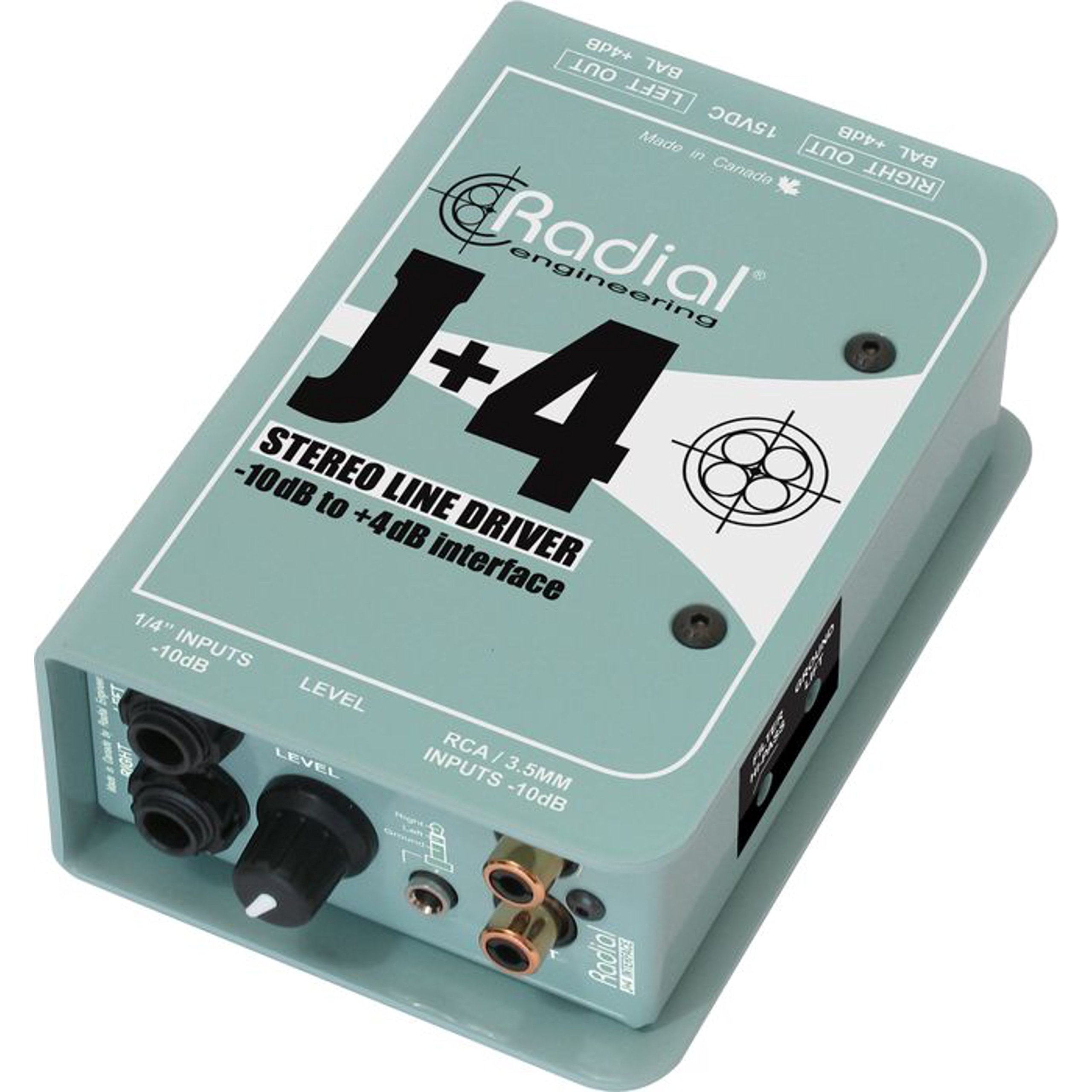
5. Guida all'installazione
Follow these steps for initial setup of your Radial J+4:
- Power Off All Equipment: Before making any connections, ensure all audio equipment (source devices, mixers, amplifiers) are powered off.
- Collegare la sorgente di ingresso: Connect your low-level audio source (e.g., MP3 player, computer, instrument output) to the appropriate input jacks on the front panel of the J+4 (1/4" TRS, RCA, or 1/8" TRS).
- Connetti uscite: Connect the XLR outputs of the J+4 to the line-level inputs of your professional audio equipment (e.g., mixer, audio interface). Use balanced XLR cables for optimal performance.
- Connetti alimentazione: Connect the provided power adapter to the POWER INPUT on the rear panel of the J+4, then plug the adapter into an appropriate power outlet.
- Accensione: Power on your professional audio equipment first, then power on your source device. The J+4 will power on automatically when connected to its power supply.
- Impostazione del guadagno iniziale: Set the GAIN control on the J+4 to its minimum position before playing audio.
6. Funzionamento
Once connected, operating the J+4 is straightforward:
- Regolazione del guadagno: Play audio from your source device. Slowly increase the GAIN control on the J+4 until the desired output level is achieved at your professional audio equipment. Monitor the input levels on your mixer or interface to avoid clipping.
- Using the Highpass Filter: If you notice excessive low-frequency rumble or unwanted bass content, engage the HIGHPASS filter switch. This can help clean up the signal, especially with vocal or acoustic instrument sources.
- Addressing Hum and Buzz: If you experience a persistent hum or buzz, try engaging the GROUND LIFT switch. This can often resolve ground loop issues by breaking the electrical ground connection between the J+4 and other equipment. If the hum persists, check all cable connections and try different power outlets.
7. Manutenzione
The Radial J+4 is designed for durability and requires minimal maintenance.
- Pulizia: Utilizzare un panno morbido e asciutto per pulire l'esterno dell'unità. Non utilizzare detergenti abrasivi, solventi o cere.
- Ispezione: Ispezionare periodicamente i cavi e i collegamenti per verificare la presenza di eventuali segni di usura o danni.
- Magazzinaggio: Quando non si utilizza l'unità per lunghi periodi, conservarla in un ambiente asciutto e privo di polvere.
8. Risoluzione Dei Problemi
If you encounter issues with your Radial J+4, refer to the following common problems and solutions:
| Problema | Possibile causa | Soluzione |
|---|---|---|
| Nessuna uscita audio |
|
|
| Ronzio o ronzio |
|
|
| Suono distorto |
|
|
9. Specifiche
- Modello: R800 8015
- Numero di canali: 2
- Tecnologia di connettività: 1/4" TRS, 1/8" TRS, RCA (inputs), XLR (outputs)
- Signal Level Conversion: Da -10 dB a + 4 dB
- Tipo di materiale: Acciaio inossidabile
- Dimensioni del prodotto: 10.8 x 4.9 x 2.8 pollici
- Peso dell'articolo: 0.01 once
- Dispositivi compatibili: Personal Computer, various audio sources
- Software supportato: Pro Tools, Logic Pro, Ableton Live, FL Studio, Cubase (when used with compatible audio interfaces)
10. Garanzia e supporto
For warranty information and technical support, please refer to the official Radial Engineering webo contattare il servizio clienti. Conservare la ricevuta d'acquisto come prova d'acquisto per eventuali reclami in garanzia.