
1. Introduzione
The DT Systems BL509 Remote Bird Launcher is an advanced training tool designed for hunting dogs. It facilitates realistic field training by launching quail or pigeon-sized birds remotely. This manual provides essential information for the proper setup, operation, and maintenance of your BL509 launcher to ensure effective and safe training sessions.
Key features include a quiet-release mechanism, a 700-yard remote range, an easy-load trap door, and an integrated beeper/locator for easy marking in the field.

Figure 1: The DT Systems BL509 Remote Bird Launcher and its accompanying remote control.
2. Componenti finitiview
Familiarize yourself with the main components of your BL509 Remote Bird Launcher and Transmitter:
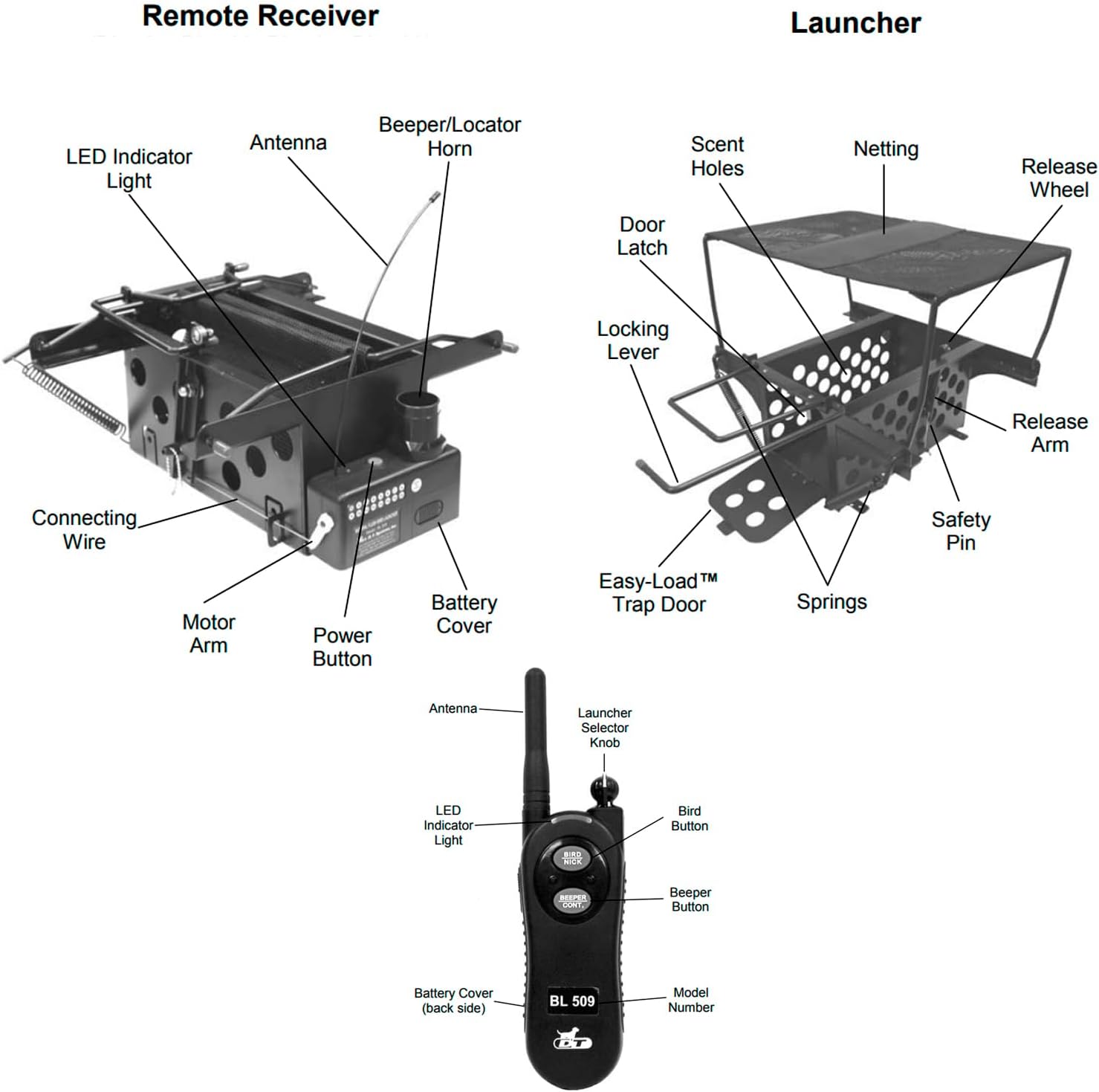
Figure 2: Detailed diagram illustrating the various parts of the Remote Receiver (Launcher) and the Transmitter (Remote Control).
2.1. Remote Receiver (Launcher)
- Rete: Holds the bird securely before launch.
- Scent Holes: Allow for maximum scent dispersion to attract the dog.
- Easy-Load™ Trap Door: Patented design for safe and easy loading/unloading of birds.
- molle: Provide the launching force.
- Release Arm & Wheel: Mechanism for launching the bird.
- Spilla di sicurezza: Engages to prevent accidental launches.
- Door Latch & Locking Lever: Secure the trap door.
- Antenna: For receiving signals from the transmitter.
- Beeper/Locator Horn: Emits sound for locating the launcher in the field.
- Indicatore LED: Fornisce feedback sullo stato.
- Pulsante di accensione: Per accendere/spegnere il ricevitore.
- Coperchio della batteria: Accesso al vano batteria.
2.2. Trasmettitore (telecomando)
- Antenna: For sending signals to the receiver.
- Launcher Sensor Knob: Adjusts sensitivity or settings for the launcher.
- Bird Button: Activates the bird launch.
- Beeper Button: Activates the beeper/locator on the receiver.
- Indicatore LED: Fornisce feedback sullo stato.
- Model Number (BL509): Identifica il modello specifico.
- Coperchio della batteria: Accesso al vano batteria.
3. Impostazione
3.1. Installazione della batteria
- Ricevitore: Locate the battery cover on the receiver unit. Open it and insert the required batteries, ensuring correct polarity. Close the cover securely.
- Trasmettitore: Locate the battery cover on the back of the remote control. Open it and insert the required batteries, ensuring correct polarity. Close the cover securely.
3.2. Preparing the Launcher
- Svolgere: Carefully unfold the launcher mechanism. Ensure all parts are properly aligned and secured.
- Inserire la spilla di sicurezza: Always ensure the safety pin is engaged before loading a bird to prevent accidental launches.
- Load Bird: Open the Easy-Load™ Trap Door. Gently place a quail or pigeon-sized bird inside the netting. Close the trap door and secure it with the door latch and locking lever.
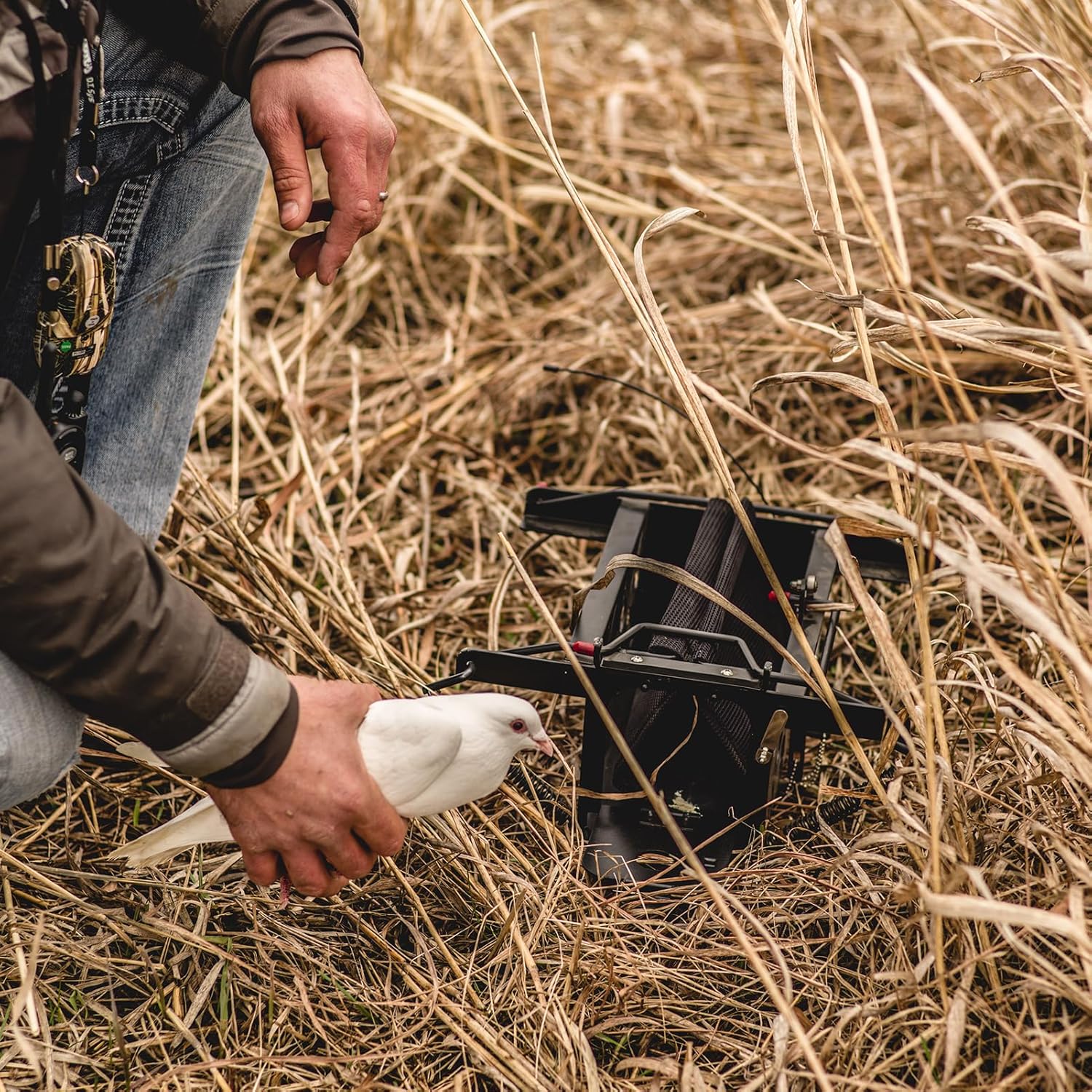
Figure 3: Demonstrating the process of loading a bird into the launcher using the Easy-Load Trap Door.
3.3. Associazione del trasmettitore e del ricevitore
Your BL509 unit typically comes pre-paired. If re-pairing is necessary or if you are adding additional launchers:
- Turn on both the receiver and the transmitter.
- Follow the specific pairing instructions provided in the full product manual (not included here) or on the manufacturer's website. This usually involves pressing a sequence of buttons on both devices within a certain timeframe.
- A successful pairing is often indicated by a specific LED light pattern or sound.
4. Istruzioni per l'uso
4.1. Field Placement
Place the loaded launcher in the desired training area. Ensure it is stable and positioned to allow for a clear launch path. The launcher's design with scent holes helps in natural scent dispersion, making it effective even when partially concealed in grass.
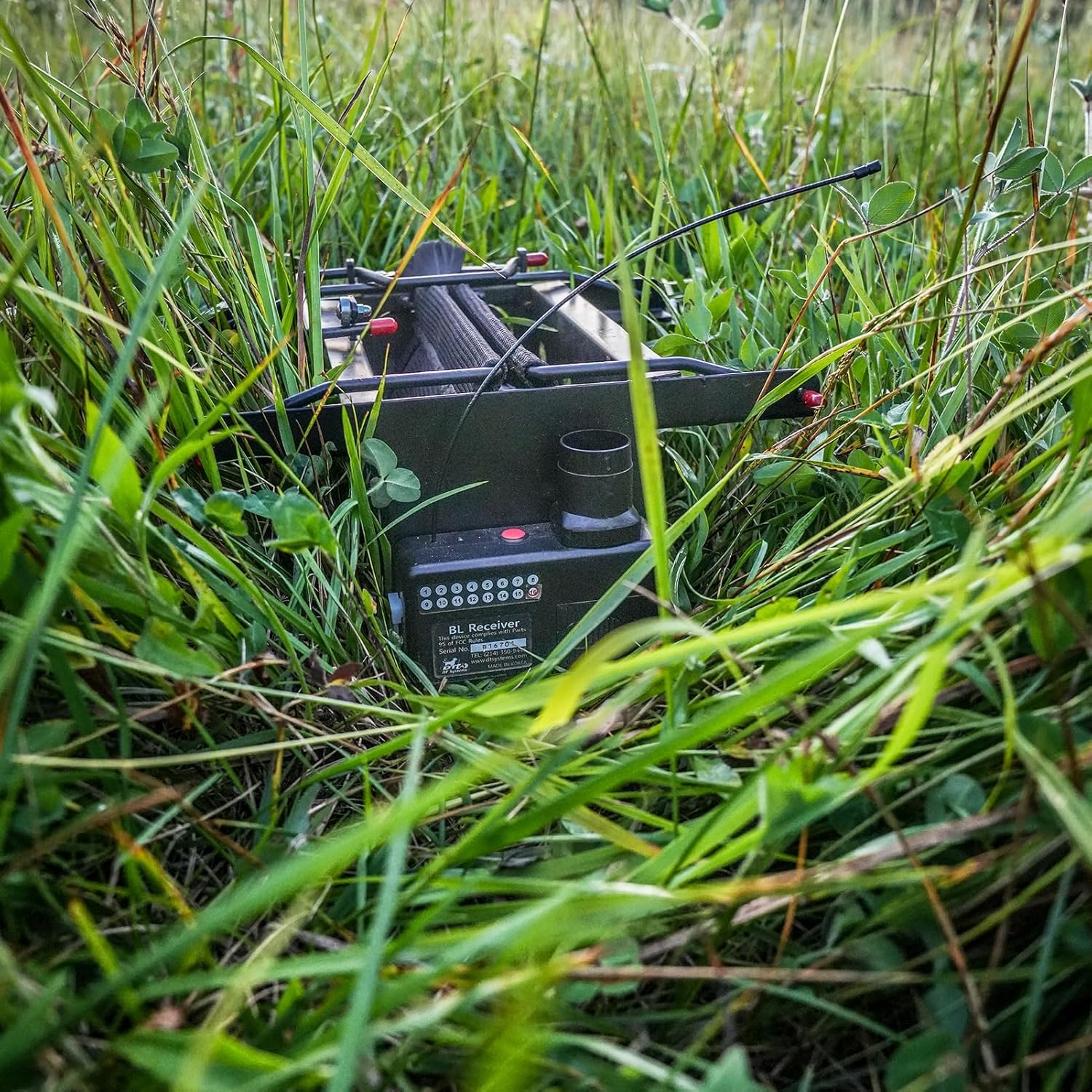
Figure 4: The BL509 launcher positioned discreetly within tall grass, ready for a training exercise.
4.2. Activating the Launcher
- Ensure the safety pin is removed from the launcher.
- From your remote transmitter, press the Bird Button to initiate the launch. The launcher will release the bird with its quiet-release springs.
- The BL509 offers a remote range of up to 700 yards, allowing for flexible placement and control during training.

Figure 5: A sequence showing the launcher in its set position (left) and immediately after a bird has been launched (right), demonstrating the quiet-release action.
4.3. Using the Beeper/Locator
If you need to locate the launcher in dense cover or after a long retrieve, press the Beeper Button on your transmitter. The receiver's beeper/locator horn will emit an audible sound, detectable up to 400 yards away, guiding you to its location.
5. Manutenzione
Proper maintenance ensures the longevity and reliable performance of your BL509 Remote Bird Launcher.
- Pulizia: After each use, especially in wet or muddy conditions, clean the launcher thoroughly. Remove any debris, dirt, or bird feathers from the netting, springs, and moving parts. Use a damp cloth and mild soap if necessary, then dry completely.
- Cura della batteria: Remove batteries from both the receiver and transmitter if the unit will not be used for an extended period to prevent corrosion. Store batteries in a cool, dry place.
- Magazzinaggio: Store the launcher in a dry, protected environment when not in use. Avoid extreme temperatures.
- Ispezione primaverile: Periodically inspect the springs for any signs of wear, rust, or damage. Replace if necessary to maintain consistent launch performance.
- Ispezione delle reti: Check the netting for tears or damage. Damaged netting can affect bird containment and launch effectiveness.
6. Risoluzione Dei Problemi
If you encounter issues with your BL509 Remote Bird Launcher, refer to the following common problems and solutions:
| Problema | Possibile causa | Soluzione |
|---|---|---|
| Launcher does not fire. | Dead or low batteries in receiver or transmitter. Safety pin engaged. Fuori dal limite. Non abbinato correttamente. | Sostituire le batterie. Rimuovere la spilla da balia. Move closer to the launcher. Re-pair transmitter and receiver. |
| Beeper/Locator does not sound. | Dead or low batteries in receiver. Fuori dal limite. | Sostituire le batterie del ricevitore. Move closer to the launcher. |
| Weak or inconsistent launch. | Worn or damaged springs. Debris obstructing mechanism. | Inspect and replace springs if necessary. Clean the launcher mechanism thoroughly. |
| Bird escapes before launch. | Damaged netting. Trap door not securely latched. | Inspect and replace netting. Ensure trap door is fully closed and latched. |
If these steps do not resolve the issue, please contact DT Systems customer support.
7. Specifiche
| Caratteristica | Dettaglio |
|---|---|
| Nome del modello | DT Systems Remote Bird Launcher 500 Series (BL509) |
| Specie bersaglio | Quail, Pigeon-sized birds |
| Portata remota | Up to 700 yards (release) |
| Beeper/Locator Range | Audible up to 400 yards |
| Dimensioni articolo (LxPxA) | 6.5 x 12.75 x 14.25 pollici |
| Peso dell'articolo | 7.6 libbre |
| Colore | Nero |
| Componenti inclusi | Bird Launcher, Remote Transmitter |
| Produttore | D.T. Systems |
| Anno del modello | 2011 |
8. Garanzia e supporto
DT Systems is committed to providing high-quality dog training products. For specific warranty information, please refer to the documentation included with your purchase or visit the official DT Systems websito.
Important Note Regarding Purchases: Please be aware that if this product was purchased through a third-party retailer, such as Amazon, DT Systems' repair policy may vary. Some users have reported that DT Systems may not provide direct repair services for units purchased outside of their authorized dealer network. It is recommended to verify the warranty and repair policy with your point of purchase or DT Systems directly if you have concerns about future service needs.
For technical support or inquiries, please contact DT Systems customer service through their official channels.