
Codice articolo: 980-000402
Manuale utente del sistema di altoparlanti domestici Logitech Z623 da 400 Watt
Modello: 980-000402
Introduzione
The Logitech Z623 400 Watt Home Speaker System is a THX-certified 2.1 speaker system engineered to deliver powerful, immersive audio for your music, movies, and games. This manual provides essential information for setting up, operating, and maintaining your speaker system to ensure optimal performance and longevity.
Cosa c'è nella scatola
Your Logitech Z623 speaker system package includes the following components:
- Speakers (2 satellite speakers and 1 subwoofer)
- Cavo di ingresso audio da 3.5 mm
- Cavi connettore per altoparlanti
- Documentazione utente
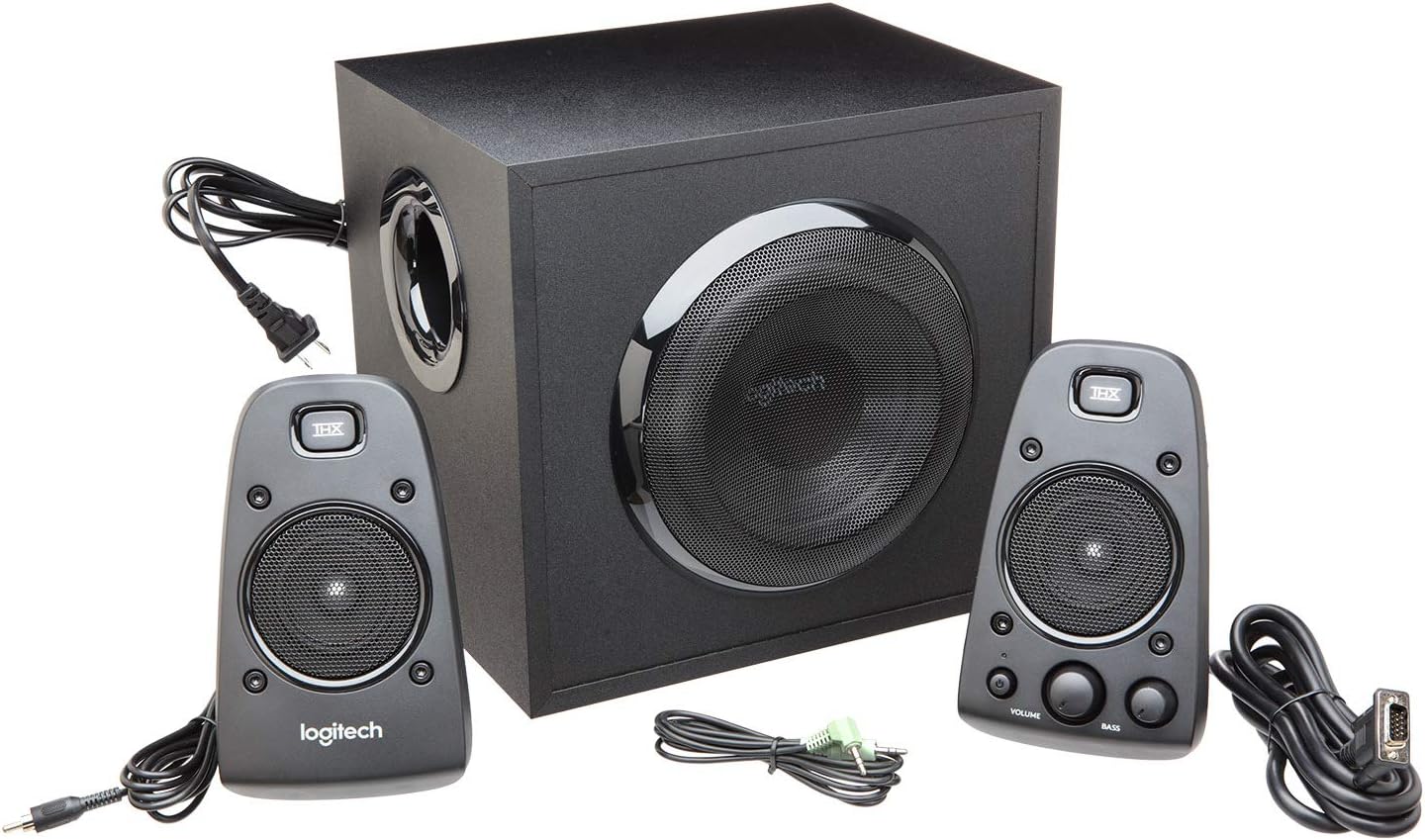
Figura 1: Tutti i componenti inclusi nella confezione Logitech Z623.
Configurazione e installazione
Per configurare il sistema di altoparlanti Logitech Z623, segui questi passaggi:
- Disimballare i componenti: Estrarre con cautela tutti gli articoli dall'imballaggio.
- Relatori di posizione: Place the subwoofer on the floor or a sturdy surface near your computer or entertainment system. Position the two satellite speakers on either side of your monitor or TV for optimal stereo sound.
- Collegare gli altoparlanti satellitari al subwoofer: The right satellite speaker (with controls) connects to the subwoofer via a proprietary VGA-style connector. The left satellite speaker connects to the subwoofer via an RCA-style cable.
- Connetti alla sorgente audio: Use the included 3.5mm audio input cable to connect the subwoofer to your computer's audio output (headphone jack) or other compatible devices. Alternatively, use RCA cables for devices with RCA outputs. The Z623 also supports optical input for digital audio sources.
- Connetti alimentazione: Collegare il cavo di alimentazione del subwoofer a una presa a muro.

Figura 2: Esample setup of the Logitech Z623 with a television.
Video 1: Un review demonstrating the unboxing and basic setup of the Logitech Z623 speaker system, including connections.
Controlli e connettività
The primary controls for your Z623 system are located on the right satellite speaker:
- Pulsante di accensione: Turns the speaker system on or off. An orange LED indicates power status.
- Quadrante del volume: Adjusts the overall volume of the system.
- Bass Dial: Controls the bass level of the subwoofer.
- Jack per cuffie (3.5 mm): Per l'ascolto privato con le cuffie.
- Ingresso ausiliario (3.5 mm): For connecting additional audio devices like smartphones or MP3 players.

Figura 3: dettagliata view of the control speaker with power, volume, bass, and input options.
The subwoofer's rear panel provides the main connection points for the satellite speakers and audio sources:
- Right Speaker Input: Proprietary connector for the right satellite speaker.
- Left Speaker Input: RCA connector for the left satellite speaker.
- Auxiliary/RCA Inputs: Red and white RCA jacks for connecting various audio devices.
- Ingresso ottico: For digital audio connections (available on some Z623 variants, though this model is Analog).
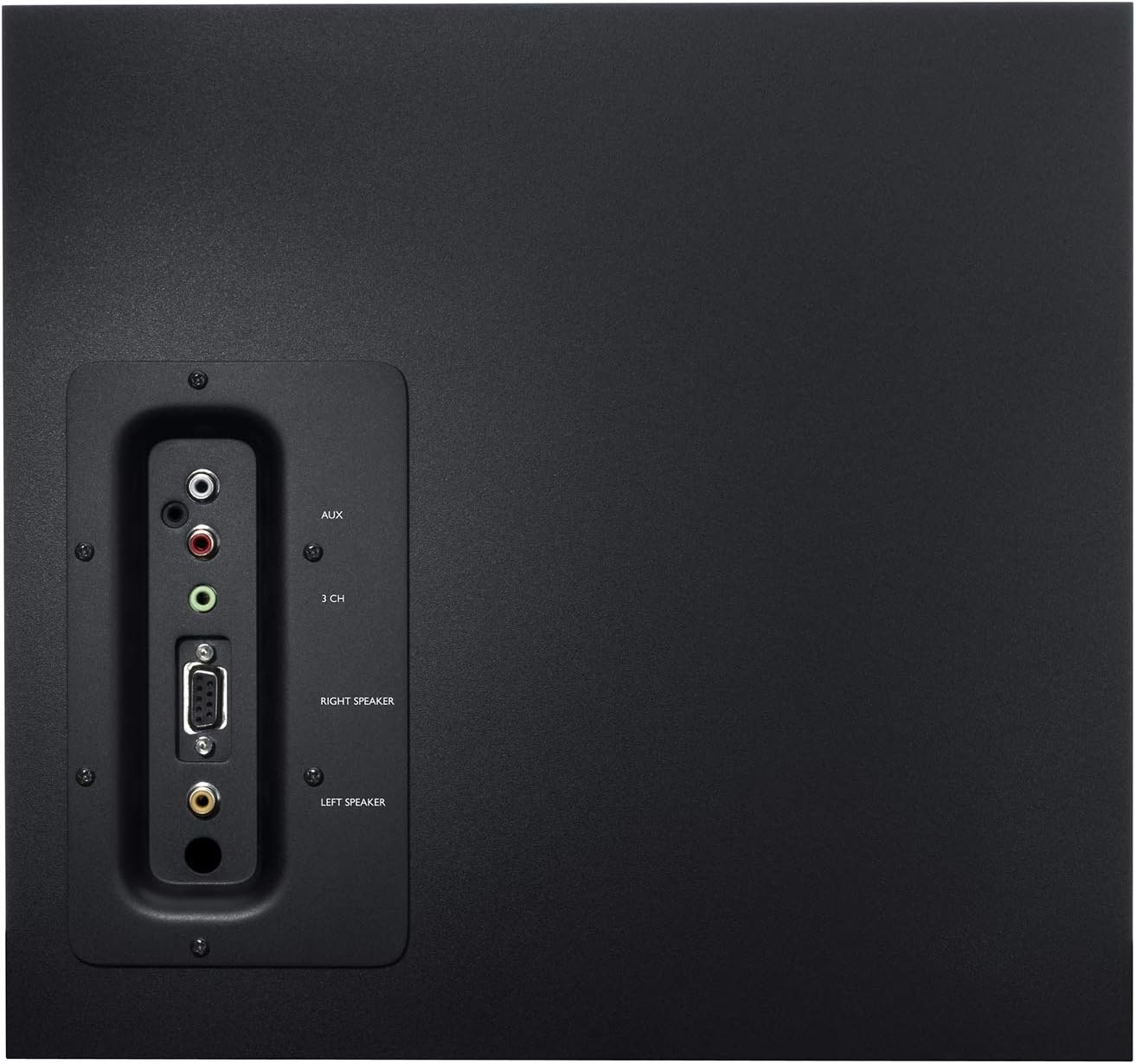
Figure 4: Rear panel of the subwoofer detailing connectivity options.
Video 2: An unboxing and test video for the Logitech Z625, which shares similar connectivity features with the Z623, demonstrating the rear panel connections.
Operazione
Once connected, power on the system using the power button on the right satellite speaker. Adjust the volume and bass levels to your preference. The THX certification ensures studio-quality audio for an immersive experience.
Video 3: Official product video highlighting the sound quality and immersive experience of the Logitech Z623 system.
Manutenzione
To ensure the longevity and optimal performance of your Logitech Z623 speaker system, follow these maintenance tips:
- Pulizia: Use a soft, dry cloth to clean the speaker surfaces. Avoid using liquid cleaners or abrasive materials.
- Ventilazione: Ensure the subwoofer and satellite speakers have adequate ventilation to prevent overheating. Do not block the subwoofer's port or speaker grilles.
- Gestione dei cavi: Keep cables organized and untangled to prevent damage and ensure proper connectivity.
- Evitare condizioni estreme: Do not expose the speakers to extreme temperatures, humidity, or direct sunlight.
Risoluzione dei problemi
Se riscontri problemi con il tuo sistema di altoparlanti, prova a seguire i seguenti passaggi per la risoluzione dei problemi:
- Nessun suono:
- Ensure the power cable is securely plugged in and the system is powered on.
- Check all audio connections (3.5mm, RCA, optical) to ensure they are firmly seated in the correct ports.
- Verify that the volume on the speaker system and your audio source (computer, TV, etc.) is turned up and not muted.
- Provare con una sorgente audio o un cavo diverso per escludere problemi esterni.
- Suono distorto:
- Lower the volume on both the speaker system and your audio source.
- Adjust the bass dial on the control speaker.
- Ensure speaker cables are not damaged or loosely connected.
- Static or Buzzing:
- Check for loose cable connections, especially the proprietary speaker cable.
- Ensure the speaker system is not placed too close to other electronic devices that may cause interference.
- Prova a collegare il sistema di altoparlanti a una presa di corrente diversa.
Specifiche
| Caratteristica | Specificazione |
|---|---|
| Nome del modello | Z623 |
| Tipo di altoparlante | Satellite, subwoofer |
| Tecnologia di connettività | RCA, ausiliario |
| Potenza massima in uscita dell'altoparlante | 400 Watt di picco / 200 Watt RMS |
| Modalità di uscita audio | Stereo |
| Colore | Nero |
| Materiale | Metallo |
| Peso dell'articolo | 8.2 chilogrammi (18.04 libbre) |
| Dimensioni del prodotto | 17.31"P x 11.87"L x 12.25"A |
| Codice UPC | 097855066466 |
Garanzia e supporto
Logitech provides a limited warranty for the Z623 speaker system. For detailed warranty information and support, please refer to the official User Guide (PDF) available online or contact Logitech customer support directly.
Please note: As per the legal disclaimer, returns may not be accepted if the unit is fully functional, due to shipping complexities.
For further assistance, you may also consult the Guida per l'utente (PDF).
Ask a question about this manual
Ask about setup, troubleshooting, compatibility, parts, safety, or missing instructions. Manuals+ will review the question and use this page’s manual context to help answer it.