
1. Introduzione
The BUFFALO Giga Switching Hub LSW3-GT-24NSR is a 24-port Gigabit Ethernet switch designed for high-speed network environments. It is ideal for small to medium-sized offices and workplaces requiring robust and reliable network connectivity. This device supports full Gigabit speeds across all ports, ensuring efficient data transfer.
Key features include a fanless design for silent operation and enhanced reliability, as well as a loop detection function to prevent network disruptions caused by accidental network loops.
2. Informazioni sulla sicurezza
Prima di utilizzare il dispositivo, leggere attentamente le seguenti precauzioni di sicurezza per evitare lesioni o danni.
- Alimentazione elettrica: Utilizzare solo l'adattatore di alimentazione fornito. Assicurarsi che la presa di corrente soddisfi la tensione specificata.tage requisiti.
- Ventilazione: Non ostruire le aperture di ventilazione. Garantire un flusso d'aria adeguato attorno al dispositivo per evitare il surriscaldamento.
- Ambiente: Avoid exposing the device to water, high humidity, extreme temperatures, or direct sunlight.
- Gestione: Do not drop or subject the device to strong impacts. Do not attempt to open or repair the device yourself. Refer all servicing to qualified personnel.
- cavi: Ensure all network cables are properly connected and secured.
3. Contenuto della confezione
Verificare che tutti gli articoli siano presenti nel pacco:
- BUFFALO Giga Switching Hub LSW3-GT-24NSR Unit
- Cavo di alimentazione
- Rack Mount Brackets (if included with your model)
- Piedini in gomma (per il posizionamento sulla scrivania)
4. Impostazione
4.1 Installazione fisica
The LSW3-GT-24NSR can be installed on a desktop or mounted in a 19-inch equipment rack.
Posizionamento sul desktop:
- Attach the included rubber feet to the bottom of the unit to prevent slipping and provide stability.
- Posizionare l'unità su una superficie piana e stabile, adeguatamente ventilata.
Montaggio su rack:
- Attach the rack mount brackets to the sides of the unit using the provided screws.
- Secure the unit into a standard 19-inch equipment rack using appropriate rack screws (not included).
4.2 Collegamento dei cavi di rete
Connect your network devices (computers, servers, other switches) to any of the 24 RJ-45 ports on the front panel using standard Ethernet cables (Category 5e or higher recommended for Gigabit speeds).

Figura 1: Pannello frontale sopraview with 24 Ethernet Ports and Status LEDs.
4.3 Collegamento dell'alimentazione
- Connect the power cable to the AC IN port on the rear of the device.
- Collegare l'altra estremità del cavo di alimentazione a una presa di corrente adeguata.
- The device will power on automatically. The POWER LED on the front panel should illuminate.

Figura 2: Pannello posteriore sopraview with AC IN Power Port.
5. Istruzioni per l'uso
5.1 Indicatori LED
The front panel features several LED indicators to monitor the status of the switch and its ports.
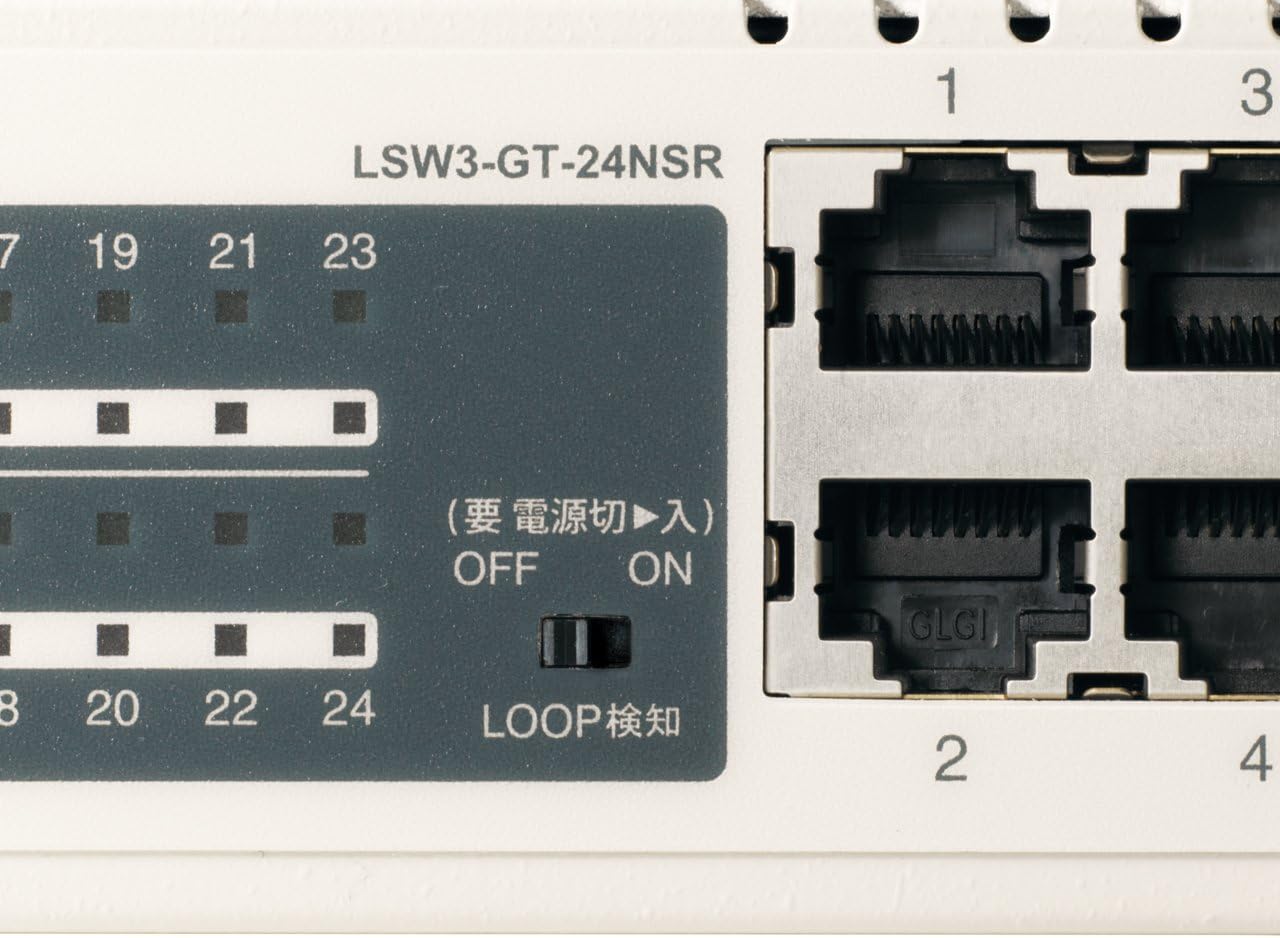
Figura 3: dettagliata view of LED Indicators and Loop Detection Switch.
| Nome LED | Stato | Descrizione |
|---|---|---|
| ENERGIA | On | Il dispositivo è acceso. |
| COLLEGAMENTO/ATTO (per porta) | On | A network device is connected and a link is established. |
| Lampeggiante | I dati vengono trasmessi o ricevuti tramite la porta. | |
| 1000/100/10M (per porta) | Verde | Port is operating at 1000 Mbps (Gigabit Ethernet). |
| Arancia | Port is operating at 100 Mbps (Fast Ethernet). | |
| Spento | Port is operating at 10 Mbps (Ethernet). | |
| LOOP DETECT | On | A network loop has been detected. |
5.2 Loop Detection Function
The LSW3-GT-24NSR features a hardware switch for enabling or disabling the loop detection function. This function helps prevent network instability caused by accidental network loops.
Figure 4: Loop Detection Switch (ON/OFF).
- SOPRA: Loop detection is active. If a loop is detected, the corresponding port will be automatically shut down to prevent network broadcast storms, and the LOOP DETECT LED will illuminate.
- OFF: Loop detection is disabled.
It is recommended to keep the loop detection function ON for network stability.
6. Manutenzione
6.1 Pulizia del dispositivo
Per mantenere prestazioni ottimali, pulire periodicamente la parte esterna dell'interruttore.
- Scollegare il cavo di alimentazione prima della pulizia.
- Utilizzare un panno morbido e asciutto per pulire la superficie.
- Do not use liquid cleaners, aerosols, or solvents, as these may damage the casing o componenti interni.
6.2 Considerazioni ambientali
Ensure the device is operated within its specified environmental conditions:
- Temperatura: da 0°C a 40°C (da 32°F a 104°F)
- Umidità: Dal 10% all'85% (senza condensa)
7. Risoluzione Dei Problemi
If you encounter issues with your BUFFALO Giga Switching Hub, refer to the following common problems and solutions.
7.1 Nessun potere
- sintomo: Il LED POWER è spento.
- Soluzione: Check if the power cable is securely connected to both the device and the power outlet. Ensure the power outlet is functional.
7.2 No Link or Slow Speed on a Port
- sintomo: The LINK/ACT LED for a connected port is off, or the 1000/100/10M LED indicates a lower speed than expected (e.g., 100M instead of 1000M).
- Soluzione:
- Verificare che il cavo Ethernet sia collegato saldamente a entrambe le estremità.
- Try a different Ethernet cable. Ensure it is a Category 5e or higher cable for Gigabit speeds.
- Collegare il dispositivo a una porta diversa dello switch.
- Check the network adapter settings on the connected device (computer, server) to ensure it is configured for auto-negotiation or the correct speed.
7.3 Network Instability / LOOP DETECT LED is On
- sintomo: The LOOP DETECT LED is illuminated, and network performance is degraded or unstable.
- Soluzione:
- A network loop has been detected. This typically occurs when two ports on the same switch (or different switches) are connected to each other, creating an infinite data path.
- Carefully inspect your network cabling to identify and remove any redundant connections that form a loop.
- If the loop detection switch is ON, the affected port will be automatically shut down. Once the loop is resolved, the port should resume normal operation.
8. Specifiche
| Caratteristica | Descrizione |
|---|---|
| Marca | BUFALO |
| Numero di modello | LSW3-GT-24NSR |
| Numero di porte | 24 porte RJ-10 100/1000/45BASE-T |
| Capacità di commutazione | 48 Gbps (Non-blocking) |
| Tasso di inoltro | 35.7 Mpps |
| Dimensioni tabella indirizzi MAC | 8K voci |
| Supporto Jumbo Frame | Fino a 9 KB |
| Caratteristiche | Auto-MDI/MDIX, Auto-Negotiation, Loop Detection Function, Fanless Design |
| Alimentazione elettrica | Alimentazione CA interna |
| Dimensioni (L x P x A) | (Specific dimensions not provided in source, typical for 1U rackmount) |
| Peso | (Specific weight not provided in source) |
| Temperatura di esercizio | da 0°C a 40°C |
| Umidità di esercizio | Dal 10% all'85% (senza condensa) |
9. Garanzia e supporto
This BUFFALO product is covered by a manufacturer's warranty. Please refer to the warranty card included with your product or visit the official BUFFALO websito per termini e condizioni di garanzia dettagliati.
For technical support, product registration, or further assistance, please visit the official BUFFALO support websito o contattare il servizio clienti. Le informazioni di contatto sono in genere reperibili sul sito web del produttore. websito o nella confezione del prodotto.