
Introduzione
The GIGABYTE GM-M7600 is a wireless precision optical mouse designed for comfortable and reliable use. This manual provides instructions for setting up, operating, maintaining, and troubleshooting your device.
Contenuto della confezione
Si prega di controllare il contenuto della confezione per assicurarsi che siano presenti tutti gli articoli:
- GIGABYTE GM-M7600 Wireless Optical Mouse
- Portable Nano USB Receiver
- 2 batterie AAA
Impostare
1. Installazione delle batterie
The GM-M7600 mouse requires two AAA batteries for operation. The batteries are included in the package.
- Individuare il coperchio del vano batteria sul lato inferiore del mouse.
- Per aprire il vano, far scorrere o sollevare delicatamente il coperchio.
- Inserire le due batterie AAA, assicurandosi che i terminali positivo (+) e negativo (-) siano allineati correttamente con le marcature all'interno del vano.
- Chiudere saldamente il coperchio del vano batterie.
2. Collegamento del ricevitore USB
The mouse connects to your computer via a portable Nano USB receiver.
- Locate the Nano USB receiver. It may be stored inside the mouse's battery compartment or packaged separately.
- Plug the Nano USB receiver into an available USB port on your computer (Laptop or Personal Computer).
- Your operating system (e.g., Windows XP, Linux) should automatically detect and install the necessary drivers. This process may take a few moments.
- Una volta installati i driver, il mouse è pronto per l'uso.
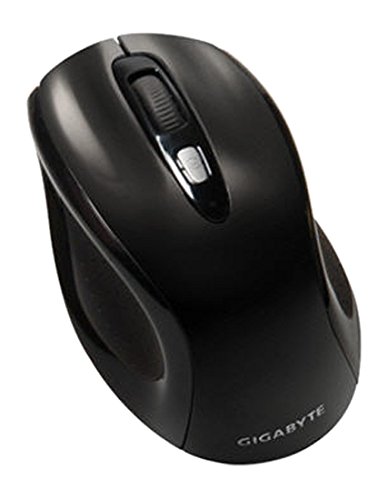
Figura 1: GIGABYTE GM-M7600 Wireless Optical Mouse. This image displays the ergonomic design of the mouse, highlighting its form factor and the location of its buttons. The Nano USB receiver is typically stored within the mouse or connected to a computer's USB port.
Istruzioni per l'uso
1. Accensione/Spegnimento
The mouse typically has a power switch on its underside. Slide the switch to the 'ON' position to activate the mouse. Slide it to 'OFF' when not in use to conserve battery life.
2. Regolazione DPI (sensibilità)
The GM-M7600 features an adjustable DPI switch, allowing you to change the mouse sensitivity between 800 DPI and 1600 DPI. This switch is usually located near the scroll wheel. Press the DPI button to toggle between the two sensitivity settings.
3. Funzioni di base del mouse
- Clic sinistro: Pulsante principale per la selezione degli elementi, l'apertura filee interagire con il software.
- Clic destro: Pulsante secondario per accedere ai menu contestuali e alle opzioni aggiuntive.
- Rotella di scorrimento: Utilizzato per scorrere i documenti e web pagine. Può anche funzionare come pulsante centrale.
Manutenzione
1. Pulizia
Per mantenere prestazioni e aspetto ottimali:
- Disconnect the mouse from your computer and turn off the power switch.
- Utilizzare un panno morbido e privo di lanugine leggermente dampPulire la superficie del mouse con acqua o una soluzione detergente delicata.
- Evitare di utilizzare prodotti chimici aggressivi, detergenti abrasivi o di spruzzare liquidi direttamente sul mouse.
- Clean the optical sensor area on the underside of the mouse with a dry cotton swab to remove any dust or debris.
2. Sostituzione della batteria
When the mouse performance degrades or it stops responding, it may be time to replace the batteries.
- Spegnere il mouse tramite l'interruttore di alimentazione.
- Open the battery compartment as described in the 'Installing Batteries' section.
- Rimuovere le vecchie batterie AAA.
- Inserire due batterie AAA nuove, rispettando la polarità corretta (+/-).
- Chiudere il vano batterie e riaccendere il mouse.
Risoluzione dei problemi
If you encounter issues with your GIGABYTE GM-M7600 mouse, try the following solutions:
- Il mouse non risponde:
- Assicurarsi che il mouse sia acceso.
- Controllare che le batterie siano installate correttamente e abbiano una carica sufficiente. Sostituirle se necessario.
- Ensure the Nano USB receiver is securely plugged into a working USB port on your computer. Try a different USB port.
- Riavvia il computer.
- Movimento irregolare del cursore:
- Pulisci il sensore ottico sul lato inferiore del mouse.
- Assicurati di utilizzare il mouse su una superficie adatta. Evita superfici altamente riflettenti o trasparenti.
- Check for any wireless interference. Move the mouse closer to the receiver or away from other wireless devices.
- DPI switch not working:
- Assicurarsi che il mouse sia acceso e collegato.
- Premere con decisione il pulsante DPI.
Specifiche
| Nome del modello | GM-M7600 |
| Marca | GIGABYTE |
| Tecnologia di connettività | Radiofrequenza wireless a 2.4 GHz |
| Rilevamento del movimento | Ottico |
| DPI regolabile | 800/1600 DPI |
| Numero di pulsanti | 3 (Sinistra, Destra, Rotellina di scorrimento/Clic centrale) |
| Fonte di alimentazione | 2 batterie AAA (incluse) |
| Tipo di ricevitore | Portable Nano USB Receiver |
| Dispositivi compatibili | Computer portatile, personal computer |
| Supporto del sistema operativo | Linux, Windows XP |
| Materiale di recinzione | Plastic with Rubberized Finish |
| Colore | Nero |
Garanzia e supporto
For warranty information and technical support, please refer to the warranty card included with your product or visit the official GIGABYTE webluogo. Conserva la ricevuta di acquisto per eventuali richieste di garanzia.