
Introduzione
This manual provides comprehensive instructions for the safe and efficient use of your BlackBerry HS-300 Wireless Bluetooth Headset. Please read this manual thoroughly before operating the device and retain it for future reference. The BlackBerry HS-300 is designed for hands-free communication with compatible Bluetooth-enabled devices.
Contenuto della confezione
Verifica che il pacco contenga i seguenti articoli:
- BlackBerry HS-300 Wireless Bluetooth Headset
- Ear hook (optional, for secure fit)
- Ear gels/tips (various sizes for comfort)
- Cavo di ricarica
- Manuale dell'utente (questo documento)
Dispositivo suview
Familiarize yourself with the components of your BlackBerry HS-300 headset.
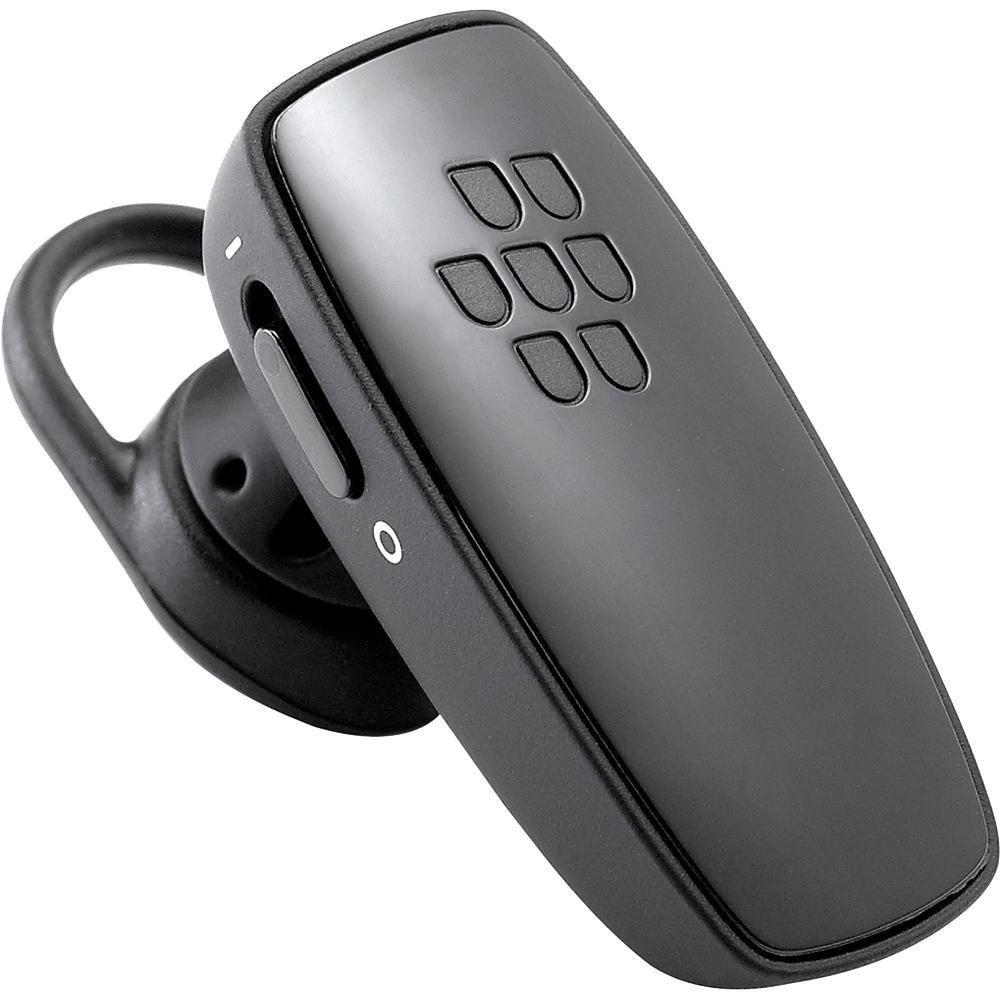
Immagine 1: Davanti view of the BlackBerry HS-300 Wireless Bluetooth Headset. The image displays the main body of the headset, featuring the BlackBerry logo (seven-dot pattern) on the front surface. A slender button, likely for volume control or multi-function, is visible on the side. An ear hook is attached, designed to secure the headset over the ear. A small indicator light is also present near the button.
- Pulsante multifunzione: Used for answering/ending calls, voice commands, and pairing.
- Pulsanti di controllo del volume: Adjusts call and media volume.
- Indicatore LED: Visualizza lo stato (alimentazione, associazione, ricarica).
- Microfono: Captures your voice during calls.
- Interruttore di alimentazione: Accende o spegne le cuffie.
- Porta di ricarica: Connects to the charging cable.
Impostare
1. Caricare l'auricolare
Before initial use, fully charge your headset. The HS-300 features rapid charge capabilities.
- Connect the charging cable to the headset's charging port and to a compatible USB power source.
- The LED indicator will show the charging status (e.g., solid red for charging, solid blue for fully charged).
- A full charge provides up to 4 hours of talk time.
2. Associazione con un dispositivo Bluetooth
To use your headset, it must be paired with a Bluetooth-enabled phone or device.
- Assicurati che le cuffie siano spente.
- Press and hold the Multi-function Button until the LED indicator flashes blue and red alternately. This indicates pairing mode.
- On your phone, enable Bluetooth and search for new devices.
- Select "BlackBerry HS-300" from the list of available devices.
- Se viene richiesto un codice di accesso, immettere "0000" (quattro zeri).
- Once paired, the LED indicator will flash blue periodically.
Istruzioni per l'uso
Accensione/spegnimento
- Per accendere: Slide the Power Switch to the 'On' position. The LED indicator will flash blue.
- Per spegnere: Portare l'interruttore di alimentazione in posizione "Off". L'indicatore LED si spegnerà.
Effettuare e ricevere chiamate
- Risposta a una chiamata: Premere una volta il pulsante multifunzione.
- Terminare una chiamata: Premere una volta il pulsante multifunzione durante una chiamata.
- Rifiutare una chiamata: Tenere premuto il pulsante multifunzione per circa 2 secondi.
- Effettuare una chiamata: Componi il numero sul tuo telefono. La chiamata verrà trasferita automaticamente all'auricolare, se connesso.
- Voice Dialing (if supported by phone): Press the Multi-function Button once when not on a call.
Controllo del volume
- Use the Volume Control Buttons on the headset to adjust the call or media volume.
Manutenzione
- Pulire regolarmente le cuffie con un panno morbido e asciutto.
- Avoid exposing the headset to extreme temperatures, moisture, or corrosive substances.
- Quando non vengono utilizzate, conservare le cuffie in un luogo fresco e asciutto.
- Non tentare di smontare o modificare l'auricolare, poiché ciò invaliderebbe la garanzia e potrebbe causare danni.
Risoluzione dei problemi
| Problema | Soluzione |
|---|---|
| L'auricolare non si accende. | Ensure the headset is charged. Connect it to a power source using the charging cable. |
| Non riesco ad associare l'auricolare al mio telefono. |
|
| Nessun audio o scarsa qualità audio. |
|
| L'auricolare si disconnette frequentemente. |
|
Specifiche
| Caratteristica | Dettaglio |
|---|---|
| Numero di modello | HS-300 |
| Connettività | Bluetooth Wireless (Version 2.1) |
| Tempo di conversazione | Fino a 4 ore |
| Ricarica | Rapid charge capable |
| Controlli | Volume control, Multi-function button |
| Microfono | Integrato |
| Fattore di forma | On-ear (single ear) |
| Peso | Circa 3.2 once |
| Dimensioni | 2.5 x 2 x 6.5 pollici (circa) |
Garanzia e supporto
For warranty information and technical support, please refer to the documentation provided at the time of purchase or visit the official BlackBerry support websito. Conservare la prova d'acquisto per eventuali reclami in garanzia.
Supporto online: www.blackberry.com/support