
Modello: Z906
Manuale utente del sistema di altoparlanti surround 5.1 Logitech Z906
Modello: Z906
Introduzione
The Logitech Z906 5.1 Surround Sound Speaker System is designed to deliver an immersive audio experience, allowing you to hear every detail in your Dolby Digital and DTS soundtracks as intended by the studio. This THX-certified home theater speaker system provides continuous 500 watts of power, with the capability to reach a peak of 1,000 watts, ensuring rich audio and thunderous bass for a truly impactful sound experience.
It offers flexible setup options, allowing connection of up to six devices including computers, music players, TVs, and game consoles. The compact control console and wireless remote provide easy sound control, enabling instant personalization of your surround sound experience.
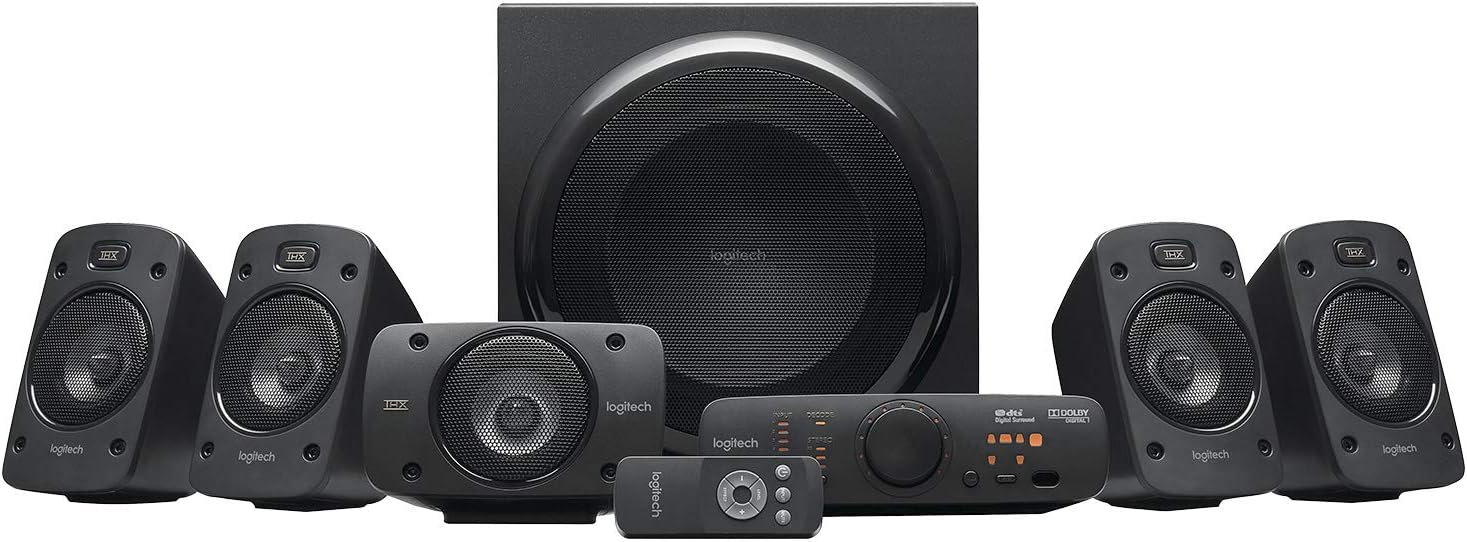
Image: The complete Logitech Z906 5.1 Surround Sound Speaker System, including the subwoofer, five satellite speakers, control console, and remote control.
Cosa c'è nella scatola
Upon unpacking your Logitech Z906 system, please ensure all the following components are present:
- Subwoofer
- Five Satellite Speakers (four satellites and one center channel speaker)
- Consolle di controllo
- Controllo remoto senza fili
- Cavi per altoparlanti
- Cavo audio da 3.5 mm
- Documentazione utente

Image: All components of the Logitech Z906 system laid out, including the subwoofer, satellite speakers, control console, remote, and cables, alongside its retail packaging.
Impostare
Follow these steps to set up your Logitech Z906 speaker system for optimal performance:
- Posizionamento dei relatori: Position the subwoofer on the floor, ideally in a corner for enhanced bass. Place the center channel speaker directly in front of your listening position, usually below or above your display. The front left and right satellite speakers should be placed equidistant from your display and at ear level. The rear left and right satellite speakers should be placed behind your listening position, also at ear level.

Image: A typical 5.1 surround sound setup with Logitech Z906 speakers, showing the front left, center, and front right speakers positioned around a television.
- Collegare gli altoparlanti al subwoofer: Connect each satellite speaker to the corresponding color-coded spring clips on the rear of the subwoofer. Ensure correct polarity (red to red, black to black).

Immagine: Primo piano view of the rear panel of the Logitech Z906 subwoofer, highlighting the various audio input ports and speaker wire terminals.
- Connect Control Console: Plug the control console cable into the "CONSOLE" port on the subwoofer.

Image: The Logitech Z906 control console, featuring input selection buttons, volume knob, and sound effect controls.
- Collegare le sorgenti audio: Use the appropriate cables (optical, coaxial, RCA, or 3.5mm) to connect your devices (PC, TV, game console, etc.) to the corresponding input ports on the subwoofer or control console. The system supports up to six devices.
- Accensione: Plug the subwoofer's power cord into a wall outlet. Turn on the system using the power button on the control console.
Funzionamento del sistema
The Logitech Z906 offers intuitive controls for managing your audio experience:
- Console di controllo: Use the input buttons (Input 1-6, Aux) to select your desired audio source. The large dial controls the master volume. Use the "Level" button to adjust individual speaker levels (front, rear, center, subwoofer) and the "Effect" button to cycle through sound modes (2.1, 4.1, 3D).

Image: The control console of the Logitech Z906, displaying various input options and controls for sound customization.
- Controllo remoto senza fili: The included remote provides convenient access to all major functions from a distance, including power, input selection, volume, and sound effects.

Image: The compact wireless remote control for the Logitech Z906 system, featuring buttons for power, input, level, and effect adjustments.
- Modalità audio:
- 2.1 Stereo: Ideal for music, distributing audio to the front left/right speakers and subwoofer.
- 4.1 Surround: Expands stereo sound to include rear speakers, creating a more enveloping experience.
- Surround 3D: Utilizes all 5.1 channels for an immersive, room-filling sound, especially effective for movies and games.
Official Product Video: Logitech Z906 Overview
Video: Un funzionario sopraview of the Logitech Z906 5.1 Speaker Surround Sound System, demonstrating its features and capabilities.
Manutenzione
To ensure the longevity and optimal performance of your Logitech Z906 speaker system, follow these simple maintenance guidelines:
- Keep the speakers and subwoofer clean by wiping them with a soft, dry cloth. Avoid using liquid cleaners or abrasive materials.
- Ensure proper ventilation for the subwoofer, as it contains the amplifier. Do not block any vents.
- Protect the speakers from extreme temperatures, humidity, and direct sunlight.
- Handle speaker cables carefully to prevent damage, which can affect sound quality.
Risoluzione dei problemi
If you encounter issues with your Logitech Z906 system, try the following common troubleshooting steps:
- Nessun suono:
- Check if the system is powered on and the volume is turned up.
- Verify that the correct input source is selected on the control console.
- Ensure all cables are securely connected to the subwoofer, speakers, and audio source.
- Test with a different audio source to rule out source device issues.
- Suono distorto:
- Lower the volume on both the speaker system and the audio source.
- Check for loose or damaged speaker cables.
- Assicurarsi che la sorgente audio non stia inviando un segnale distorto.
- Nessun suono surround:
- Confirm that your audio source is outputting a 5.1 signal (e.g., Dolby Digital or DTS).
- Ensure the system is set to a surround sound effect mode (e.g., 3D) on the control console.
- Check individual speaker levels to ensure no channels are muted or set too low.
For more detailed troubleshooting or complex issues, please refer to the official user manual or contact Logitech support.
Specifiche
| Caratteristica | Dettaglio |
|---|---|
| Marca | Logitech |
| Nome del modello | Z906 |
| Tipo di altoparlante | Satellitare |
| Tipo di montaggio | Montaggio a parete |
| Materiale | Plastica |
| Configurazione del canale audio surround | 6.1 (Note: System is 5.1, but configuration might refer to internal processing or compatibility) |
| Potenza massima in uscita dell'altoparlante | 1000 Watt (picco) |
| Potenza del subwoofer | 165 Watt |
| Potenza satellitare | 4 x 67 W |
| Risposta in frequenza | Frequenza 35 Hz |
| Tecnologia di connettività | Ausiliario, cablato |
| Modalità di uscita audio | Circondare |
| Dispositivi compatibili | MP3 Player, Gaming Console, Television, Personal Computer |
| Tipo di controllore | Telecomando |
| Peso dell'articolo | 19.6 libbra (circa 8891.61 grammi) |
| Dimensioni del prodotto | 15.2"P x 17"L x 17.3"A |
| Certificato THX | SÌ |
| Dolby Digital & DTS Digital Certified | SÌ |

Image: Detailed dimensions of the Logitech Z906 subwoofer and satellite speakers.
Garanzia e supporto
The Logitech Z906 5.1 Surround Sound Speaker System comes with a Garanzia limitata. For specific warranty terms, conditions, and duration, please refer to the official warranty documentation included with your product or visit the Logitech support websito.
For technical support, product registration, or to find answers to frequently asked questions, please visit the official Logitech support portal. You can also find contact information for customer service there.
Risorse aggiuntive
For a comprehensive guide and detailed instructions, you can download the official User Manual in PDF format:
Ask a question about this manual
Ask about setup, troubleshooting, compatibility, parts, safety, or missing instructions. Manuals+ will review the question and use this page’s manual context to help answer it.