
Introduzione
This manual provides comprehensive instructions for the installation, operation, and maintenance of your Mount-It! Dual Monitor Mount, model MI-752. Please read these instructions carefully before assembly and use to ensure proper functionality and safety. This product is designed to securely hold two computer monitors, enhancing your workspace ergonomics.

Image: The Mount-It! Dual Monitor Mount MI-752, featuring its black finish, central pole, adjustable arms, and desk clamp meccanismo.
Informazioni sulla sicurezza
- Assicurarsi che tutti i componenti siano presenti e integri prima del montaggio. Non utilizzare se qualche componente risulta mancante o difettoso.
- Verify that your desk surface is strong enough to support the combined weight of the mount and two monitors.
- Do not exceed the maximum weight capacity of 22 pounds (10 kg) per monitor arm.
- Ensure monitors are VESA compatible (75x75mm or 100x100mm) before attempting to attach them.
- Tenere lontani bambini e animali domestici durante l'installazione.
- Stringere saldamente tutte le viti, ma non eccessivamente per evitare di spanare le filettature.
Contenuto della confezione
Si prega di verificare che tutti i seguenti componenti siano inclusi nella confezione:
- Central Pole with Desk Clamp/Grommet Base
- Due bracci per monitor
- VESA Mounting Plates (pre-attached to arms)
- Hardware Kit (screws, washers, spacers for monitor attachment)
- Attrezzi (chiavi a brugola)
- Clip di gestione dei cavi
Configurazione e installazione
Follow these steps to correctly install your dual monitor mount.
Passaggio 1: scegliere il metodo di montaggio
The MI-752 supports two installation methods: C-Clamp or Grommet Base. Select the method suitable for your desk.
C-Clamp Installazione
- Allega il C-clamp assembly to the bottom of the central pole.
- Position the mount on the edge of your desk. Ensure the desk thickness is between 0.4 inches (1 cm) and 4 inches (10 cm).
- Stringere il C-clamp screws until the mount is securely fastened to the desk. Do not overtighten.
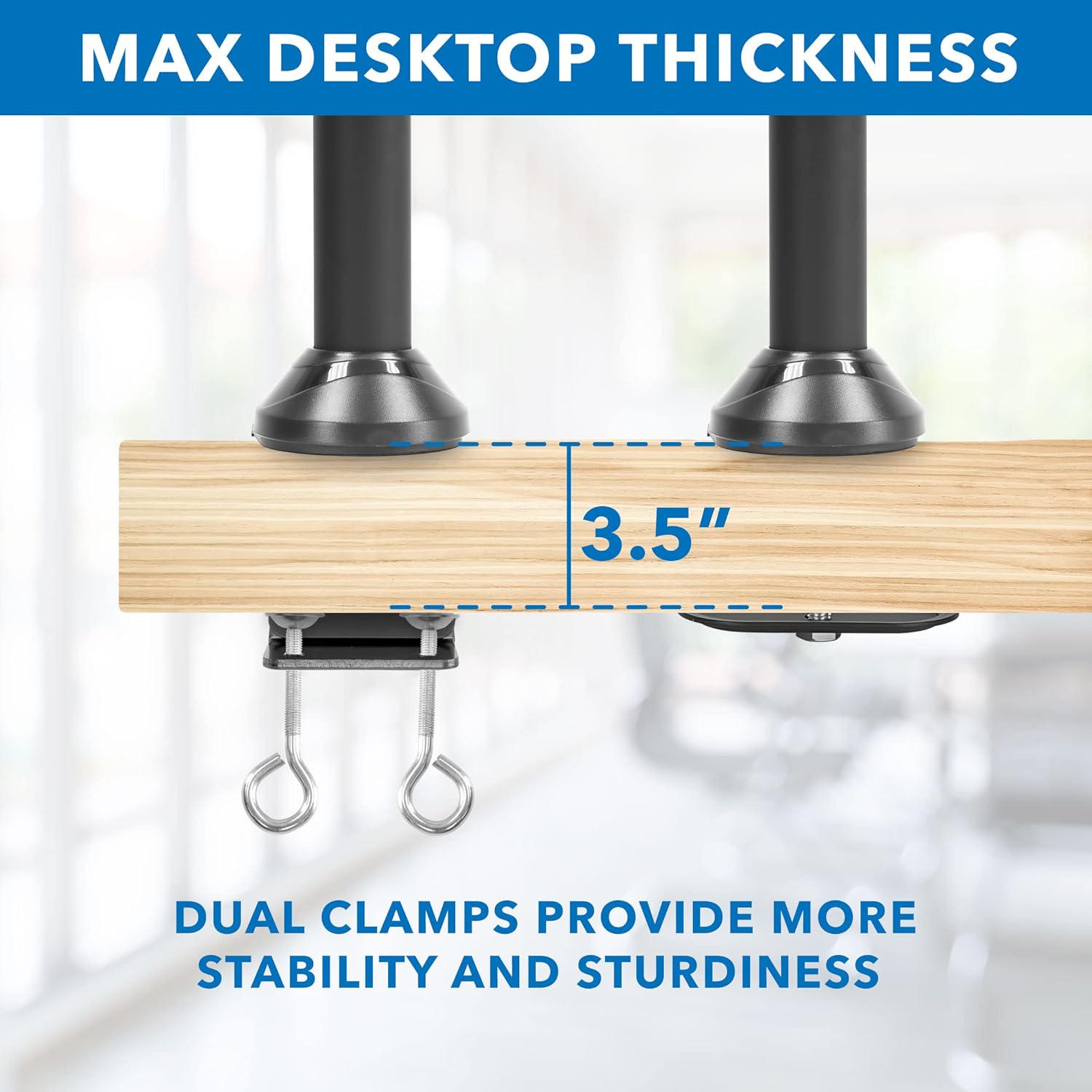
Image: Detail of the C-clamp mechanism securing the mount to a desktop, illustrating maximum compatible desk thickness.
Installazione della base dell'anello di tenuta
- If your desk has a grommet hole, disassemble the C-clamp and attach the grommet base plate to the central pole.
- Insert the central pole through the grommet hole.
- Fissare la base con occhiello da sotto la scrivania utilizzando la ferramenta fornita.
Fase 2: Fissare i bracci del monitor
Slide the monitor arms onto the central pole at your desired height. Use the included Allen wrench to tighten the set screw on each arm to secure its position.
Passaggio 3: collega i monitor
- Carefully attach the VESA mounting plates (pre-attached to the arms) to the back of your monitors using the appropriate screws from the hardware kit. Ensure the VESA pattern (75x75mm or 100x100mm) matches your monitor.
- Once the VESA plates are secured to the monitors, slide the monitors onto the arms.
- Tighten any remaining screws to ensure the monitors are firmly attached to the arms.

Image: Visual guide for VESA mounting patterns and weight capacity per arm.
Istruzioni per l'uso e regolazioni
The Mount-It! MI-752 offers various adjustment options for optimal viewcomfort.
Regolazione dell'altezza
To adjust the height of the monitors, loosen the set screw on the monitor arms where they attach to the central pole. Slide the arms up or down to the desired height, then re-tighten the set screw firmly.
Inclinazione, rotazione e rotazione
The monitor arms allow for flexible positioning:
- Inclinazione: Monitors can tilt up or down by 15 degrees. Adjust the tilt mechanism on the VESA plate.
- Girevole: The arms can swivel 360 degrees left and right.
- Rotazione: Monitors can rotate 180 degrees for landscape or portrait orientation without removal.
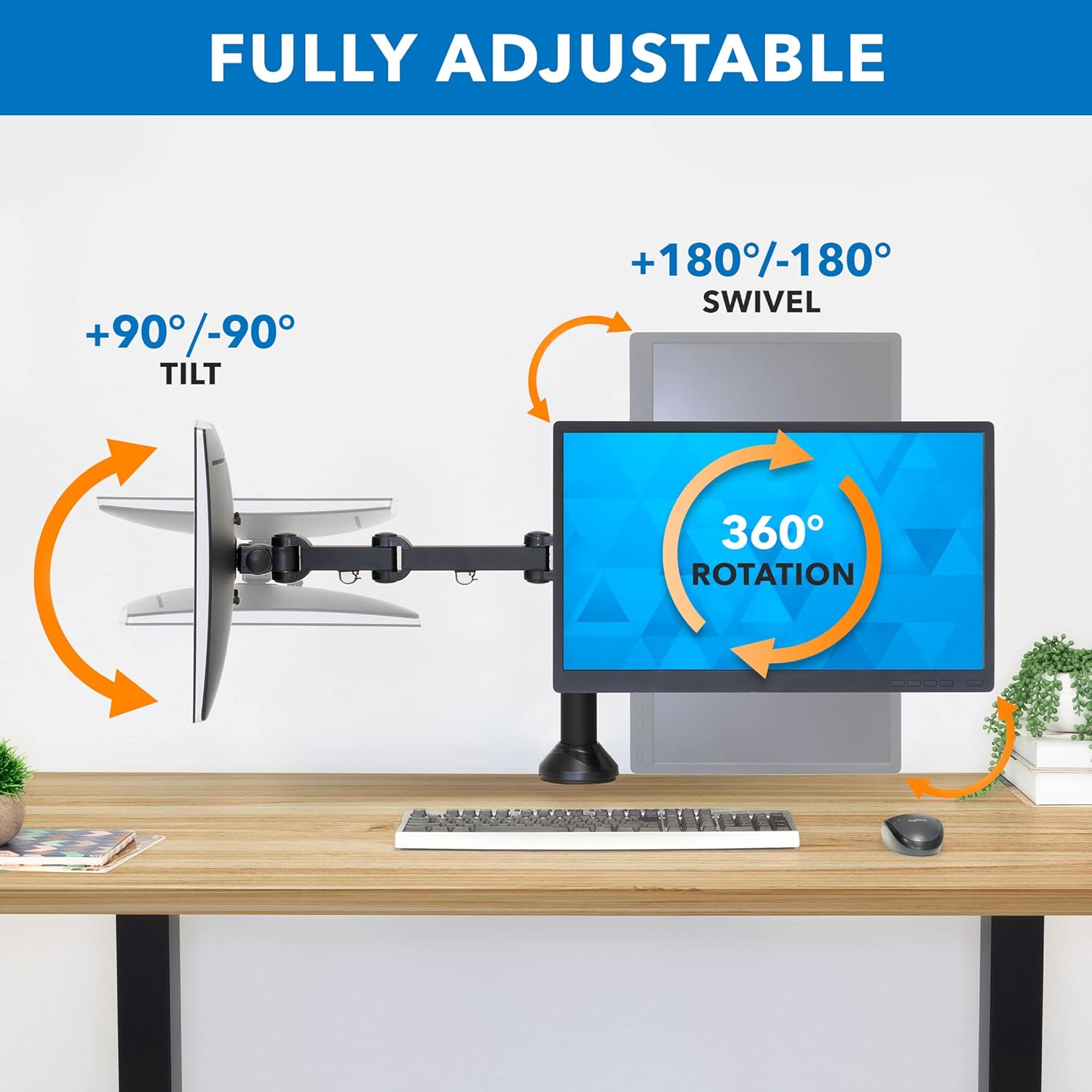
Image: Visual representation of the tilt, swivel, and rotation capabilities of the monitor arms.
Gestione dei cavi
Integrated cable management clips are located on each arm and along the central pole. Route your monitor and power cables through these clips to maintain a tidy and organized workspace.

Immagine: Example of cable routing using the integrated cable management system.
Manutenzione
To ensure the longevity and safe operation of your monitor mount:
- Controllare periodicamente tutte le viti e i collegamenti per assicurarsi che siano ben serrati. Serrare nuovamente se necessario.
- Pulisci il supporto con un panno morbido eamp panno. Evitare detergenti abrasivi o solventi.
- Do not apply excessive force when adjusting the arms or monitors.
Risoluzione dei problemi
Monitors are not level or sag
- Ensure all VESA plate screws are securely tightened to the monitor and the arm.
- Check the tightness of the pivot points on the monitor arms. Adjust with the provided Allen wrench if needed.
- Verify that the desk surface itself is level. Minor desk imperfections can be amplified by the mount.
Il monte sembra instabile
- Ricontrollare il C-clamp or grommet base installation. Ensure it is firmly secured to the desk and the desk thickness is within the specified range.
- Confirm that the combined weight of your monitors does not exceed the mount's capacity.
Difficulty adjusting monitor position
- Ensure no cables are snagged or obstructing movement.
- Check the tension of the joints. Some joints may have adjustable tension screws that can be loosened slightly with an Allen wrench if movement is too stiff.
Specifiche
| Numero di modello | MI-752 |
| Materiale | Acciaio legato, alluminio |
| Tipo di montaggio | Supporto da tavolo (C-Clamp or Grommet Base) |
| Dimensioni del monitor compatibili | 13 - 27 pollici |
| Capacità di peso per braccio | 22 libbre (10 kg) |
| Compatibilità VESA | 75x75mm, 100x100mm |
| Tipo di movimento | Articolazione, rotazione, rotazione, inclinazione |
| Angolo di inclinazione massimo | 15 gradi |
| Spessore massimo del desktop | 4 pollici (10 cm) |
| Dimensioni del prodotto | 24 x 5 x 11 pollici (circa, assemblato) |
| Peso dell'articolo | 13.2 libbre |

Image: Detailed dimensions of the monitor mount components.
Informazioni sulla garanzia
The Mount-It! Dual Monitor Mount MI-752 comes with a GARANZIA DI 5 ANNOLa presente garanzia copre i difetti di materiali e fabbricazione in condizioni di normale utilizzo. Si prega di conservare la prova d'acquisto per eventuali reclami in garanzia.
Assistenza clienti
For any questions, assistance with installation, or troubleshooting, please contact our US-based customer support team. Our friendly and responsive team is available during normal business hours to provide support.
Please refer to the Mount-It! websito o nella documentazione di acquisto per i dettagli di contatto specifici.