
Introduzione
The Kaito Voyager Solo KA450 is a versatile emergency radio designed for both daily use and emergency preparedness. It features multiple power options, AM/FM/Shortwave radio reception, and NOAA weather alerts. This manual provides instructions for setup, operation, and maintenance to ensure optimal performance.
Contenuto della confezione
Verificare che tutti gli articoli siano presenti nel pacco:
- Kaito KA450 Emergency Radio
- AC Adapter with mini-USB male plug
- Auricolari
- Manuale dell'utente (questo documento)
- Bonus cell phone charging kit (USB cable and various tips)
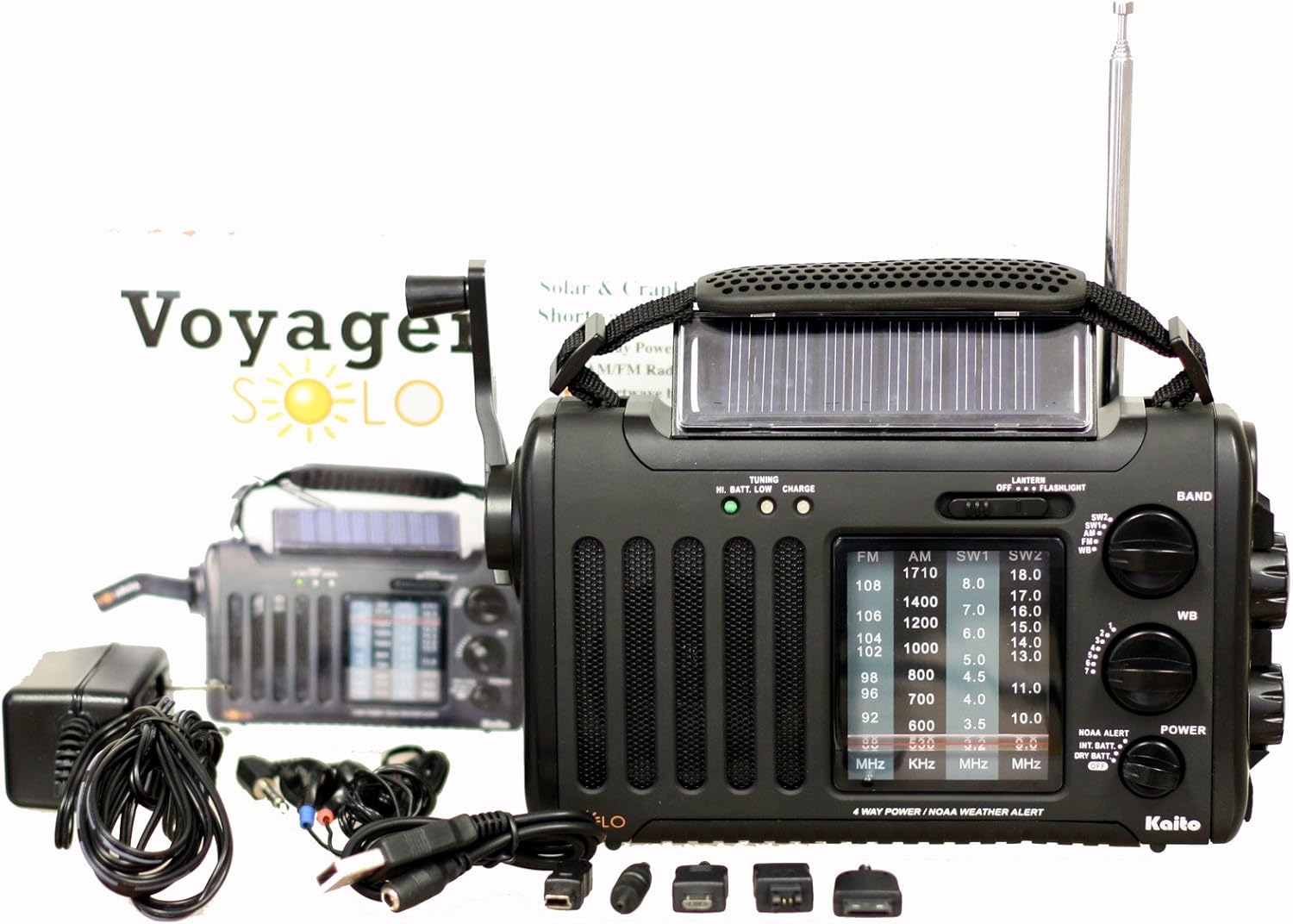
Image: The Kaito KA450 emergency radio displayed with its accompanying accessories, including the AC adapter, earphones, and various cell phone charging cables.
Setup and Powering the Radio
The KA450 offers four methods for power:
- Batterie AA: Insert three (3) AA batteries (not included) into the battery compartment located on the back of the radio. Ensure correct polarity.

Immagine: Posteriore view of the Kaito KA450 radio, highlighting the battery compartment cover and the telescopic antenna in its retracted position.
- Adattatore AC/DC: Connect the included AC adapter to a standard wall outlet and plug the mini-USB end into the "DC IN" port on the side of the radio. This also charges the internal Ni-MH battery.
- Dinamo a manovella: Extend the hand crank located on the side of the radio. Rotate the crank clockwise or counter-clockwise for approximately 1-3 minutes to generate power for short-term use or to charge the internal battery.

Immagine: dall'alto verso il basso view of the Kaito KA450 radio, clearly showing the foldable hand crank and the integrated solar panel.
- Pannello solare: Position the radio with the solar panel facing direct sunlight. The adjustable flip-up solar panel ensures maximum exposure. This method charges the internal Ni-MH battery and can power the radio when no other batteries are installed.
The radio includes a built-in rechargeable Ni-MH battery (600mAh) which can be charged via the AC adapter, hand crank, or solar panel.
Istruzioni per l'uso
Funzionamento radio (AM/FM/SW)
- Accensione/spegnimento: Ruotare il VOLUME knob clockwise to turn the radio on and adjust the sound level. Rotate counter-clockwise to turn off.
- Selezione della banda: Utilizzare il BANDA switch to select between AM, FM, SW1, SW2, or WB (Weather Band).
- tuning: Ruotare il ACCORDATURA knob to find desired stations. Extend the telescopic antenna for better FM and Shortwave reception. For AM, rotate the radio for optimal signal.
- Jack per cuffie: For private listening, plug 3.5mm earphones into the headset jack socket.

Immagine: Pro lateralefile of the Kaito KA450 radio, illustrating the tuning and volume control knobs, the integrated flashlight, and the DC IN power input port.
NOAA Weather Band and Alert Function
- Weather Band Selection: Imposta il BANDA switch to "WB".
- Sintonizzazione del canale: Utilizza l'apposito WB CHANNEL switch to select one of the 7 pre-programmed NOAA weather channels.
- Modalità avviso: To activate the NOAA Alert feature, set the ALLERTA NOAA switch to "Alert". In this mode, the radio will automatically activate to broadcast hazardous weather conditions or warnings from the Emergency Alert System (EAS) via the National Weather Radio (NWR) network.
Torcia elettrica e lettura Lamp
- Torcia elettrica: The single LED flashlight is located on the side of the radio. Use the LEGGERO interruttore per accenderlo o spegnerlo.
- Lettura Lamp: The 5-LED reading lamp is located on the back of the radio. Use the LEGGERO interruttore per accenderlo o spegnerlo.
Cell Phone Charging
- Connect your cell phone or other compatible device to the standard USB female output jack using the appropriate charging cable (included bonus kit).
- Power for charging is drawn from the radio's internal battery or generated via the hand crank/solar panel. Charging efficiency may vary depending on the device and power source.
Manutenzione
- Pulizia: Pulire la radio con un panno morbido, damp panno. Non usare detergenti abrasivi o solventi.
- Cura della batteria: If using AA batteries, remove them if the radio will not be used for an extended period to prevent leakage. Regularly charge the internal Ni-MH battery to maintain its capacity.
- Magazzinaggio: Conservare la radio in un luogo fresco e asciutto, lontano dalla luce solare diretta e da temperature estreme.
Risoluzione dei problemi
- Nessun potere:
- Check if AA batteries are inserted correctly and have sufficient charge.
- Assicurarsi che l'adattatore CA sia collegato correttamente e che la presa sia funzionante.
- Crank the dynamo for 1-3 minutes or expose the solar panel to direct sunlight to charge the internal battery.
- Scarsa ricezione radio:
- Extend the telescopic antenna fully for FM and Shortwave bands.
- For AM reception, try rotating the radio to find the best signal.
- Allontanarsi dai dispositivi elettronici che potrebbero causare interferenze.
- Cell Phone Not Charging:
- Assicurarsi che la radio abbia energia sufficiente (batteria interna carica o in fase di avviamento/ricarica solare).
- Verify the USB cable and phone adapter are correctly connected and compatible with your device.
- Note that charging speed and compatibility may vary.
Specifiche
| Caratteristica | Dettaglio |
|---|---|
| Modello | KA450 |
| Bande radiofoniche | FM: 88 - 108 MHz AM (MW): 530 - 1710 KHz SW 1: 3.2 - 8.0 MHz SW 2: 9.0 - 18.0 MHz NOAA Weather: 1 - 7 Channels |
| Fonti di energia | 3 batterie AA (non incluse) AC/DC Adapter (included) Dinamo a manovella Pannello solare Built-in Rechargeable Ni-MH Battery (600mAh) |
| Altoparlante interno | 0.5W |
| Presa per cuffie | 3.5 millimetri |
| Uscita USB | Standard USB female jack for charging external devices |
| Dimensioni | 8 x 4.5 x 2.5 pollici (20.3 x 11.4 x 6.35 cm) |
| Peso | 1 libbre (0.45 kg) |
| Caratteristiche speciali | NOAA Weather Alert, 5-LED Reading Lamp, Single LED Flashlight |
Garanzia e supporto
For warranty information and technical support, please refer to the contact details provided with your purchase documentation or visit the official Kaito websito. Conserva la ricevuta d'acquisto come prova d'acquisto.
Kaito Ufficiale Websito: Visit the Kaito Store on Amazon