
1. Introduzione
This manual provides instructions for the VTech ATT-CL80100 DECT 6.0 accessory handset. This handset is designed to expand your existing compatible VTech/ATT DECT 6.0 cordless phone system. It is compatible with ATT models CL81100, CL81200, CL81300, CL82100, CL82200, CL82300, CL82350, CL82400, CL82500, CL82600, CL84100, and CL84200. Please read this manual thoroughly before using your new accessory handset.
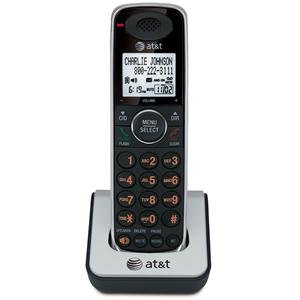
Image 1.1: The VTech ATT-CL80100 accessory handset. This image shows the front view of the cordless handset, typically including the display, keypad, and speaker.
2. Impostazione
Before using your new accessory handset, it must be registered to your existing compatible base unit and its battery must be charged.
2.1 Contenuto della confezione
Assicurati che il tuo pacco contenga i seguenti articoli:
- ATT-CL80100 Accessory Handset
- Handset Battery Pack
- Handset Charger with Power Adapter
- Manuale dell'utente (questo documento)
2.2 Installazione della batteria
- Aprire il coperchio del vano batterie sul retro del portatile.
- Collegare saldamente il connettore del pacco batteria al jack all'interno del vano.
- Inserire la batteria nel vano.
- Rimettere a posto il coperchio del vano batteria finché non scatta in posizione.
2.3 Ricarica del portatile
- Plug the small end of the charger's power adapter into the back of the handset charger.
- Collegare l'estremità grande dell'adattatore di alimentazione a una presa elettrica standard.
- Place the handset face forward into the charger cradle. The charge indicator light on the handset should illuminate, indicating proper charging.
- Allow the handset to charge for at least 12 hours before initial use. A full charge ensures optimal battery performance.
2.4 Registrazione del portatile
This accessory handset must be registered to your existing base unit to function. Refer to your main system's user manual for specific registration instructions, as procedures may vary slightly between base models (CL81xxx, CL82xxx, CL84xxx series). Generally, the process involves:
- Placing the accessory handset in its charger.
- Initiating a registration sequence on the base unit (often by pressing and holding a "PAGE" or "HANDSET LOCATOR" button).
- Confirming registration on the accessory handset.
If registration is successful, the handset display will show "Registered" or a similar confirmation message.
3. Utilizzo del telefono
Once registered and charged, your accessory handset operates similarly to your primary handsets.
3.1 Effettuare e ricevere chiamate
- Per effettuare una chiamata: Premere PARLA/FLASH or ORATORE, quindi componi il numero di telefono.
- Per rispondere a una chiamata: Press any key (Any Key Answer feature) or press PARLA/FLASH or ORATORE.
- Per terminare una chiamata: Premere SPENTO/CANCELLA oppure riposizionare il portatile nel caricabatterie.
3.2 Utilizzo della directory
The handset shares the main system's 50-name/number directory. To access:
- Premere MENU/SELEZIONA.
- Scroll to "Directory" and press MENU/SELEZIONA.
- Scroll through entries or use the keypad to search by name.
- Premere PARLA/FLASH to dial a selected entry.
3.3 Ricomposizione
The handset stores the last 20 numbers dialed. To redial:
- Premere RICHIAMA/PAUSA.
- Scroll through the list of recent calls.
- Premere PARLA/FLASH per comporre il numero selezionato.
3.4 Handset Settings
You can customize various settings on your handset, including selectable ringer tones and menu language (English/Spanish/French setup menu). Access these options via the MENU/SELEZIONA button and navigate to the "Settings" or "Handset Setup" menu.
4. Manutenzione
Proper care ensures the longevity of your accessory handset.
- Pulizia: Wipe the handset and charger with a soft, damp panno. Non utilizzare spray detergenti o prodotti chimici aggressivi.
- Cura della batteria: Replace the battery pack when its performance significantly degrades. Use only the specified replacement battery.
- Ambiente: Tenere il telefono lontano da fonti di calore eccessivo, dalla luce solare diretta e dall'umidità.
5. Risoluzione Dei Problemi
If you experience issues with your accessory handset, try the following solutions:
5.1 No Dial Tone or Cannot Make/Receive Calls
- Ensure the handset is properly registered to the base unit.
- Check that the handset battery is charged.
- Verify the main base unit is powered on and connected to the telephone line.
5.2 Handset Display is Blank or Not Working
- Place the handset in its charger to ensure it is charging.
- Check the battery connection inside the handset.
- Se il problema persiste, potrebbe essere necessario sostituire la batteria.
5.3 Scarsa qualità audio
- Avvicinarsi all'unità base per migliorare la potenza del segnale.
- Assicurarsi che non vi siano oggetti metallici di grandi dimensioni o altri dispositivi elettronici che interferiscono con il segnale.
- Controllare che il portatile o l'unità base non presentino danni fisici.
5.4 Handset Not Registering
- Ensure you are following the registration steps outlined in your main system's user manual.
- Try resetting the base unit by unplugging its power for a few minutes, then plugging it back in.
- Ensure the accessory handset is within range of the base unit during registration.
6. Specifiche
| Caratteristica | Specificazione |
|---|---|
| Marca | VTech |
| Modello | ATT-CL80100 |
| Fonte di alimentazione | Corded Electric (for charger) |
| Tipo di combinatore | Tastiera singola |
| Dimensioni articolo (L x P x A) | 2.36 x 4.96 x 7.08 pollici |
| Tipo di sistema di risposta | Digital (system dependent) |
| Peso dell'articolo | 1 chilogrammo |
| Identificazione del chiamante | No (as per product specifications, system dependent) |
| Codice UPC | 172302632910, 132017996028, 168141379444, 650530020506 |
7. Informazioni sulla garanzia
VTech products are manufactured with high-quality components and are designed to provide years of trouble-free operation. For specific warranty details, including duration and coverage, please refer to the warranty card included with your original base unit purchase or visit the official VTech support websito. Conserva la ricevuta d'acquisto come prova d'acquisto.
8. Assistenza clienti
For technical assistance, product registration, or to order replacement parts, please contact VTech customer support. You can typically find contact information (phone numbers, website, email) on the VTech official website or in the documentation provided with your main phone system.
Le risorse online possono includere:
- Domande frequenti (FAQ)
- Product Support Documents
- Software/Firmware Updates (if applicable)
When contacting support, please have your product model number (ATT-CL80100) and purchase date available.