
1. Introduzione
This manual provides detailed instructions for the installation, operation, and maintenance of your Corsair Carbide Series 500R Mid-Tower Case. Please read this manual thoroughly before beginning assembly to ensure proper setup and to maximize the performance and longevity of your system.
2. Prodotto finitoview
The Corsair Carbide Series 500R is a mid-tower computer case designed for high-performance PC builds, offering extensive cooling options, flexible storage configurations, and user-friendly features for assembly and maintenance.
2.1 Caratteristiche principali
- Supports graphics cards up to 452 mm in length (with hard drive cage removed).
- Integrated multi-channel fan controller.
- Includes a 200 mm side panel fan, two front-mounted 120 mm fans, and one rear 120 mm fan.
- Side panel with mesh fan mount locations for additional cooling.
- Quattro alloggiamenti per unità da 5.25 pollici.
- Six 3.5-inch hard drive bays with 2.5-inch compatibility for SSDs.
- Otto slot di espansione.
- Supports most 240 mm dual radiators (15 mm spacing).
- Front I/O panel: 2 USB 3.0 connectors, 1 Firewire connector, 3.5-inch headphone and microphone jacks, power and reset switches, and fan LED on/off switch.
- Tool-free drive installation and thumb screws for side panels.
- Integrated, removable dust filters for easy maintenance.
- Cable management system for routing cables behind the motherboard.
2.2 Componenti inclusi
La confezione del prodotto contiene i seguenti articoli:
- 1x Corsair Carbide Series 500R Mid-Tower Case
- 1x Guida rapida
- 1x Installation Kit (screws, standoffs, cable ties)
2.3 Prodotto Views
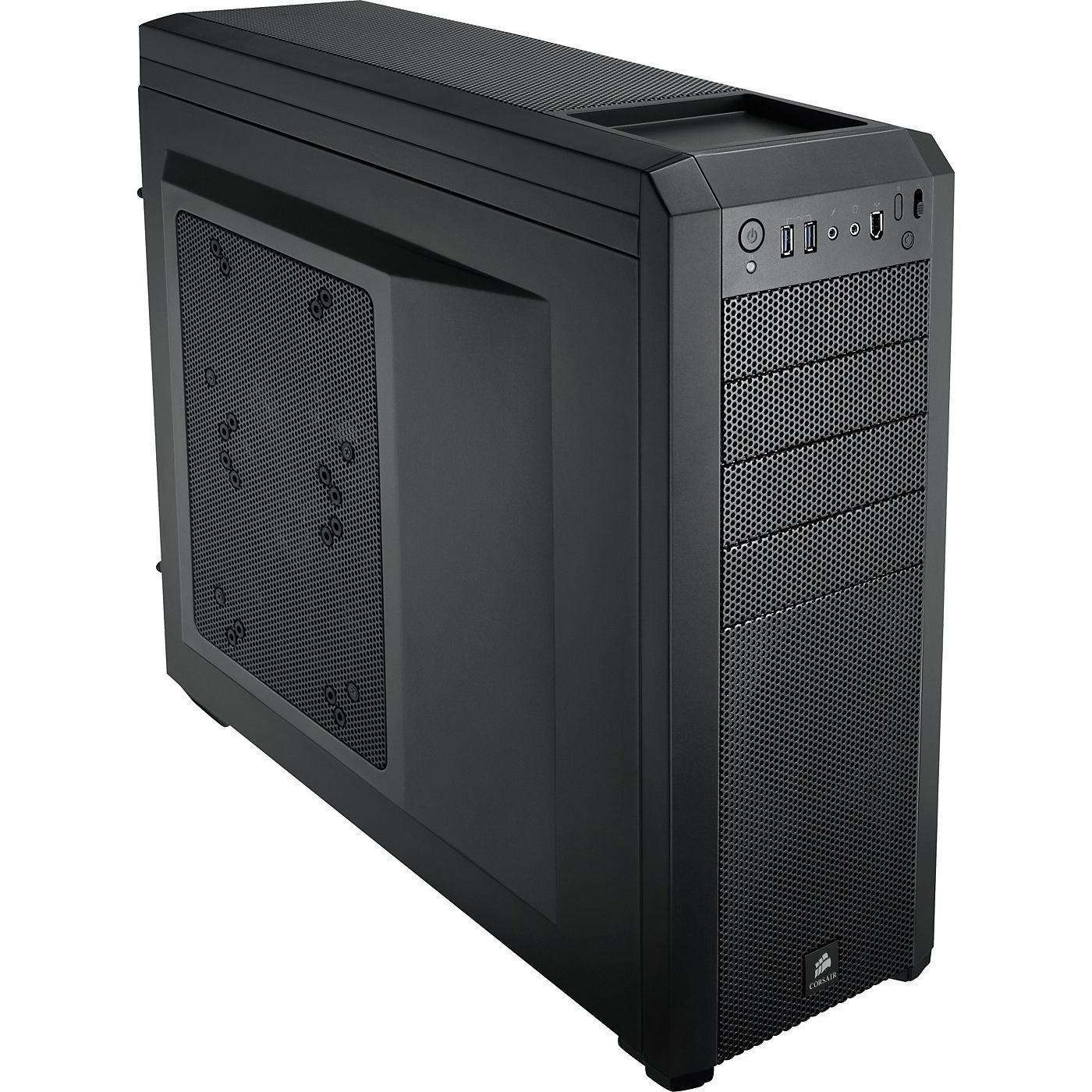
Figura 1: Fronte angolato view of the Corsair Carbide Series 500R Mid-Tower Case.
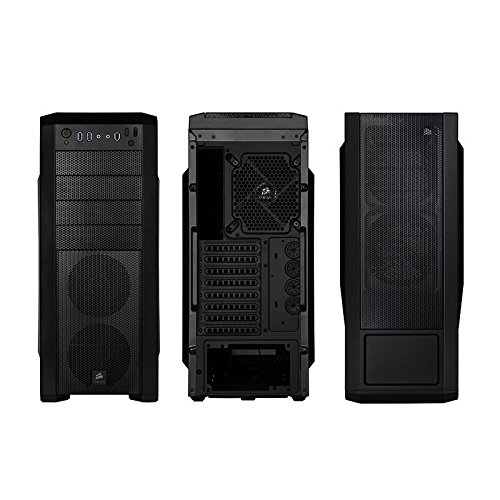
Figure 2: Front, rear, and side panel views of the case, highlighting various ports and fan mounts.
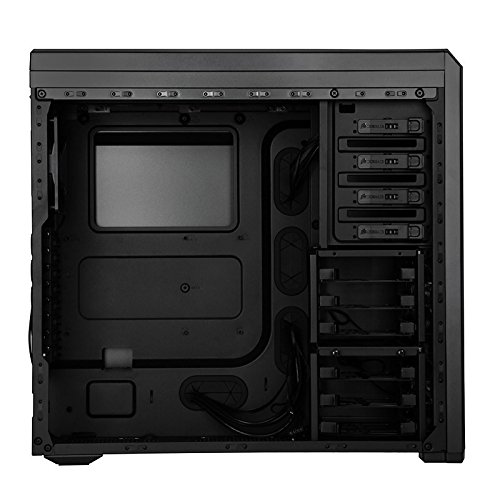
Figure 3: Internal layout of the case, showing drive bays, motherboard tray, and cable routing options.
3. Istruzioni per l'installazione
Follow these steps to set up your Corsair Carbide Series 500R case and install your computer components.
3.1 Preparazione del caso
- Disimballare la valigia e rimuovere tutto il materiale di imballaggio.
- Posizionare la custodia su una superficie piana e stabile.
- Remove the side panels by unscrewing the thumb screws at the rear of the case and sliding the panels backward.
3.2 Installazione della scheda madre
- Install the I/O shield provided with your motherboard into the rear I/O cutout of the case.
- Align your motherboard with the pre-installed standoffs. Install additional standoffs from the installation kit if required by your motherboard's form factor.
- Carefully place the motherboard onto the standoffs and secure it with the provided screws.
3.3 Installazione dell'unità
The Carbide Series 500R features tool-free installation for 5.25-inch and 3.5-inch drives.
3.3.1 5.25-inch Optical Drives
- Remove the desired front panel bay cover.
- Slide the 5.25-inch device into the bay from the front until the tool-free locking mechanism engages.
3.3.2 3.5-inch Hard Drives / 2.5-inch SSDs
- Pull out a drive tray from one of the 3.5-inch bays.
- For 3.5-inch drives: Flex the tray and insert the drive, aligning the pins with the screw holes.
- For 2.5-inch SSDs: Secure the SSD to the bottom of the tray using the provided screws.
- Slide the loaded tray back into the drive bay until it clicks into place.
- The hard drive cages are removable and relocatable to accommodate longer graphics cards. To remove, locate the release tabs or screws and carefully detach the cage.
3.4 Installazione della scheda grafica e della scheda di espansione
- Rimuovere le coperture degli slot di espansione necessari nella parte posteriore del case.
- Insert your graphics card or other expansion cards into the appropriate PCIe/PCI slots on your motherboard.
- Secure the cards with the provided screws or tool-free retention clips.
3.5 Installazione dell'alimentatore
- Place your power supply unit (PSU) into the designated compartment at the bottom rear of the case.
- Secure the PSU to the case using the screws from your PSU's accessory kit.
3.6 Gestione dei cavi
Utilize the cable routing holes and tie-down points behind the motherboard tray to organize and conceal cables. This improves airflow and maintains a clean internal appearance.
4. Istruzioni per l'uso
This section details the operation of the case's integrated features.
4.1 Pannello I/O frontale
Il pannello I/O frontale fornisce un comodo accesso alle porte e ai controlli essenziali:
- Pulsante di accensione: Press to turn on or off your computer.
- Pulsante di reset: Press to restart your computer.
- Porte USB: 3.0 Connect compatible USB 3.0 devices for high-speed data transfer.
- Firewire Port: Connect Firewire-compatible devices.
- Jack per cuffie: Collegare le cuffie per l'uscita audio.
- Jack per microfono: Collegare un microfono per l'ingresso audio.
4.2 Regolatore ventola
The integrated multi-channel fan controller allows you to adjust the speed of the connected case fans. Refer to the Quick Start Guide for specific fan connections. Typically, the controller offers multiple speed settings (e.g., Low, Medium, High) to balance cooling performance and noise levels.
4.3 Fan LED Control
A dedicated button on the front panel allows you to toggle the white LEDs on the front panel fans on or off, providing aesthetic control.
5. Manutenzione
Una manutenzione regolare aiuta a garantire prestazioni ottimali e longevità dei componenti del computer.
5.1 Pulizia del filtro antipolvere
The Corsair Carbide Series 500R includes integrated dust filters on the front and bottom of the case. These filters prevent dust buildup inside your system.
- Periodically check the dust filters for accumulation.
- Carefully remove the filters (the bottom filter slides out, front filters may require removing the front panel).
- Clean the filters using compressed air, a soft brush, or by rinsing with water (ensure they are completely dry before reinstallation).
- Reinstall the cleaned dust filters.
5.2 Pulizia generale
Utilizzare un morbido, damp cloth to clean the exterior surfaces of the case. Avoid abrasive cleaners or solvents that could damage the finish.
6. Risoluzione Dei Problemi
Questa sezione affronta i problemi più comuni che potresti riscontrare durante la configurazione o il funzionamento.
6.1 Il sistema non si accende
- Ensure the power supply is properly connected to the wall outlet and the power switch on the PSU is in the 'ON' position.
- Verify that the motherboard's 24-pin and 8-pin (or 4-pin) power connectors are securely seated.
- Check that the front panel power switch cable is correctly connected to the motherboard's front panel header. Refer to your motherboard manual for correct pin assignments.
6.2 Flusso d'aria scarso o surriscaldamento
- Ensure all case fans are spinning correctly. If not, check their power connections to the motherboard or fan controller.
- Clean any accumulated dust from the dust filters and fan blades.
- Verify that cables are neatly routed behind the motherboard tray to avoid obstructing airflow.
- Confirm that the fan controller is set to an appropriate speed for your system's cooling needs.
6.3 Front Panel USB/Audio Not Working
- Check that the USB 3.0 header cable and HD Audio cable from the front panel are securely connected to the corresponding headers on your motherboard.
- Assicurati che i driver della scheda madre siano aggiornati.
7. Specifiche
Detailed specifications for the Corsair Carbide Series 500R Mid-Tower Case:

Figure 4: Product dimensions of the Corsair Carbide Series 500R Mid-Tower Case.
| Caratteristica | Specificazione |
|---|---|
| Marca | Corsaro |
| Numero di modello | CC-9011012-WW |
| Serie | Carbide Series 500R |
| Colore | Nero |
| Tipo di caso | Mid Tower |
| Compatibilità della scheda madre | Mini ITX (and larger ATX/Micro-ATX compatible) |
| Dimensioni del prodotto (LxWxH) | 52.07 x 20.57 x 50.8 cm (20.5 x 8.1 x 20 pollici) |
| Peso dell'articolo | 7.26 kg (16 libbre) |
| Alloggiamenti per unità da 5.25 pollici | 4 |
| 3.5-inch / 2.5-inch Drive Bays | 6 (with 2.5-inch compatibility) |
| Slot di espansione | 8 |
| Porte I / O anteriori | 2x USB 3.0, 1x Firewire, 1x Headphone, 1x Microphone |
| Ventilatori inclusi | 2x 120mm Front, 1x 120mm Rear, 1x 200mm Side |
| Supporto radiatore | Up to 240mm dual radiators (top) |
8. Garanzia e supporto
Corsair provides a 2-year warranty for the Carbide Series 500R Mid-Tower Case, covering defects in materials and workmanship under normal use. For warranty claims or technical assistance, please visit the official Corsair support websito o contattare il loro servizio clienti.
Per ulteriori risorse e supporto, visitare il sito Negozio Corsair su Amazon.