
Introduzione
This manual provides essential instructions for setting up, operating, and maintaining your Canon PowerShot ELPH 310 HS digital camera. Please read this manual thoroughly to ensure proper use and to maximize your camera's performance.
Cosa c'è nella scatola
Dopo aver disimballato, verificare che siano presenti tutti i seguenti articoli:
- Canon PowerShot ELPH 310 HS Camera
- Pacco batteria NB-4L
- Battery Charger CB-2LV
- Cinturino da polso
- Cavo USB
- CD-ROM (Software/Driver)
Impostare
1. Carica della batteria
Insert the Battery Pack NB-4L into the Battery Charger CB-2LV. Plug the charger into a power outlet. The charging indicator light will show the charging status. Once fully charged, remove the battery.
2. Inserimento della batteria e della scheda di memoria
Open the battery/card compartment cover on the camera. Insert the charged battery pack, ensuring correct orientation. Insert a compatible SD/SDHC/SDXC memory card into the card slot until it clicks into place. Close the compartment cover securely.

Immagine: Frontale view of the Canon PowerShot ELPH 310 HS digital camera, showcasing its silver finish and lens.
Utilizzo della fotocamera
1. Accensione/spegnimento
Premere il tasto ACCESO/SPENTO button located on the top or side of the camera to power it on or off. The lens will extend when powered on.
2. Fotografia di base
- Messa a fuoco: Gently press the shutter button halfway down to focus. The camera will emit a beep and display a green frame when focus is achieved.
- Scattare una foto: Premere completamente il pulsante di scatto per catturare l'immagine.
- Ingrandisci: Utilizzare la leva dello zoom attorno al pulsante di scatto per regolare lo zoom ottico (8x).
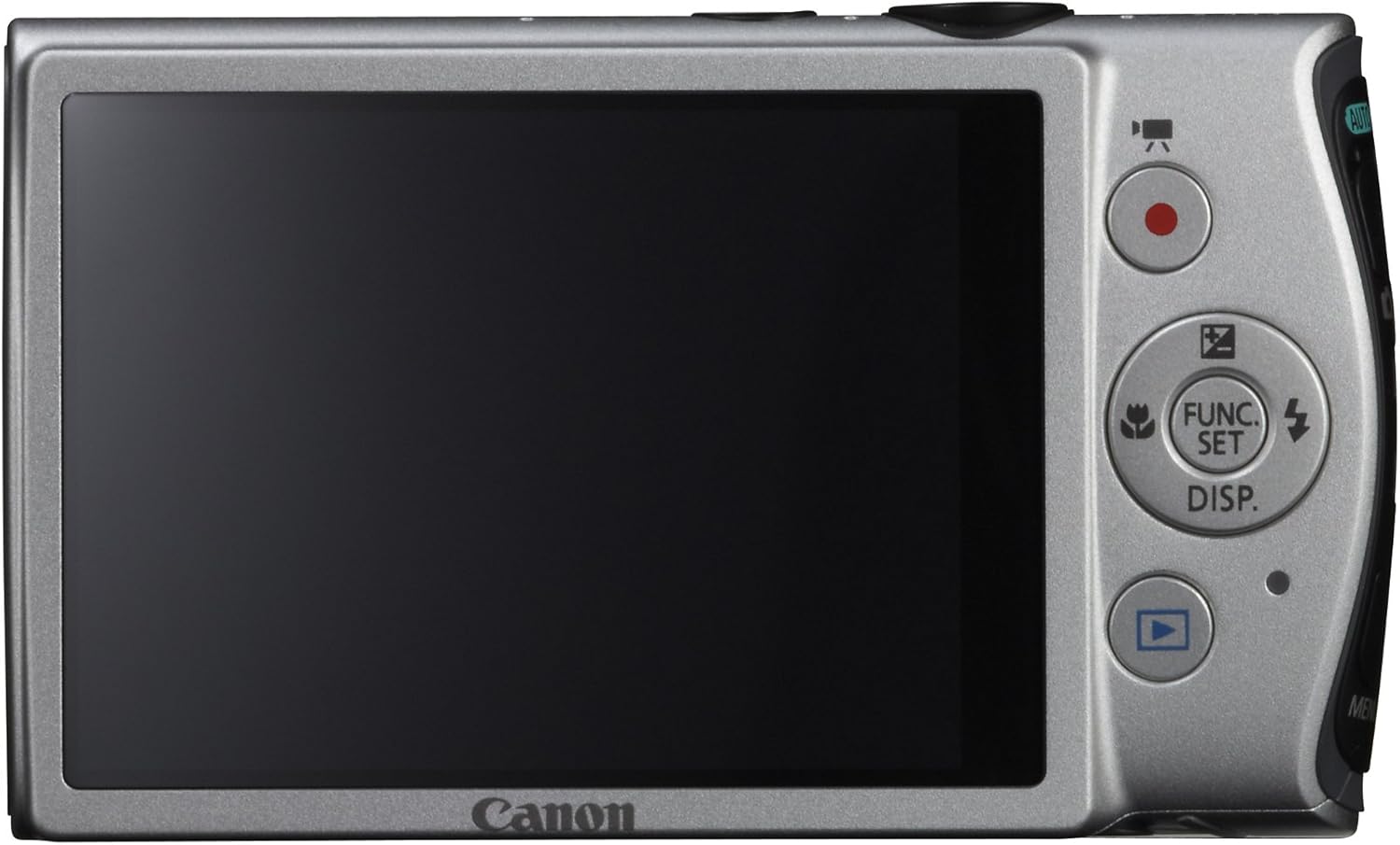
Immagine: Posteriore view of the Canon PowerShot ELPH 310 HS, displaying the 3.0-inch LCD screen and various control buttons for navigation and function selection.
3. Modalità di scatto
The PowerShot ELPH 310 HS offers various shooting modes to suit different situations. Use the mode dial or menu to select:
- AUTOMATICO intelligente: Automatically detects scenes and applies optimal settings for point-and-shoot simplicity.
- Programma (P): Allows for automatic aperture/shutter speed selection based on conditions, with some user control.
- Sintesi del film: Records a short video clip before each still image, combining them into a daily video.
- Scoppio ad alta velocità: Captures rapid action at approximately 8.7 frames per second.
- Filmato in Super Slow Motion: Records video at high frame rates (up to 240 fps) for slow-motion playback.
- Modalità scena speciali: Includes options like Handheld Night Scene, Portrait, Beach, Snow, Fireworks, Fisheye Effect, Miniature Effect, Toy Camera Effect, and more for specific photographic effects.
4. Registrazione video
To record videos, press the dedicated movie button. The camera supports Full HD 1080p video at 24 fps and 720p HD video at 30 fps. The iFrame movie format is also supported for easier editing.
5. Image Stabilization (Intelligent IS)
The camera features Intelligent IS, which automatically selects the best shake correction method for your shooting situation. This includes modes for stills (Normal, Panning, Macro, Tripod) and videos (Dynamic, Powered, Macro, Tripod) to ensure steady images and footage.
Manutenzione
1. Pulizia della fotocamera
- Lente: Utilizzare un panno morbido e privo di lanugine, specificamente progettato per gli obiettivi delle fotocamere. Evitare di toccare l'obiettivo direttamente con le dita.
- Schermo LCD: Wipe gently with a soft, dry cloth. Do not use abrasive cleaners.
- Corpo macchina fotografica: Use a soft, dry cloth to wipe away dust and smudges.
2. Cura della batteria
- Conservare le batterie in un luogo fresco e asciutto quando non vengono utilizzate.
- Evitare di scaricare completamente la batteria frequentemente per prolungarne la durata.
- Non esporre le batterie a temperature estreme.
3. Conservazione
Quando si ripone la fotocamera per periodi prolungati, rimuovere la batteria e la scheda di memoria. Conservare la fotocamera in un ambiente asciutto e privo di polvere, preferibilmente in una borsa o custodia per fotocamera.
Risoluzione dei problemi
| Problema | Possibile causa/soluzione |
|---|---|
| La fotocamera non si accende. | Battery may be depleted or incorrectly inserted. Ensure battery is charged and inserted correctly. |
| Le immagini sono sfocate. | Camera shake, subject movement, or incorrect focus. Ensure proper grip, use Intelligent IS, or check focus settings. |
| Errore della scheda di memoria. | La scheda di memoria potrebbe essere piena, danneggiata o incompatibile. Prova a formattarla (tutti i dati verranno cancellati) o a utilizzarne una diversa. |
| Il flash non si attiva. | Flash may be set to OFF or Red-Eye Reduction mode. Check flash settings in the menu. |
| Impossibile registrare il video. | Memory card may be full or too slow. Ensure sufficient space and use a high-speed memory card. |
Specifiche
| Caratteristica | Dettaglio |
|---|---|
| Nome del modello | Canon PowerShot ELPH 310 HS |
| Sensore di immagine | CMOS da 12.1 Megapixel |
| Processore di immagini | DIGIC 4 |
| Zoom ottico | 8x |
| Lente | 28mm Wide-Angle (35mm equivalent: 28-224mm) |
| Stabilizzazione dell'immagine | Ottico (Intelligent IS) |
| Registrazione video | Full HD 1080p (24 fps), HD 720p (30 fps) |
| Schermo LCD | 3.0-inch PureColor LCD (461,000 dots) |
| Supporti di memorizzazione | Schede di memoria SD, SDHC, SDXC |
| Connettività | HDMI, USB |
| Batteria | NB-4L Lithium-ion Battery Pack |
| Peso | Approx. 0.31 Pounds (including battery and memory card) |
Garanzia e supporto
Per informazioni sulla garanzia e supporto tecnico, fare riferimento alla documentazione inclusa con il prodotto o visitare il sito ufficiale Canon websito. Conservare la ricevuta d'acquisto come prova d'acquisto per eventuali reclami in garanzia.
Supporto Canon Websito: www.usa.canon.com/support