
1. Informazioni importanti sulla sicurezza
Please read this entire manual before assembling or operating the Zipro Holo 2 Exercise Bike. Keep this manual for future reference. Failure to follow these instructions can result in serious injury or damage to the equipment.
- Peso massimo dell'utente: This exercise bike is designed for users weighing up to 130 kg (approximately 286 lbs). Do not exceed this weight limit.
- Considerazioni sulla salute: Consult your physician before starting any new exercise program, especially if you have pre-existing health conditions. Stop exercising immediately if you feel faint, dizzy, or experience pain.
- Posizionamento corretto: Place the exercise bike on a stable, level surface. Ensure adequate clearance (at least 0.6 meters or 2 feet) around the equipment for safe operation and movement.
- Bambini e animali domestici: Tenere bambini e animali domestici lontani dall'apparecchiatura durante il funzionamento. Questa apparecchiatura non è un giocattolo.
- Ispezione: Before each use, inspect the bike for loose parts, wear, or damage. Do not use the equipment if it is damaged.
- Vestiario: Indossare abbigliamento sportivo e calzature adeguate. Evitare indumenti larghi che potrebbero impigliarsi nelle parti in movimento.
- Regolazioni: Ensure all adjustment knobs and levers are securely tightened before use.
2. Prodotto finitoview
The Zipro Holo 2 is a robust indoor exercise bike designed for effective home training. It features a sturdy steel frame, adjustable components, and a mechanical resistance system to simulate real cycling conditions.

Image 2.1: The Zipro Holo 2 Exercise Bike, showcasing il suo design complessivo e i suoi componenti.
Caratteristiche principali:
- Multifunction LCD Computer: Displays essential training data including time, distance, calories burned, and heart rate.
- Robusto telaio in acciaio: Ensures stability and durability during intense workouts.
- Adjustable Saddle and Handlebars: Allows for vertical and horizontal adjustments to achieve an ergonomic and comfortable riding position for various user heights.
- Heavy Steel Flywheel with Chain Drive: Provides a smooth and realistic cycling motion.
- Non-slip Pedals with Adjustable Straps: Securely holds footwear, ensuring stability even during dynamic riding.
- Fixed Wheel Drive: Engages muscles continuously for maximum training effectiveness.
3. Assemblaggio e configurazione
Before assembly, ensure all parts are present and undamaged. Refer to the included hardware pack and assembly diagram for detailed steps. It is recommended to have two people for assembly.
3.1. Disimballaggio e identificazione dei componenti
Carefully remove all components from the packaging. Lay them out on a clean, flat surface. Verify all parts against the parts list provided in the separate assembly guide.
3.2. Stabilizer Installation
Fissare gli stabilizzatori anteriore e posteriore al telaio principale utilizzando i bulloni e le rondelle forniti. Assicurarsi che siano ben serrati per fornire una base stabile alla bici.

Image 3.1: Close-up of the bike's base, showing the transport wheels and adjustable feet for leveling.
3.3. Saddle and Handlebar Adjustment
The saddle and handlebars can be adjusted vertically and horizontally to fit your body. Loosen the adjustment knobs, position the saddle/handlebars to your desired height and distance, and then securely tighten the knobs.

Image 3.2: Detail of the adjustable saddle post, allowing for vertical and horizontal positioning.

Image 3.3: Diagram illustrating the dimensions of the Zipro Holo 2 Exercise Bike (125 cm L x 64 cm W x 126 cm H).
4. Istruzioni per l'uso
4.1. Per iniziare
- Ensure the bike is on a stable surface and all adjustments are secure.
- Step onto the bike, placing your feet firmly in the pedal cages. Adjust the straps for a snug fit.
- Inizia a pedalare a un ritmo confortevole.

Image 4.1: Close-up of the non-slip pedals with adjustable straps, designed to secure your feet during exercise.
4.2. Regolazione della resistenza
The Zipro Holo 2 features a mechanical resistance system. To adjust the resistance level:
- Locate the resistance knob, typically positioned on the frame below the handlebars.
- Ruotare la manopola in senso orario per aumentare la resistenza, rendendo la pedalata più dura.
- Ruotare la manopola in senso antiorario per diminuire la resistenza, rendendo la pedalata più facile.
- For emergency stops, press down firmly on the resistance knob.
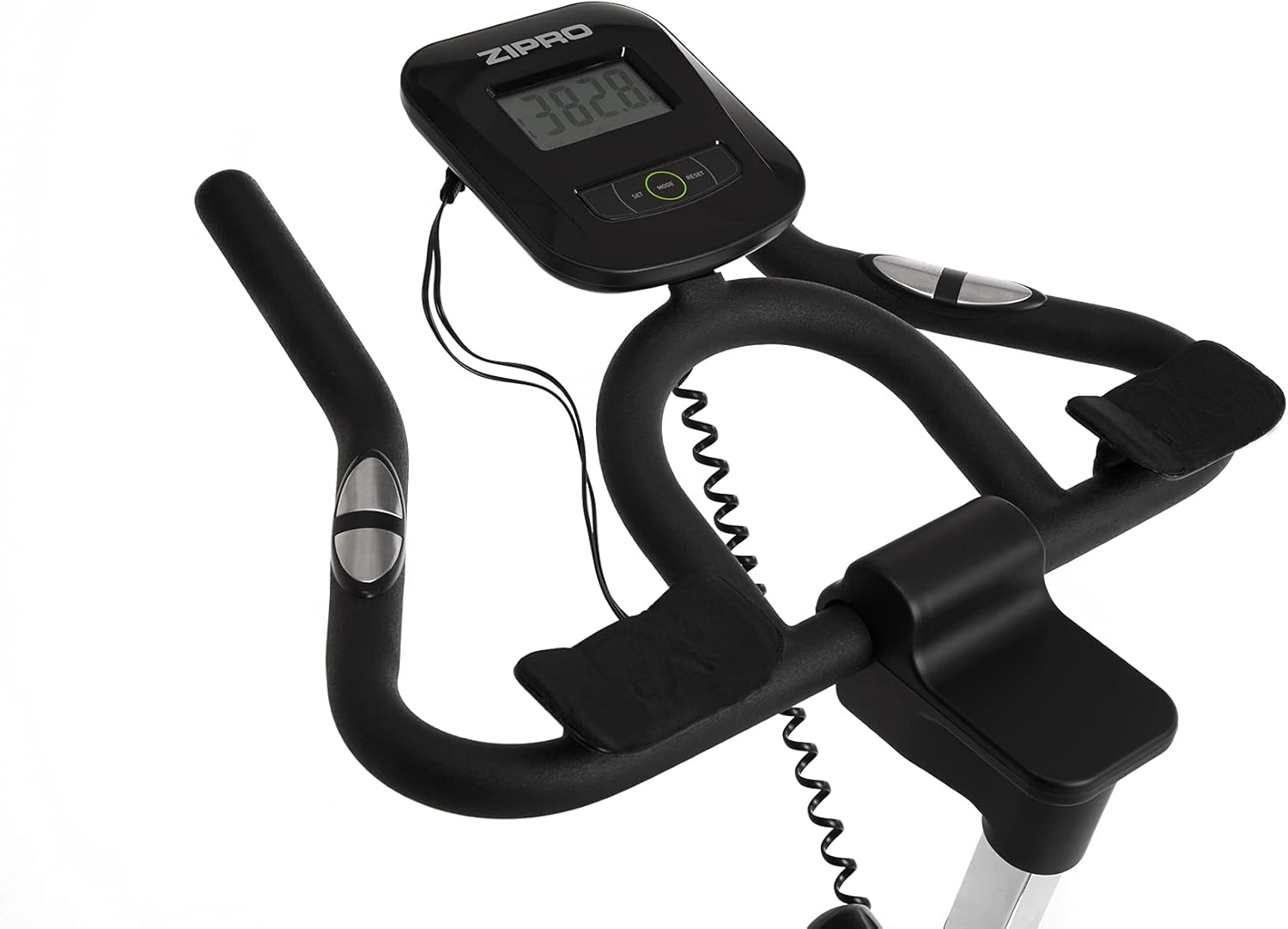
Image 4.2: Detail of the resistance adjustment knob, allowing for precise control over workout intensity.
4.3. Using the Multifunction Computer
The integrated LCD computer displays your workout data. Connect the pulse sensors (if applicable) for heart rate monitoring.
- Modalità di visualizzazione: The computer cycles through various metrics such as Time, Distance, Calories, Speed, and Pulse.
- Avvio/Arresto: The computer automatically starts when you begin pedaling and pauses when you stop.
- Reset: Press and hold the 'MODE' or 'RESET' button (refer to the computer's specific buttons) to clear all data.
- Misurazione degli impulsi: Afferrare i sensori di pulsazioni sul manubrio per visualizzare la frequenza cardiaca. Assicurarsi che entrambe le mani siano saldamente sui sensori per una lettura accurata.

Image 4.3: Close-up of the multifunction LCD computer and handlebars with integrated pulse sensors.
4.4. Water Bottle Holder
A convenient water bottle holder is integrated into the frame to keep you hydrated during your workout.

Image 4.4: Detail of the water bottle holder mounted on the bike frame.
5. Manutenzione
Regular maintenance ensures the longevity and safe operation of your Zipro Holo 2 Exercise Bike.
- Pulizia: Pulisci la bici con la pubblicitàamp panno dopo ogni utilizzo per rimuovere sudore e polvere. Evitare detergenti abrasivi o solventi.
- Lubrificazione: Periodically check the chain drive for proper lubrication. Apply a suitable lubricant if necessary, following the manufacturer's recommendations for bicycle chains.
- Controllo bulloni e dadi: Ispezionare regolarmente tutti i bulloni, i dadi e i collegamenti per assicurarsi che siano ben serrati. Serrare eventuali elementi di fissaggio allentati.
- Usura e deterioramento: Check for signs of wear on moving parts, such as pedals, straps, and the saddle. Replace worn components as needed.
- Magazzinaggio: Conservare la bicicletta in un luogo asciutto e fresco, lontano dalla luce solare diretta e da temperature estreme.
6. Risoluzione Dei Problemi
If you encounter issues with your Zipro Holo 2 Exercise Bike, refer to the following common troubleshooting steps:
| Problema | Possibile causa | Soluzione |
|---|---|---|
| Computer display is blank or erratic. | Low or dead batteries; loose connection. | Replace batteries (AA or AAA, typically). Check all cable connections to the computer. |
| Resistance feels inconsistent or too loose/tight. | Resistance mechanism issue; knob not properly adjusted. | Ensure the resistance knob is fully functional and not stripped. Inspect the mechanical resistance pads for wear. |
| Rumori insoliti (cigolii, stridii). | Loose parts; lack of lubrication; worn components. | Check all bolts and nuts for tightness. Lubricate the chain drive if dry. Inspect pedals and flywheel for any obstructions or wear. |
| Saddle or handlebars slip during use. | Adjustment knobs not tightened sufficiently. | Ensure all adjustment knobs for the saddle and handlebars are tightened firmly. |
7. Specifiche
| Caratteristica | Specificazione |
|---|---|
| Modello | Holo 2 |
| Marca | ZIPPRO |
| Numero di modello | 5944594 |
| Dimensioni (L x P x A) | Dimensioni: 125 cm x 64 cm x 126 cm |
| Peso dell'articolo | 42.5 kg (42500 grammi) |
| Peso massimo dell'utente | 130 kg (130000 grammi) |
| Sistema di azionamento | Catena |
| Meccanismo di resistenza | Meccanico |
| Fonte di alimentazione | Battery Powered (for computer) |
| Materiale principale | Plastic (components), Steel (frame) |
| Colore | Nero / Verde |
8. Garanzia e supporto
For specific warranty details, please refer to the documentation included with your purchase or contact the retailer. General return policy for this product is typically 30 days from the date of purchase.
For technical support, spare parts, or further assistance, please contact ZIPRO customer service through their official websito o rivenditore presso cui è stato acquistato il prodotto.