
1. Introduzione
This manual provides detailed instructions for the safe and proper installation, operation, and maintenance of your Premier Mounts CTM Universal Flat-Panel Mount. Please read this manual thoroughly before installation and retain it for future reference. This mount is designed to support flat-panel screens ranging from 55 inches to 63 inches.
2. Informazioni sulla sicurezza
AVVERTIMENTO: Failure to read, understand, and follow all instructions can result in serious personal injury, property damage, or voiding of the warranty. Improper installation may cause the display to fall, resulting in severe injury.
- Assicurarsi che la superficie di montaggio possa sostenere in modo sicuro il peso combinato del supporto e del display.
- Do not exceed the weight capacity of this mount.
- Always use two people for lifting and positioning the display.
- Verify that all components are present and undamaged before installation. Do not use damaged parts.
- Consult a qualified professional for assistance if you are unsure about the installation process or the suitability of your mounting surface.
3. Contenuto della confezione
Carefully unpack the box and ensure all items are present and in good condition. If any parts are missing or damaged, contact Premier Mounts customer service.
- Montaggio piastra a parete
- Display Brackets (2)
- Mounting Hardware Kit (screws, washers, spacers for various TV models and wall types)
- Manuale di istruzioni (questo documento)
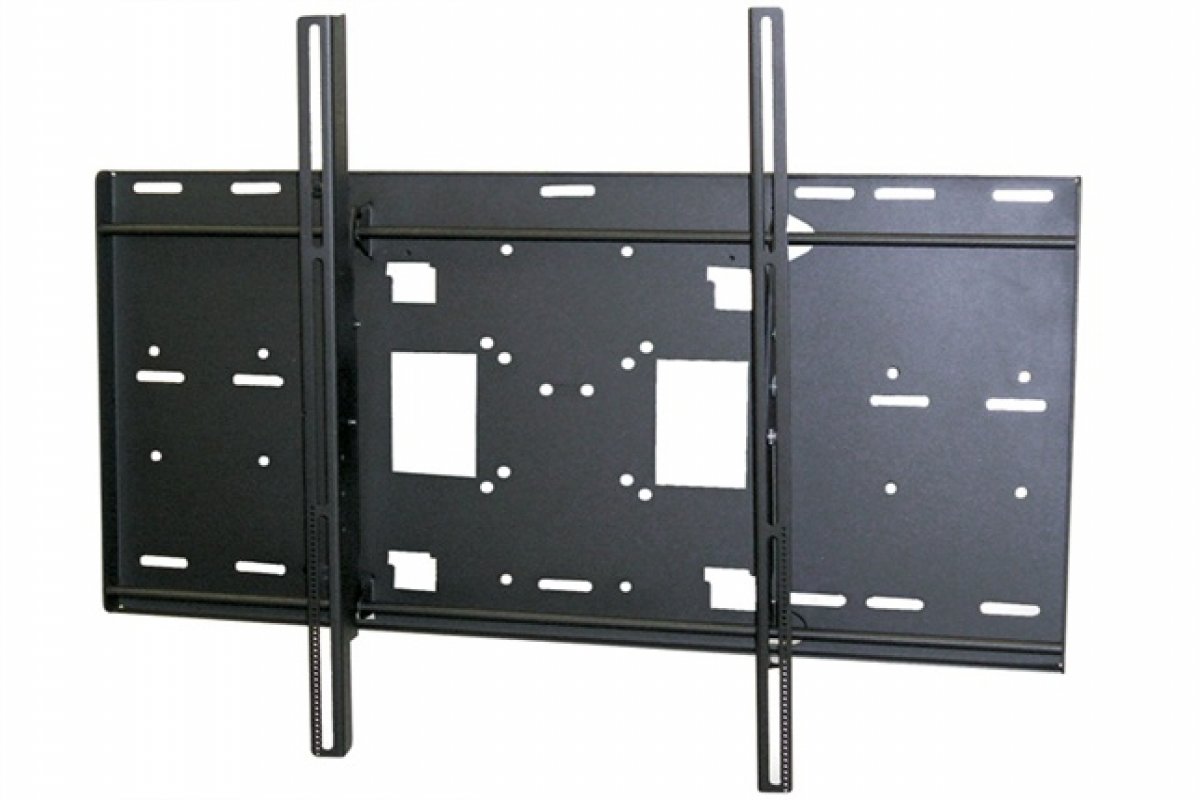
Figure 1: Illustration of typical package contents for the CTM-MS3 mount. Actual contents may vary slightly.
4. Configurazione e installazione
Before beginning, gather the necessary tools: drill, stud finder, level, tape measure, pencil, and screwdriver. Ensure you have identified the correct mounting location and wall type.
4.1 Attaching Display Brackets to TV
- Posizionare con cautela il televisore a faccia in giù su una superficie morbida e pulita.
- Identifica i fori di montaggio VESA sul retro del televisore.
- Seleziona dal kit di ferramenta le viti, le rondelle e i distanziali adatti ai fori di montaggio del tuo televisore.
- Attach the two display brackets to the back of the TV, ensuring they are level and securely fastened. Do not overtighten.
4.2 Montaggio della piastra a parete
- Determine the desired height for your TV. Mark the center of the desired location on the wall.
- Use a stud finder to locate two adjacent wooden studs. The wall plate must be mounted to at least two studs for secure installation.
- Position the wall plate against the wall, ensuring it is level using a spirit level. Mark the pilot hole locations.
- Drill pilot holes into the studs at the marked locations.
- Secure the wall plate to the wall using the provided lag bolts and washers. Tighten until snug, but do not overtighten.
4.3 Appendere la TV
- With assistance, carefully lift the TV and hook the display brackets onto the top edge of the wall plate.
- Gently lower the TV until the brackets engage with the wall plate.
- Locate the safety screws or locking mechanisms on the bottom of the display brackets. Secure the TV to the wall plate to prevent accidental dislodgement.
5. Istruzioni per l'uso
The Premier Mounts CTM-MS3 is a fixed flat-panel mount, meaning it does not offer tilt, swivel, or articulation. Once installed, your TV will remain in a fixed position against the wall.
- Viewangolo di ing: Ensure the TV is mounted at an optimal viewing height and angle during installation.
- Gestione dei cavi: Route cables neatly behind the TV and through any designated cable management openings in the wall plate (if applicable) to maintain a clean appearance and prevent damage.
6. Manutenzione
Regular maintenance ensures the longevity and safety of your mount.
- Ispezione periodica: Annually inspect all mounting hardware and connections to ensure they remain secure. Tighten any loose screws or bolts.
- Pulizia: Pulisci la montatura con un panno morbido e asciutto. Evita detergenti abrasivi o solventi che potrebbero danneggiare la finitura.
- Capacità di peso: Do not hang additional items or exceed the maximum weight capacity of the mount.
7. Risoluzione Dei Problemi
Se si verificano problemi durante o dopo l'installazione, fare riferimento ai seguenti problemi comuni e alle relative soluzioni.
| Problema | Possibile causa | Soluzione |
|---|---|---|
| La TV non è in piano dopo l'installazione. | Wall plate was not level during installation. | Remove TV, loosen wall plate screws, adjust level, and re-tighten. Re-hang TV. |
| La TV sembra instabile sul supporto. | Mounting screws are loose or incorrect hardware used. | Ensure all screws are securely tightened. Verify correct hardware for TV and wall type. Ensure safety screws are engaged. |
| Cannot find correct screws for TV. | TV requires specific VESA hardware not included. | Consult your TV's manual for VESA screw specifications. Purchase appropriate screws if necessary. |
8. Specifiche
- Modello: CTM-MS3
- Marca: Cavalcature Premier
- Screen Size Support: 55" to 63" Flat-Panel Displays
- Tipo di montaggio: Montaggio a parete fisso
- Compatibilità VESA: Universal (various patterns supported by included hardware)
- Peso dell'articolo: 37 pounds (mount only)
- Dimensioni della confezione: 37 x 30.12 x 3.35 pollici
Nota: le specifiche sono soggette a modifiche senza preavviso.
9. Garanzia e supporto
Premier Mounts products are designed for durability and reliability. For specific warranty information, please refer to the warranty card included with your product or visit the official Premier Mounts website. For technical support or assistance with installation, please contact Premier Mounts customer service.
Informazioni sui contatti: Per favore visita www.premiermounts.com per le risorse di supporto più recenti e i dettagli di contatto.