
1. Introduzione
Thank you for choosing the Ultrak Heat Index Solar Powered Stopwatch, Model 830. This device is designed for precise timing and environmental monitoring, offering features such as temperature, humidity, heat index, and dew point calculations. It is ideal for athletes, coaches, and outdoor enthusiasts who require accurate data in various conditions. This manual provides detailed instructions to help you maximize the functionality and lifespan of your stopwatch.
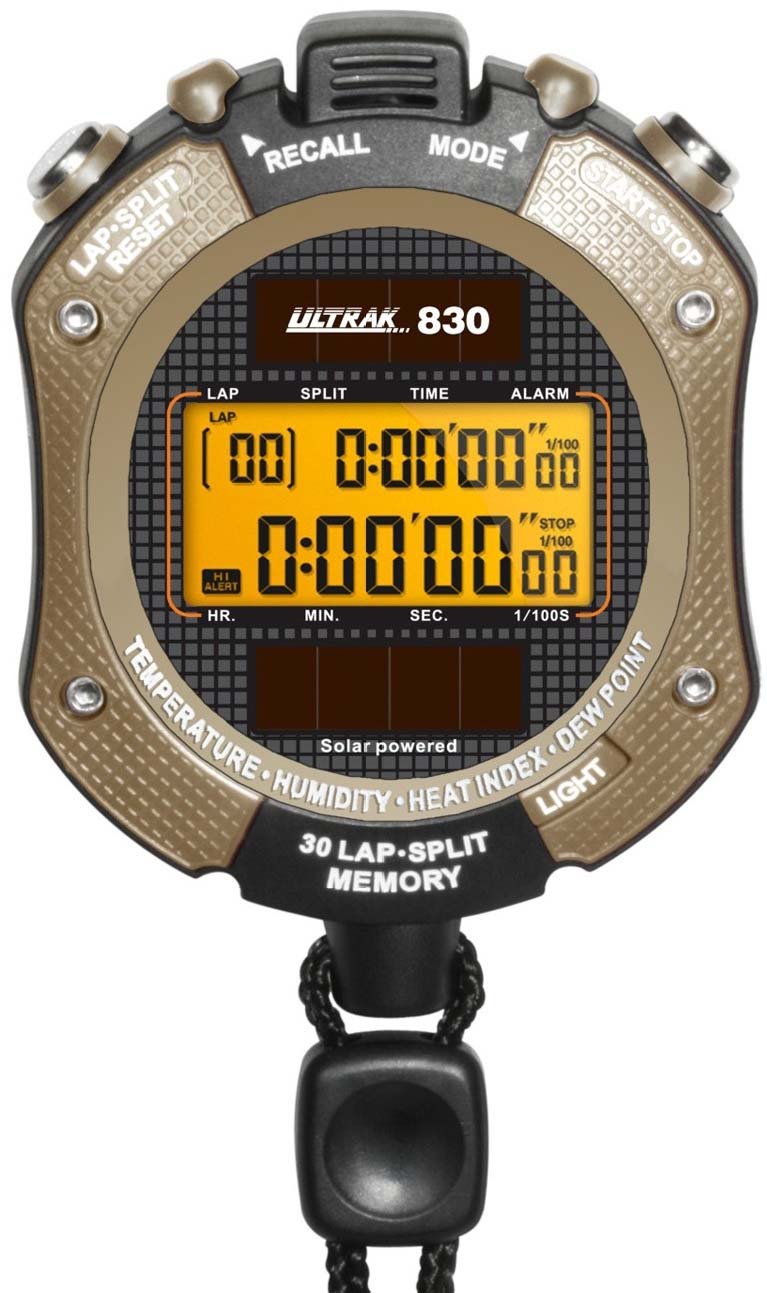
Figura 1: Davanti view of the Ultrak Heat Index Solar Powered Stopwatch, displaying its digital screen and control buttons.
2. Caratteristiche principali
- Accurate calculation of temperature, humidity, heat index, and dew point.
- 30 dual split recallable memory for tracking multiple laps or splits.
- Measures time up to 10 hours with 1/100 second resolution.
- Presettable countdown timer with an auto-repeat function.
- Displays time, calendar, and features an alarm function.
- Retroilluminazione a LED per la visibilità in condizioni di scarsa illuminazione.
- Solar-powered with a back-up lithium battery for continuous operation.
- Water-resistant design for use in various environments.
3. Configurazione e utilizzo iniziale
3.1 Accensione
The Ultrak 830 is solar-powered. Ensure the solar panel on the front of the stopwatch is exposed to light for initial power-up. A built-in lithium battery provides backup power.
3.2 Impostazione di data e ora
- In modalità Ora, tenere premuto il tasto MODALITÀ finché il display non lampeggia.
- Utilizzare il AVVIO/ARRESTO pulsante per regolare la cifra lampeggiante (ore, minuti, secondi, anno, mese, giorno).
- Premere il tasto GIRO/RESET pulsante per passare all'impostazione successiva.
- Una volta che tutte le impostazioni sono corrette, premere il tasto MODALITÀ pulsante per uscire dalla modalità di impostazione.
3.3 Attivazione della retroilluminazione
Premere il tasto LEGGERO button (usually located on the side or top) to illuminate the display for a few seconds in low-light conditions.
4. Istruzioni per l'uso
4.1 Funzione cronometro
- From Time mode, press the MODALITÀ button repeatedly until "STOPWATCH" or a similar indicator appears.
- Premere AVVIO/ARRESTO per iniziare a cronometrare.
- Premere GIRO/RESET to record a lap/split time while the stopwatch continues running. The display will momentarily show the lap time.
- Premere AVVIO/ARRESTO di nuovo per mettere in pausa il cronometro.
- Premere GIRO/RESET durante la pausa per azzerare il cronometro.
4.2 Richiamo della memoria
The stopwatch can store up to 30 dual split times. After stopping the stopwatch, press the MEMORIA button (or a designated button, refer to on-device labels) to scroll through recorded lap and split times.
4.3 Conto alla rovescia
- Navigate to the "TIMER" mode using the MODALITÀ pulsante.
- Premere e tenere premuto GIRO/RESET per accedere alla modalità di impostazione.
- Utilizzo AVVIO/ARRESTO to adjust the hours, minutes, and seconds. Use GIRO/RESET per spostarsi tra le cifre.
- Premere MODALITÀ per confermare l'impostazione.
- Premere AVVIO/ARRESTO per iniziare il conto alla rovescia. Un allarme suonerà quando il timer raggiungerà lo zero.
- To activate auto-repeat, ensure this option is enabled in the timer setting mode (if available).
4.4 Heat Index and Environmental Readings
In the dedicated "HEAT INDEX" or "ENVIRONMENT" mode (accessed via the MODALITÀ button), the stopwatch will display current temperature, humidity, heat index, and dew point. Allow a few moments for the sensors to stabilize and provide accurate readings, especially after moving to a new environment.
4.5 Funzione di allarme
- Go to "ALARM" mode using the MODALITÀ pulsante.
- Premere e tenere premuto GIRO/RESET per accedere alla modalità di impostazione della sveglia.
- Regola l'ora della sveglia usando AVVIO/ARRESTO and move between digits with GIRO/RESET.
- Premere MODALITÀ per confermare.
- Attiva/disattiva la sveglia utilizzando AVVIO/ARRESTO in modalità Allarme (non in modalità impostazione).
5. Manutenzione
- Pulizia: Pulisci il cronometro con un panno morbido eamp stoffa. Non utilizzare prodotti chimici aggressivi o detergenti abrasivi.
- Magazzinaggio: Conservare in un luogo fresco e asciutto, lontano dalla luce solare diretta, quando non si utilizza per lunghi periodi.
- Resistenza all'acqua: The stopwatch is water-resistant, but not waterproof. Avoid submerging it in water or exposing it to high-pressure water jets.
- Batteria: The solar panel charges the internal battery. Ensure regular exposure to light to maintain optimal battery life. No user-replaceable battery is required under normal operation.
6. Risoluzione Dei Problemi
| Problema | Possibile causa | Soluzione |
|---|---|---|
| Il display è vuoto o poco luminoso. | Insufficient light exposure for solar charging. | Expose the solar panel to bright light for several hours. |
| Ora/data errate. | Time/date not set correctly or reset after power loss. | Refer to Section 3.2 "Setting Time and Date" to adjust. |
| Stopwatch not responding. | Problema temporaneo del software. | Attempt a soft reset by pressing all buttons simultaneously for a few seconds (if applicable, consult specific model instructions if available). If not, allow battery to fully drain and recharge. |
| Inaccurate environmental readings. | Sensor obstruction or not enough time for stabilization. | Ensure sensors are clean and unobstructed. Allow 5-10 minutes for readings to stabilize after moving to a new environment. |
7. Specifiche
- Modello: Ultrak 830
- Timing Resolution: 1/100 secondo
- Maximum Timing Capacity: 10 ore
- Memoria: 30 dual split recallable memory
- Sensori ambientali: Temperature, Humidity, Heat Index, Dew Point
- Fonte di energia: Solar powered with lithium backup battery
- Display: Digital with LED backlight
- Resistenza all'acqua: Yes (splash resistant, not submersible)
- Codice GTIN (UPC): 743223008308
8. Garanzia e supporto
Ultrak products are manufactured to high-quality standards. For specific warranty information, please refer to the warranty card included with your purchase or visit the official Ultrak websito.
For technical support, troubleshooting assistance beyond this manual, or to inquire about replacement parts, please contact Ultrak customer service through their official websito o le informazioni di contatto fornite sulla confezione del prodotto.