
1. Introduzione
This manual provides detailed instructions for the safe and effective use of the PeakTech P 4980 Dual Laser Pointer IR Thermometer. This device is designed for non-contact temperature measurements across a wide range, from -50 to +800 °C. It features dual laser pointers for precise targeting of the measurement area. Please read this manual thoroughly before operating the device and keep it for future reference.
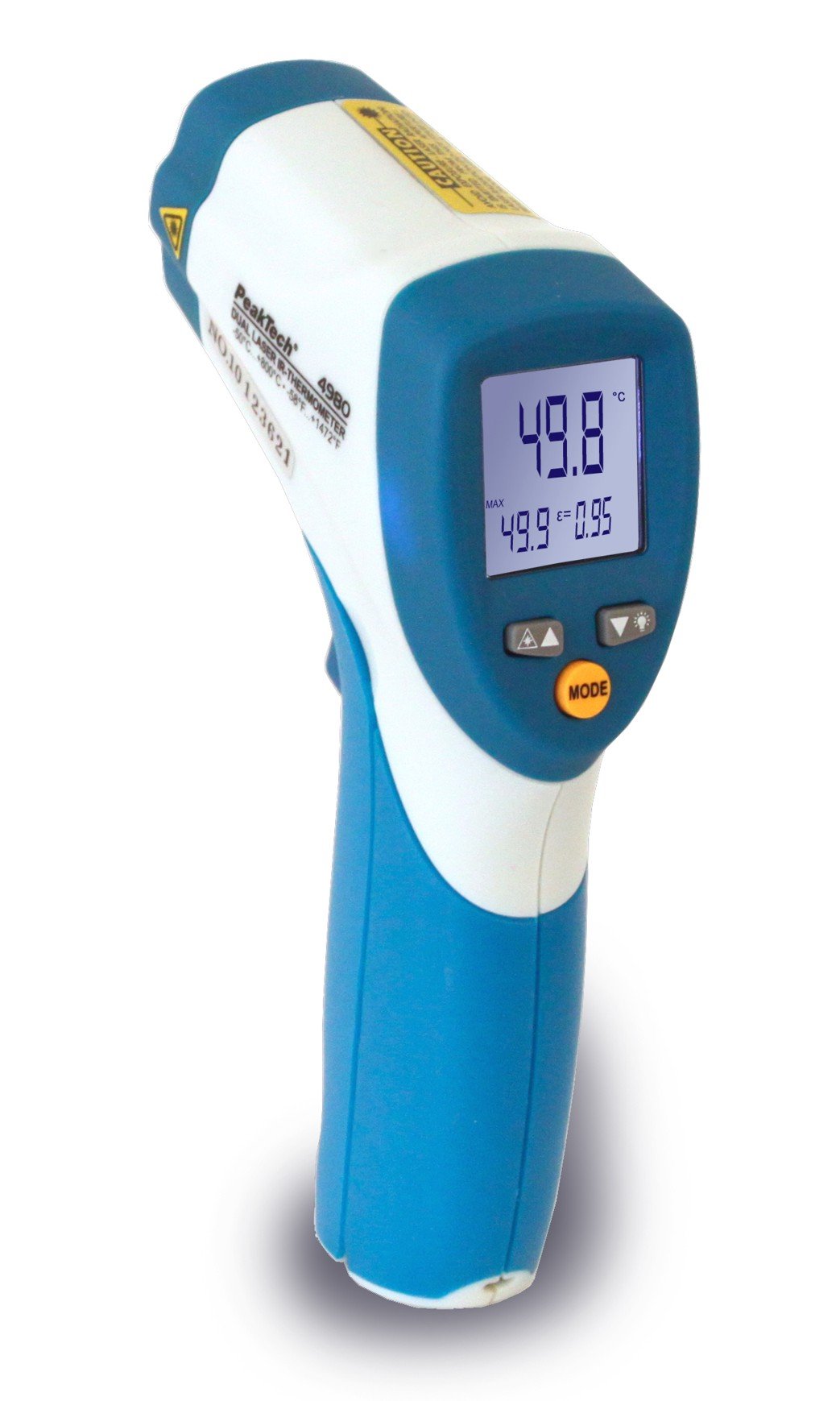
Image 1.1: The PeakTech P 4980 Dual Laser Pointer IR Thermometer, showing its ergonomic design and display.
2. Informazioni sulla sicurezza
Always observe the following safety precautions to prevent injury and avoid damage to the device:
- Sicurezza laser: This device uses Class 2 lasers. Do not stare directly into the laser beam or direct it at people or animals. Avoid direct eye exposure.
- Ambiente operativo: Do not use the thermometer in environments with explosive gases, vapor, or dust.
- Limiti di temperatura: Non esporre il dispositivo a temperature estreme al di fuori dell'intervallo operativo specificato.
- Manutenzione: Only qualified personnel should perform repairs. Do not attempt to modify the device.
- Pulizia: Per la pulizia, utilizzare un panno morbido e asciutto. Non utilizzare detergenti abrasivi o solventi.
- Gestione della batteria: Ensure correct battery polarity. Remove batteries if the device will not be used for an extended period. Dispose of batteries according to local regulations.
3. Caratteristiche del prodotto
The PeakTech P 4980 offers advanced features for accurate and convenient temperature measurement:
- Puntatori laser doppi: Provides precise targeting, indicating the exact measurement spot.
- Ampio intervallo di temperatura: Measures temperatures from -50 °C to +800 °C (-58 °F to +1472 °F).
- Misura senza contatto: Safely measure hot, hazardous, or hard-to-reach surfaces.
- Schermo LCD: Clear digital display for easy reading of temperature values.
- Emissività regolabile: Allows for accurate measurements on various surface types (refer to operating instructions for details).
- Funzione di conservazione dei dati: Blocca la lettura visualizzata per facilitarne la registrazione.
- Retroilluminazione: Improves visibility in dimly lit conditions.
- Spegnimento automatico: Conserva la durata della batteria.
4. Impostazione
4.1 Installazione della batteria
- Individuare il coperchio del vano batteria sull'impugnatura del dispositivo.
- Aprire il coperchio facendolo scorrere o sbloccandolo.
- Insert the included battery, ensuring correct polarity (+ and - terminals).
- Chiudere saldamente il coperchio del vano batterie.
4.2 Accensione/Spegnimento
- To power on the device, press the trigger. The display will illuminate.
- Il dispositivo si spegnerà automaticamente dopo un periodo di inattività per preservare la durata della batteria.
5. Istruzioni per l'uso
5.1 Esecuzione di una misurazione
- Puntare il termometro verso la superficie da misurare.
- Premere e tenere premuto il grilletto. I due puntatori laser si attiveranno, indicando l'area di misurazione.
- The measured temperature will be displayed on the LCD.
- Rilasciare il grilletto per mantenere la lettura sul display (funzione Data Hold).
5.2 Distance-to-Spot Ratio
The accuracy of the measurement depends on the distance-to-spot ratio. Ensure the target area is larger than the measurement spot size at your chosen distance. The dual lasers help define this spot.
5.3 Regolazione dell'emissività
Different materials emit infrared energy differently. For accurate readings, adjust the emissivity setting to match the surface being measured. Consult a standard emissivity table for common materials. The P 4980 allows adjustment via dedicated buttons (refer to device interface for specific controls).
5.4 Selezione unità (°C/°F)
To switch between Celsius (°C) and Fahrenheit (°F), locate the unit selection button (usually labeled '°C/°F' or similar) and press it. The display will change accordingly.
6. Manutenzione
6.1 Pulizia del dispositivo
- Pulisci il dispositivo casing con un morbido, damp stoffa. Non utilizzare materiali abrasivi o solventi.
- Per la lente, utilizzare un panno morbido o un batuffolo di cotone con una piccola quantità di alcol isopropilico.
6.2 Sostituzione della batteria
When the low battery indicator appears on the display, replace the battery as described in Section 4.1. Always use the specified battery type.
6.3 Conservazione
Conservare il termometro in un luogo fresco e asciutto, lontano dalla luce solare diretta e da temperature estreme. Rimuovere le batterie se si prevede di non utilizzarlo per periodi prolungati.
7. Risoluzione Dei Problemi
| Problema | Possibile causa | Soluzione |
|---|---|---|
| Il dispositivo non si accende. | Batteria scarica o installata in modo errato. | Controllare la polarità delle batterie o sostituirle con batterie nuove. |
| Letture imprecise. | Incorrect emissivity setting; distance too far; lens dirty. | Adjust emissivity; move closer to target; clean lens. |
| Laser pointers not visible. | Laser function disabled (if applicable); bright ambient light. | Check laser activation button; use in less bright conditions. |
| Display shows 'ERR' or similar. | Measurement outside range; internal error. | Ensure target temperature is within -50 to +800 °C. If error persists, contact support. |
8. Specifiche
| Caratteristica | Specificazione |
|---|---|
| Modello | La persona 4980 |
| Intervallo di temperatura | Da -50 ° C a +800 ° C (da -58 ° F a +1472 ° F) |
| Risoluzione | 0.1 °C / 0.1 °F |
| Tipo di visualizzazione | LCD |
| Caratteristica speciale | Non-contact, Dual Laser Pointer |
| Fonte di alimentazione | Alimentato a batteria |
| Componenti inclusi | Batteria |
| Materiale esterno | Plastica |
| Colore | Bianco/Blu |
9. Garanzia e supporto
9.1 Informazioni sulla garanzia
This PeakTech product is backed by a 3-year manufacturer's warranty, ensuring quality and reliability. Please retain your proof of purchase for warranty claims.
9.2 Assistenza clienti
For technical assistance, troubleshooting, or warranty inquiries, please contact PeakTech customer support. Refer to the official PeakTech websito o sulla confezione del prodotto per le informazioni di contatto più aggiornate.