
Introduzione
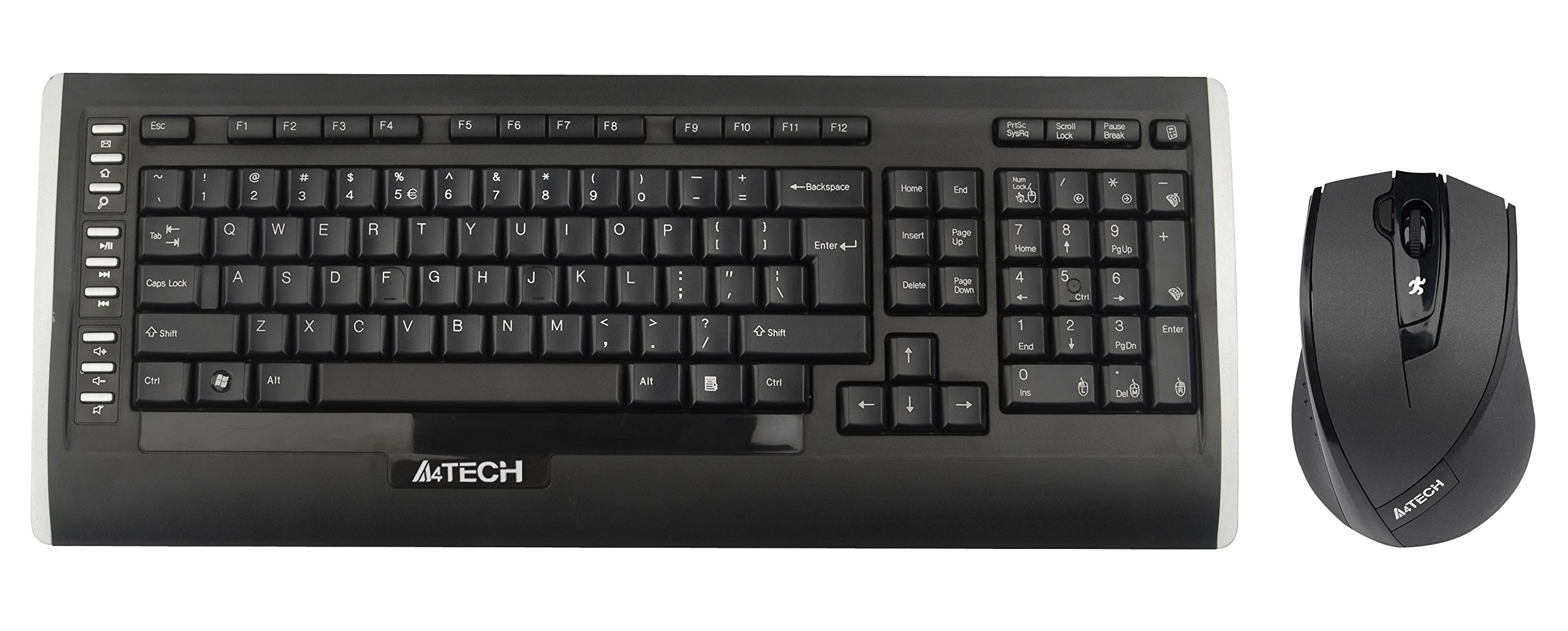
This user manual provides comprehensive instructions for the A4Tech 9300F Wireless RF Keyboard and Mouse Combo. Please read this manual thoroughly before using the product to ensure proper setup and operation. This combo features a wireless keyboard and a mouse with V-Track technology, designed for reliable performance and ease of use with your personal computer.
Impostare
Follow these steps to set up your A4Tech 9300F Wireless RF Keyboard and Mouse Combo.
1. Installazione della batteria
- Individuare gli scomparti delle batterie sul lato inferiore della tastiera e del mouse.
- Open the battery compartment covers.
- Insert two AA alkaline batteries into the keyboard and two AA alkaline batteries into the mouse, ensuring correct polarity (+/-).
- Chiudere saldamente i coperchi del vano batteria.
2. Collegamento del ricevitore
- Individuare il ricevitore USB, solitamente conservato nel vano batterie del mouse o confezionato separatamente.
- Plug the USB receiver into an available USB port on your personal computer.
- Il sistema operativo dovrebbe rilevare e installare automaticamente i driver necessari. Questo processo potrebbe richiedere alcuni istanti.
- Once drivers are installed, the keyboard and mouse should be ready for use. If not, ensure the power switches on both devices are in the "ON" position.
Istruzioni per l'uso
This section details the basic and advanced functions of your A4Tech 9300F combo.
Funzioni della tastiera
- Digitazione standard: The keyboard features a standard QWERTY layout with comfortable, round-edged keycaps for general typing tasks.
- Tastiera numerica: Il tastierino numerico dedicato consente un inserimento efficiente dei dati.
- Tasti funzione (F1-F12): These keys perform various system or application-specific functions. Refer to your operating system or application documentation for specific uses.
- Dual-Function Keys: Some keys may have secondary functions accessible via a modifier key (e.g., Fn key, if present). These can include media controls or quick access to applications.
Mouse Functions and V-Track Technology
- Standard Mouse Operation: The mouse provides precise cursor control with left, right, and scroll wheel buttons.
- V-Track Technology: This innovative optical technology uses vertical light to ensure smooth and accurate tracking on virtually any surface, including soft fabrics, without the need for a mouse pad. This technology is characterized by:
- Vertical light for enhanced precision.
- Short light path for lower power consumption.
- Incomparable adaptability on diverse surfaces.
- Smooth operation even on soft textiles.
- Tiny lens hole for optimal precision.
- Screen Capture Tool: The mouse may support a screen capture tool with value-added functions such as screen capture, TutorPen, 16-in-One, 4-way wheel, multi-link management, and DPI adjustment. Refer to the manufacturer's website for software download and updates related to this feature.
Manutenzione
Proper maintenance ensures the longevity and optimal performance of your wireless combo.
Pulizia
- Prima di pulire il ricevitore USB, scollegarlo dal computer.
- Per pulire le superfici della tastiera e del mouse, utilizzare un panno morbido, asciutto e privo di lanugine.
- Per sporco ostinato, leggermente dampPulire il panno con acqua o con un detergente delicato e non abrasivo. Evitare l'eccessiva umidità.
- Non spruzzare soluzioni detergenti direttamente sui dispositivi.
- Utilizzare aria compressa per rimuovere polvere e detriti dagli spazi tra i tasti della tastiera.
Sostituzione della batteria
- When the devices exhibit reduced performance or stop responding, it is likely time to replace the batteries.
- Seguire i passaggi per l'installazione della batteria descritti nella sezione "Configurazione".
- Always replace all batteries in a device at the same time with new, fresh alkaline batteries of the specified type (AA).
- Smaltire le batterie usate in modo responsabile secondo le normative locali.
Risoluzione dei problemi
If you encounter issues with your A4Tech 9300F combo, refer to the following common solutions.
- Nessuna risposta da tastiera/mouse:
- Assicurarsi che le batterie siano installate correttamente e non siano scariche. Sostituirle se necessario.
- Check that the power switches on both devices are turned "ON".
- Verifica che il ricevitore USB sia collegato saldamente a una porta USB funzionante del computer. Prova una porta USB diversa.
- Ensure the devices are within the 15-meter operating range of the receiver and there are no significant obstructions.
- Riavvia il computer.
- Connessione ritardata o intermittente:
- Avvicinare i dispositivi al ricevitore USB.
- Evitare di posizionare il ricevitore vicino ad altri dispositivi wireless o a grandi oggetti metallici che potrebbero causare interferenze.
- Sostituire le batterie se sono scariche.
- Il cursore del mouse salta o non è preciso:
- Ensure the mouse lens is clean and free of dust or debris.
- While V-Track technology works on most surfaces, extreme textures or highly reflective surfaces might still affect performance. Try using the mouse on a different surface.
- Tasti specifici non funzionanti:
- Check for physical obstructions under the keycap.
- If multiple keys are affected, try the general troubleshooting steps for no response.
Specifiche
| Numero di modello | 9300 °F |
| Marca | A4Tech |
| Tecnologia di connettività | Radiofrequenza (RF) |
| wireless Range | Fino a 15 metri |
| Keyboard Form Factor | Standard QWERTY |
| Tecnologia di tracciamento del mouse | Optical (V-Track) |
| Fonte di alimentazione | Alimentato a batteria |
| Tipo di batteria | AA Alkaline (2 for keyboard, 2 for mouse) |
| Dispositivi compatibili | Personal computer |
| Colore | Nero |
| Peso dell'articolo | Circa 1.85 libbre (0.84 kg) |
Garanzia e supporto
Per informazioni sulla garanzia e supporto tecnico, fare riferimento alla documentazione inclusa con il prodotto o visitare il sito ufficiale A4Tech websito. Conservare la ricevuta d'acquisto come prova d'acquisto per eventuali reclami in garanzia.
Produttore: A4Tech
Websito: www.a4tech.com