
Cen-Tech CT-750-12
Cen-Tech 750W Continuous/1500W Peak Power Inverter User Manual
Model: CT-750-12 | Brand: Cen-Tech
1. Introduzione
This manual provides essential information for the safe and efficient operation of your Cen-Tech 750W Continuous/1500W Peak Power Inverter. This device converts 12V DC battery power into 115V AC household power, allowing you to operate various electronics and small appliances from your vehicle or other 12V power sources. Please read this manual thoroughly before installation and use, and retain it for future reference.
2. Informazioni importanti sulla sicurezza
AVVERTIMENTO: Failure to follow these instructions may result in electric shock, fire, serious injury, or death. Always exercise extreme caution when working with electrical equipment.
- Rischio di scossa elettrica: Non aprire l'inverter casing. There are no user-serviceable parts inside. Contact qualified service personnel for repairs.
- Rischio di incendio: Do not operate the inverter near flammable materials, gases, or vapors. Ensure adequate ventilation around the inverter.
- Ventilazione adeguata: The inverter generates heat during operation. Ensure it is placed in a well-ventilated area, away from direct sunlight or heat sources.
- Polarità corretta: Always connect the inverter to a 12V DC battery with the correct polarity (red to positive, black to negative). Incorrect connection can damage the inverter and battery.
- Protezione da sovraccarico: Non superare la potenza nominale continua (750 W) o la potenza nominale di picco (1500 W) dell'inverter. Il sovraccarico può causare danni e incendi.
- Esposizione all'umidità: Do not expose the inverter to rain, moisture, or water. This can cause electric shock or damage.
- Bambini e animali domestici: Tenere l'inverter fuori dalla portata dei bambini e degli animali domestici.
- Dispositivi Medici: This inverter is not designed for use with life-support systems or other medical devices.
3. Caratteristiche del prodotto
The Cen-Tech 750W Power Inverter is designed for reliable performance and includes the following key features:
- Potenza continua: Provides up to 750 watts of continuous power.
- Picco di potenza: Capable of handling up to 1500 watts for starting products with high surge requirements.
- Uscita a onda sinusoidale modificata: Efficiently converts 12V DC to 115V AC with up to 87% efficiency.
- Prese multiple: Features two 115V AC power outlets for connecting various devices.
- Porta di ricarica USB: Includes a 5V/500mA USB port for charging compatible devices.
- Protezione completa: Built-in safeguards against low/high voltage, low/high temperatures, low/high currents, short circuits, and overloads.
- Connessione facile: Comes with heavy-duty input cables equipped with alligator clips for direct battery connection.
- Indicatore di stato: An LED indicator light provides operational status.
4. Contenuto della confezione
Si prega di controllare la confezione per verificare la presenza dei seguenti elementi:
- Cen-Tech 750W Continuous/1500W Peak Power Inverter
- Heavy-duty input cables with alligator clips
- Manuale dell'utente (questo documento)
5. Configurazione e installazione
Per configurare correttamente il tuo inverter di potenza, segui questi passaggi:
- Scegli una posizione: Select a dry, well-ventilated area for the inverter. Ensure it is away from direct sunlight, heat sources, and flammable materials. The inverter should be placed on a stable, flat surface.
- Preparare la batteria: Ensure the 12V DC battery is fully charged and in good condition. Turn off any loads connected to the battery.
- Connect Input Cables:
- Collegare il ROSSO alligator clip cable to the POSITIVO (+) terminale della batteria da 12 V.
- Collegare il NERO alligator clip cable to the NEGATIVO (-) terminale della batteria da 12 V.
IMPORTANTE: Ensure connections are secure and correct polarity is observed to prevent damage to the inverter or battery. A loose connection can cause overheating.
- Accensione: Once the battery connections are secure, turn on the inverter using its power switch (if applicable). The LED indicator light should illuminate.
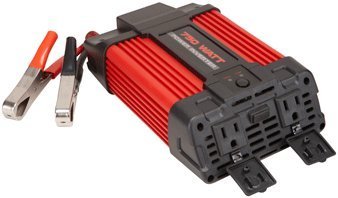
Image 1: Cen-Tech 750W Power Inverter connected to a 12V battery using the provided alligator clips. The image shows the compact design and the input/output ports.
6. Istruzioni per l'uso
After successful setup, you can begin using your power inverter:
- Accendere l'inverter: Ensure the inverter's power switch is in the "ON" position. The LED indicator should confirm it is powered.
- Collegare i dispositivi CA: Collega i tuoi dispositivi a 115 V CA alle prese CA dell'inverter. Assicurati che la potenza totaletage of all connected devices does not exceed 750 watts continuously or 1500 watts peak.
- Connetti dispositivi USB: For charging USB-powered devices, plug them into the 5V/500mA USB port.
- Monitorare il livello della batteria: Keep an eye on your 12V battery's charge level. Prolonged use can drain the battery. The inverter has low voltage protection and will shut down if the battery voltage scende troppo in basso.
- Spegni: When finished, first disconnect all AC and USB devices from the inverter. Then, turn off the inverter's power switch. Finally, disconnect the alligator clips from the battery, starting with the black (negative) clip, then the red (positive) clip.
Nota: Some sensitive electronic devices may not operate correctly with a modified sine wave inverter. Consult your device's manufacturer for compatibility if issues arise.
7. Manutenzione
Una manutenzione regolare garantisce prestazioni ottimali e longevità del vostro inverter:
- Pulizia: Keep the inverter clean and free of dust and debris. Use a dry cloth to wipe the exterior. Do not use liquid cleaners.
- Ventilazione: Periodically check that the ventilation openings are not blocked. Clear any obstructions to ensure proper airflow.
- Connessioni via cavo: Regularly inspect the input cables and alligator clips for any signs of wear, damage, or corrosion. Ensure connections remain tight and secure.
- Magazzinaggio: When not in use for extended periods, store the inverter in a cool, dry place, away from direct sunlight and extreme temperatures. Disconnect it completely from the battery.
8. Risoluzione Dei Problemi
Se riscontri problemi con l'inverter, fai riferimento ai seguenti problemi comuni e alle relative soluzioni:
| Problema | Possibile causa | Soluzione |
|---|---|---|
| Nessuna potenza in uscita / L'inverter non si accende |
|
|
| L'inverter si spegne inaspettatamente |
|
|
| AC devices not working correctly |
|
|
9. Specifiche
| Caratteristica | Dettaglio |
|---|---|
| Numero di modello | CT-750-12 |
| Potenza continua | 750 Watt |
| Potenza di picco | 1500 Watt |
| Ingresso volumetage | 12V CC |
| Volume di uscitatage | 115 V CA |
| Forma d'onda di uscita | Onda sinusoidale modificata |
| Efficienza | Fino al 87% |
| Prese AC | 2 |
| Porta USB | 5V / 500mA |
| Caratteristiche di protezione | Vol. basso/altotage, Low/High Temperature, Low/High Current, Short Circuit, Overload |
| Peso dell'articolo | 2.11 libbre |
| Dimensioni (circa) | Non specificato nei dati forniti |
10. Garanzia e supporto
Information regarding product warranty and customer support was not provided in the available product data. For warranty details or technical assistance, please refer to the product packaging or contact the manufacturer directly.
Ask a question about this manual
Ask about setup, troubleshooting, compatibility, parts, safety, or missing instructions. Manuals+ will review the question and use this page’s manual context to help answer it.