
Introduzione
This manual provides essential instructions for the setup, operation, maintenance, and troubleshooting of your Insignia 6.1-Channel 600W Digital Home Theater Receiver, model IS-HC040917. Please read this manual thoroughly before using the receiver to ensure proper and safe operation.
Importanti istruzioni di sicurezza
- Non ostruire le aperture di ventilazione. Installare secondo le istruzioni del produttore.
- Non installare vicino a fonti di calore come radiatori, bocchette di riscaldamento, stufe o altri apparecchi (inclusi amplificatori) che producono calore.
- Proteggere il cavo di alimentazione per evitare che venga calpestato o schiacciato, in particolare in corrispondenza delle spine, delle prese di corrente e del punto in cui esce dall'apparecchio.
- Utilizzare solo accessori/componenti specificati dal produttore.
- Scollegare l'apparecchio durante i temporali o quando non viene utilizzato per lunghi periodi di tempo.
- Affidare tutte le operazioni di manutenzione a personale di assistenza qualificato. L'assistenza è necessaria quando l'apparecchio è stato danneggiato in qualsiasi modo.
Guida all'installazione
1. Disimballaggio
Carefully remove the receiver and all accessories from the packaging. Ensure all components are present:
- Insignia IS-HC040917 Receiver
- Telecomando
- Antenna ad anello AM
- Antenna a filo FM
- Manuale dell'utente (questo documento)
2. Collegamento degli altoparlanti
The IS-HC040917 receiver supports a 6.1-channel speaker configuration. Connect your speakers to the corresponding terminals on the rear panel. Ensure correct polarity (+ to + and - to -) for each speaker.
- Front Left/Right: For main stereo sound.
- Centro: For dialogue.
- Surround Left/Right: For ambient sound effects.
- Surround posteriore: For additional rear channel effects in 6.1 setups.
- Subwoofer (Pre-out): Connect to a powered subwoofer's LFE input.
Note: The receiver is designed for speakers with an impedance of 8 ohms.
3. Connecting Audio/Video Sources
Connect your external devices (e.g., DVD player, Blu-ray player, game console, cable box) to the appropriate input jacks on the receiver.
- HDMI: Use HDMI cables for high-definition audio and video signals. The receiver has 3 HDMI input ports.
- Audio digitale (ottico/coassiale): For digital audio from devices like CD players or set-top boxes.
- Audio analogico (RCA): For standard stereo audio connections from devices like VCRs or older CD players.
- Video S: For video signals from compatible devices.
4. Collegamento dell'antenna
Connect the supplied AM loop antenna and FM wire antenna to their respective terminals on the rear panel for radio reception.
5. Collegamento elettrico
Once all audio/video and speaker connections are made, plug the receiver's power cord into a standard AC wall outlet.
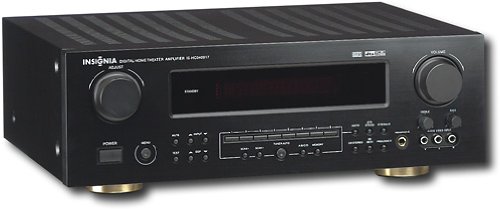
Immagine: Rear panel of the Insignia IS-HC040917 receiver, showing various input and output connections for speakers, audio/video sources (HDMI, RCA, S-Video, Digital), and antenna terminals. This diagram is crucial for correctly wiring the home theater system.
Istruzioni per l'uso
1. Accensione/spegnimento
Premere il tasto ENERGIA pulsante sul pannello frontale o sul telecomando per accendere o spegnere il ricevitore.
2. Selezione ingresso
Utilizzare il SELETTORE DI INGRESSO knob/buttons on the front panel or the remote control to choose the desired audio/video source (e.g., HDMI 1, DVD, CD, Tuner).
3. Controllo del volume
Regolare il volume principale utilizzando il grande VOLUME manopola sul pannello frontale o VOLUME +/- pulsanti sul telecomando.
4. Modalità audio
The receiver supports various audio modes, including 6.1-channel surround sound. Use the MODALITÀ or Controllo di Produzione buttons on the remote to cycle through available sound modes (e.g., Stereo, Dolby Digital, DTS, Pro Logic).
5. Tuner Operation (AM/FM Radio)
Select the "Tuner" input. Use the BANDA button to switch between AM and FM. Use the SINTONIA +/- buttons to manually tune to stations or PRESET +/- to select stored stations. Refer to the remote control for specific tuner functions.
Manutenzione
1. Pulizia
Wipe the exterior of the receiver with a soft, dry cloth. Do not use liquid cleaners or aerosol sprays, as they may damage the finish or internal components. Ensure the unit is unplugged before cleaning.
2. Ventilazione
Ensure that the ventilation openings on the top and sides of the receiver are not blocked. Proper airflow is essential to prevent overheating and ensure long-term performance.
3. Gestione dei cavi
Periodically check all cable connections to ensure they are secure. Loose connections can lead to poor audio or video quality.
Risoluzione dei problemi
| Problema | Possibile causa | Soluzione |
|---|---|---|
| Nessun potere | Cavo di alimentazione scollegato; presa di corrente non attiva. | Controllare il collegamento del cavo di alimentazione; provare una presa diversa. |
| Nessun suono | Selezione di un ingresso errato; cavi degli altoparlanti allentati; volume troppo basso; disattivazione audio attivata. | Selezionare l'ingresso corretto; controllare i collegamenti degli altoparlanti; aumentare il volume; disattivare l'audio. |
| Nessun video | Incorrect input selected; video cables loose or incorrect. | Select correct input; check video cable connections (HDMI, S-Video, RCA). |
| Il telecomando non funziona | Batterie scariche; ostruzione tra telecomando e ricevitore; modalità telecomando errata. | Replace batteries; remove obstructions; ensure remote is in the correct operating mode. |
Specifiche
- Modello: IS-HC040917
- Marca: INSIGNIA
- Potenza di uscita: 600 Watt
- Numero di canali: 6.1 canale
- Modalità di uscita audio: Circondare
- Porte HDMI totali: 3
- Tipi di connettori: 3.5mm Jack, HDMI, RCA, USB
- Dispositivi compatibili: Oratore
- Metodo di controllo: Remoto
- Colore: Nero
- Codice UPC: 799530659962
- ASIN: B0075C3DN2
Garanzia e supporto
For warranty information and customer support, please refer to the warranty card included with your product or visit the official Insignia webluogo. Conserva la ricevuta di acquisto per eventuali richieste di garanzia.
For further assistance, you may contact Insignia customer service. Contact details are typically available on the manufacturer's websito o nella confezione del prodotto.