
1. Introduzione
Grazie per l'acquistoasing the Medeli M30 61-Key Professional Keyboard. This instrument is designed to provide a rich musical experience with its touch-sensitive keys, extensive voice library, and versatile accompaniment styles. This manual will guide you through the setup, operation, and maintenance of your new keyboard.
Contenuto della confezione
- Medeli M30 61-Key Professional Keyboard
- Adattatore di alimentazione
- Riposo musicale
- Manuale dell'utente (questo documento)
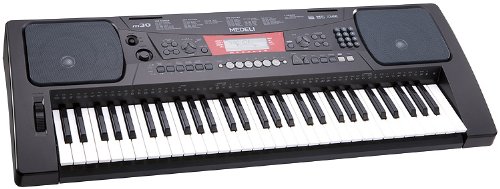
Figure 1: Medeli M30 61-Key Professional Keyboard. This image shows the keyboard from a front-angle view, highlighting its 61 keys, control panel, and display.
2. Istruzioni di sicurezza
- Alimentazione elettrica: Utilizzare solo l'adattatore di alimentazione specificato. Assicurarsi che il volumetage corrisponde all'alimentazione elettrica locale.
- Acqua e umidità: Non esporre la tastiera all'acqua o all'umidità. Evitare di posizionare liquidi vicino allo strumento.
- Ventilazione: Do not block ventilation openings. Ensure adequate airflow around the keyboard.
- Fonti di calore: Tenere la tastiera lontana da fonti di calore quali termosifoni, bocchette di riscaldamento, stufe o altri apparecchi (inclusi amplificatori) che producono calore.
- Pulizia: Pulire solo con un panno asciutto. Non utilizzare detergenti liquidi o spray.
- Manutenzione: Non tentare di riparare questo prodotto da soli. Affidare tutte le operazioni di manutenzione a personale di assistenza qualificato.
3. Impostazione
3.1 Disimballaggio
Rimuovere con cautela tutti i componenti dall'imballaggio. Conservare l'imballaggio per eventuali trasporti o rimessaggio futuri.
3.2 Collegamento di alimentazione
- Ensure the keyboard's power switch is in the "OFF" position.
- Collegare l'adattatore di alimentazione alla presa DC IN sul pannello posteriore della tastiera.
- Collegare l'adattatore di alimentazione a una presa CA standard.
- Turn the power switch to the "ON" position to power on the keyboard.
3.3 Installazione del leggio
Insert the music rest into the designated slots on the top panel of the keyboard. Ensure it is securely seated.
4. Istruzioni per l'uso
4.1 Riproduzione di base
- Accensione: Press the [POWER] button to turn on the keyboard.
- Regolazione del volume: Use the [MASTER VOLUME] knob to adjust the overall sound level.
- Suonare le chiavi: The M30 features 61 touch-sensitive keys. The harder you press, the louder the sound.
4.2 Selezione delle voci
The M30 offers 359 different voices (instrument sounds).
- Premere il pulsante [VOICE].
- Use the numeric keypad or the [+] / [-] buttons to select a voice number.
- The selected voice name will appear on the display.
4.3 Selecting Styles
The keyboard includes 150 accompaniment styles.
- Premere il pulsante [STILE].
- Use the numeric keypad or the [+] / [-] buttons to select a style number.
- Press [START/STOP] to begin the accompaniment.
- Adjust the style volume using the [ACCOMPANIMENT VOLUME] button (if available, or general volume).
4.4 Playing Songs
The M30 has 100 built-in songs and 2 demo songs.
- Premere il pulsante [SONG].
- Use the numeric keypad or the [+] / [-] buttons to select a song number.
- Press [PLAY/PAUSE] to start or pause the song.
- Press [STOP] to stop the song.
5. Connettività
5.1 Connessione USB
The Medeli M30 features a USB port for connecting to a computer. This allows for MIDI data transfer, enabling the keyboard to be used as a MIDI controller or to connect with music software.
- Connect a standard USB cable (Type B to Type A, not included) from the keyboard's USB port to your computer's USB port.
- Your computer should automatically recognize the keyboard as a MIDI device.
- Refer to your music software's documentation for instructions on setting up MIDI input devices.
6. Manutenzione
6.1 Pulizia
- Pulisci la superficie della tastiera con un panno morbido e asciutto.
- Per sporco ostinato, leggermente dampInumidire il panno con acqua e un detergente delicato, quindi asciugarlo immediatamente.
- Non utilizzare detergenti abrasivi, cere o solventi.
6.2 Conservazione
- Se non si utilizza il dispositivo per lunghi periodi, scollegare l'adattatore di alimentazione.
- Conservare la tastiera in un luogo fresco e asciutto, lontano dalla luce solare diretta e da temperature estreme.
- Consider using a dust cover to protect the keys and control panel.
7. Risoluzione Dei Problemi
| Problema | Possibile causa | Soluzione |
|---|---|---|
| Nessun suono | Il volume è troppo basso o disattivato. | Increase the [MASTER VOLUME] knob. |
| La tastiera non si accende | Adattatore di alimentazione non collegato o difettoso. | Ensure power adapter is securely connected and plugged into a working outlet. Check power switch position. |
| I tasti non rispondono | La tastiera potrebbe essere in una modalità specifica (ad esempio, modalità demo). | Try powering off and on again. Refer to the operating section for specific mode exits. |
8. Specifiche
| Caratteristica | Dettaglio |
|---|---|
| Chiavi | 61, Touch-Sensitive |
| Voci | 359 |
| Stili | 150 |
| Canzoni | 100 (plus 2 Demo Songs) |
| Connettività | USB (MIDI) |
| Dimensioni (L x P x A) | Dimensioni: 93.98 x 35.56 x 15.24 cm |
| Peso | 6.8 kg |
| Numero di modello | Numero di modello: M30 |
| Codice UPC/GTIN | 857285003529 |
9. Garanzia e supporto
For warranty information and technical support, please refer to the warranty card included with your product or visit the official Medeli websito. Conservare la prova d'acquisto per eventuali reclami in garanzia.
Produttore: Medeli
Websito: www.medeli.com (Nota: questo è un segnaposto URL, fare riferimento alla documentazione effettiva del prodotto per contattare l'assistenza corretta.)