
Introduzione
Thank you for choosing the Medeli MD600 61-Key Professional Keyboard. This manual provides essential information for the safe and efficient use of your instrument. Please read it thoroughly before operating the keyboard and retain it for future reference.
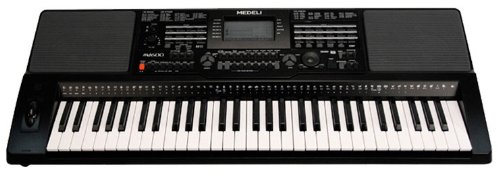
Image: The Medeli MD600 61-Key Professional Keyboard, showcasingrazie al suo design compatto e alla disposizione dei tasti.
Informazioni importanti sulla sicurezza
- Alimentazione elettrica: Utilizzare solo l'adattatore di alimentazione specificato. Assicurarsi che il volumetage corrisponde all'alimentazione elettrica locale.
- Umidità: Do not expose the keyboard to rain, moisture, or excessive humidity. Avoid placing liquid containers on the instrument.
- Ventilazione: Ensure adequate ventilation around the keyboard. Do not block ventilation openings.
- Posizionamento: Place the keyboard on a stable, level surface. Avoid extreme temperatures, direct sunlight, or heat sources.
- Pulizia: Scollegare l'alimentazione prima della pulizia. Utilizzare un panno morbido e asciutto. Non utilizzare detergenti liquidi o spray.
- Manutenzione: Non tentare di riparare lo strumento da soli. Affidare qualsiasi intervento di manutenzione a personale qualificato.
Contenuto della confezione
Si prega di verificare che tutti gli articoli siano presenti nel pacco:
- Medeli MD600 61-Key Professional Keyboard
- Adattatore di alimentazione
- Riposo musicale
- Manuale dell'utente (questo documento)
Impostare
1. Collegamento elettrico
- Ensure the keyboard's power switch is in the SPENTO posizione.
- Connect the power adapter cable to the DC IN jack on the rear panel of the keyboard.
- Collegare l'adattatore di alimentazione a una presa a muro CA standard.
2. Music Rest Installation
Insert the tabs of the music rest into the slots located on the top panel of the keyboard, behind the control panel.
3. Collegamento di periferiche
- Cuffie: Collegare le cuffie stereo standard al TELEFONI jack for private practice. This will mute the internal speakers.
- Connettività USB: The MD600 features USB connectivity. Connect a USB cable (not included) from the keyboard's USB port to your computer for MIDI data transfer. Refer to your computer's operating system and music software documentation for specific setup instructions.
Istruzioni per l'uso
1. Accensione/spegnimento
- Per accendere: premere il tasto ENERGIA button located on the control panel. The display will illuminate.
- Per spegnere: premere il tasto ENERGIA di nuovo il pulsante.
2. Controllo del volume
Regolare il volume di uscita complessivo utilizzando VOLUME PRINCIPALE knob or buttons on the control panel. Start with a low volume and increase gradually.
3. Selezione delle voci (toni)
The MD600 offers 559 different voices. To select a voice:
- Premere il tasto VOCE pulsante.
- Utilizzare il tastierino numerico o il +/- buttons to enter the desired voice number. Voice categories and numbers are listed in the Voice List appendix (not included in this manual, refer to full product documentation).
- Premere ENTRARE per confermare la selezione.
4. Selecting Styles (Accompaniment)
The MD600 includes 203 accompaniment styles. To select a style:
- Premere il tasto STILE pulsante.
- Utilizzare il tastierino numerico o il +/- buttons to enter the desired style number. Style categories and numbers are listed in the Style List appendix.
- Premere ENTRARE per confermare la selezione.
- Premere AVVIO/ARRESTO per iniziare o terminare l'accompagnamento.
5. Touch Response
The keyboard features touch-sensitive keys, meaning the volume and timbre of the sound change based on how hard you strike the keys. This allows for expressive playing. The touch response sensitivity can often be adjusted in the keyboard's settings menu (refer to the full manual for detailed instructions).
Manutenzione
Pulizia
To clean the keyboard, first disconnect the power adapter. Use a soft, dry, lint-free cloth to wipe the surfaces. Do not use abrasive cleaners, waxes, or solvents, as these can damage the finish. For stubborn dirt, a slightly damp cloth followed by a dry cloth may be used, ensuring no moisture enters any openings.
Magazzinaggio
When not in use for extended periods, store the keyboard in a cool, dry place away from direct sunlight and extreme temperatures. If possible, cover the keyboard with a dust cover to prevent dust accumulation.
Risoluzione dei problemi
| Problema | Possibile causa | Soluzione |
|---|---|---|
| Nessun suono dagli altoparlanti/cuffie. |
|
|
| Keys do not respond or sound incorrect. |
|
|
| Accompaniment not starting. |
|
|
If the problem persists after trying these solutions, please contact Medeli customer support or refer to the full product manual for more detailed troubleshooting.
Specifiche
- Modello: Medeli MD600
- Chiavi: 61, Touch Response
- Voci: 559
- Stili: 203
- Connettività: USB
- Dimensioni (L x P x A): Circa 37 x 14 x 6 pollici (94 x 35.5 x 15.2 cm)
- Peso: Circa 15 libbre (6.8 kg)
- Alimentazione elettrica: DC 12V (via included AC adapter)
- Produttore: Medeli
Le specifiche sono soggette a modifiche senza preavviso per migliorare il prodotto.
Garanzia e supporto
The Medeli MD600 61-Key Professional Keyboard comes with a One year warranty from date of purchase against manufacturer defects. Conservare la prova d'acquisto per eventuali richieste di garanzia.
For technical support, service, or further inquiries, please contact your authorized Medeli dealer or visit the official Medeli websito per le informazioni di contatto.