
1. Informazioni importanti sulla sicurezza
Read this user manual carefully before using the appliance and save it for future reference. Always follow basic safety precautions when using electrical appliances to reduce the risk of fire, electric shock, and/or injury to persons.
- Non immergere l'apparecchio in acqua o in altri liquidi.
- Assicurare il volumetage indicato sull'apparecchio corrisponde al vol . della rete localetage prima di effettuare la connessione.
- Tenere l'apparecchio fuori dalla portata dei bambini.
- Do not operate the appliance if the plug, the mains cord, or the appliance itself is damaged.
- Utilizzare l'apparecchio solo per lo scopo domestico previsto.
2. Prodotto finitoview
Familiarize yourself with the components of your Philips Senseo HD7870/10 Twist Coffee Pad Machine.

Figura 1: Oltreview of the Senseo HD7870/10 machine with accessories.
- Riserva d'acqua: Detachable tank for water. Capacity for 6 cups.
- Beccuccio del caffè: Height-adjustable to accommodate various cup sizes.
- Pad Holder: For single or double coffee pads.
- vassoio antigoccia: Raccoglie il liquido in eccesso ed è rimovibile per la pulizia.
- Schermo touchscreen: For operation and status indicators.
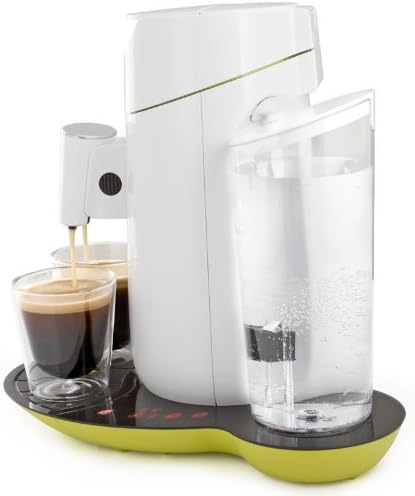
Figura 2: lato view highlighting the water reservoir.

Figure 3: Detail of the touchscreen control panel with power, 1-cup, 2-cup, and descaling indicators.
3. Impostazione
3.1 Primo utilizzo e risciacquo
- Rimuovere tutti i materiali di imballaggio.
- Clean the water reservoir, pad holders, and drip tray with warm water and a mild detergent. Rinse thoroughly.
- Riempire il serbatoio dell'acqua con acqua fresca e fredda fino all'indicazione MAX.
- Place the water reservoir back onto the appliance.
- Place a pad holder (without a coffee pad) and close the lid.
- Metti una ciotola sotto il beccuccio.
- Press the power button to turn on the machine. The 1-cup and 2-cup buttons will flash.
- Press the 2-cup button to start the rinsing cycle. Repeat this process once or twice until the water reservoir is empty.
3.2 Riempimento del serbatoio dell'acqua
- Remove the water reservoir from the appliance.
- Riempirlo con acqua fresca e fredda del rubinetto fino al livello MAX.
- Place the water reservoir back onto the appliance, ensuring it is seated correctly.
4. Funzionamento della macchina da caffè
4.1 Erogazione del caffè
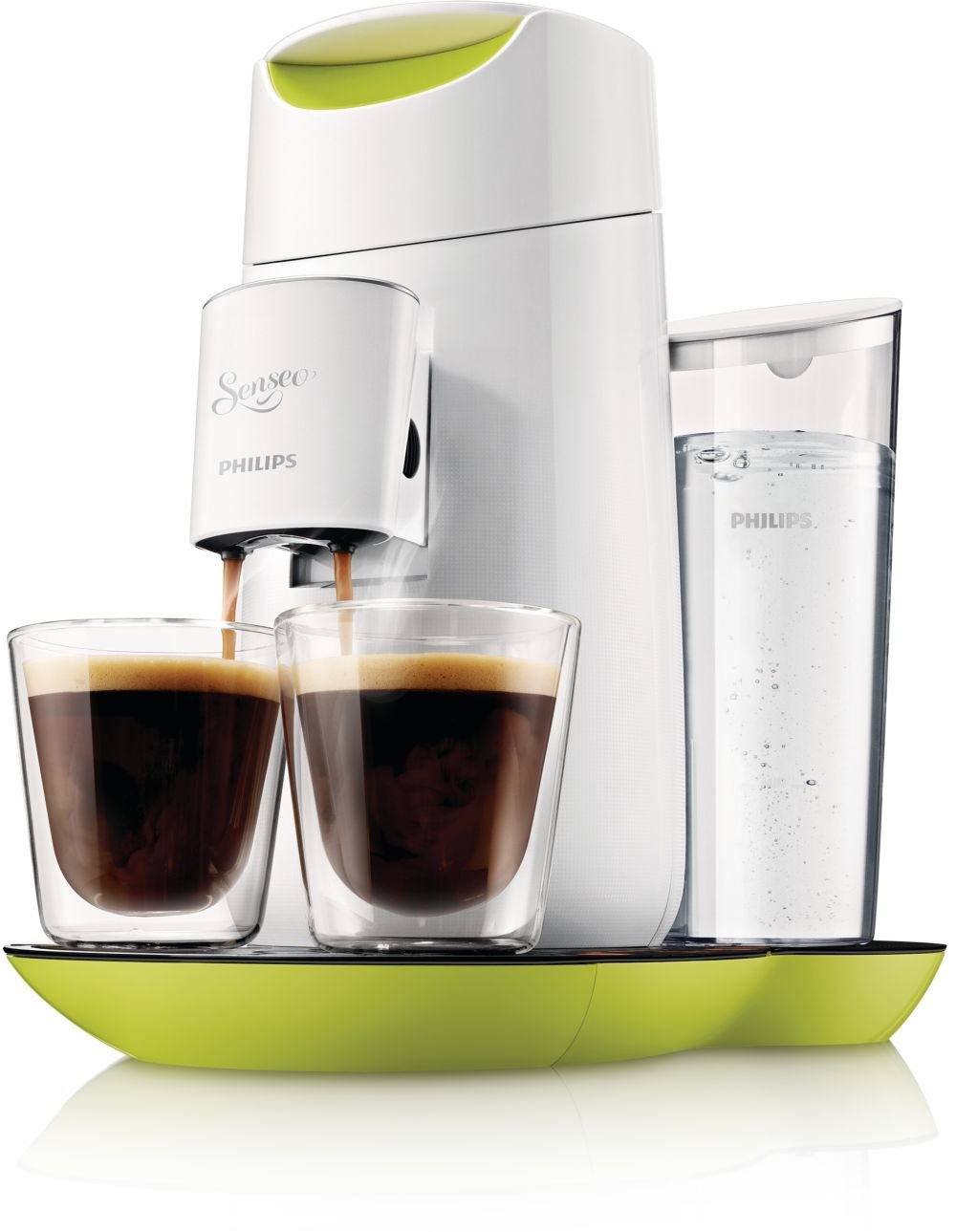
Figure 4: The machine brewing two cups of coffee simultaneously.
- Assicurarsi che il serbatoio dell'acqua sia pieno.
- Open the lid and place one or two Senseo coffee pads into the appropriate pad holder. Use the 1-cup pad holder for one pad and the 2-cup pad holder for two pads.
- Chiudere bene il coperchio.
- Place one or two cups under the coffee spout. Adjust the spout height if necessary.
- Press the power button. The 1-cup and 2-cup buttons will light up steadily when the machine is ready.
- Premere il tasto Pulsante da 1 tazza for a single cup of coffee or the Pulsante da 2 tazza for two cups. The machine will start brewing.
- The machine will automatically stop when the coffee is ready.

Figura 5: in alto view of the machine, illustrating the pad placement area.
4.2 Regolazione dell'intensità del caffè
The Senseo HD7870/10 allows you to adjust the coffee strength:
- After pressing the power button, the 1-cup and 2-cup buttons will light up.
- To select a stronger coffee, press the desired cup button (1 or 2) twice quickly. The button will flash faster to indicate stronger brew selection.
- For a regular coffee, press the desired cup button once.
4.3 Standby automatico
The machine automatically switches to standby mode after 15 minutes of inactivity to save energy. To reactivate, press the power button.
5. Manutenzione
5.1 Pulizia
- Prima di pulire l'apparecchio, staccare sempre la spina.
- Pulire l'esterno della macchina con un pannoamp stoffa. Non utilizzare detergenti abrasivi.
- The water reservoir, pad holders, and drip tray can be cleaned with warm water and a mild detergent or in the dishwasher.
- Clean the coffee spout regularly to prevent blockages.
5.2 Decalcificazione
The Senseo HD7870/10 features a descaling indicator (CALC light on the touchscreen). When this light illuminates, it is time to descale your machine. Regular descaling ensures optimal coffee quality and extends the lifespan of your appliance.
Follow the descaling instructions provided in the full manual or on the Philips support website. Typically, this involves using a Senseo descaling agent and running several rinsing cycles.
6. Risoluzione Dei Problemi
If you encounter issues with your Senseo machine, refer to the following common problems and solutions:
| Problema | Possibile causa | Soluzione |
|---|---|---|
| Non viene erogato alcun caffè. | Water reservoir is empty. Lid is not closed properly. Appliance is clogged. | Fill the water reservoir. Close the lid firmly until it clicks. Descale the appliance. |
| Il caffè è troppo leggero. | Incorrect coffee strength selected. | Ensure you press the cup button twice for stronger coffee. Use fresh coffee pads. |
| La spia CALC è accesa. | La macchina necessita di decalcificazione. | Perform a descaling cycle as per the instructions in Section 5.2. |
| La macchina non si accende. | Not plugged in. Power outage. | Check power connection. Verify power supply. |
If the problem persists, please contact Philips Consumer Care.
7. Specifiche
| Caratteristica | Dettaglio |
|---|---|
| Marca | Philips |
| Numero di modello | Modello HD7870/10 |
| Colore | Lime Yellow |
| Dimensioni del prodotto | Dimensioni: 30.99 x 24.99 x 32 cm |
| Peso | 1.5 kg |
| Capacità del serbatoio dell'acqua | 1 litro (circa 6 tazze) |
| Potenza/Watttage | 1450 watt |
| Voltage | 240 Volt |
| Materiale | Plastica |
| Caratteristiche speciali | Water filter, Touchscreen display, Descaling indicator, Adjustable coffee strength, Automatic standby after 15 minutes, Height-adjustable spout. |
8. Garanzia e supporto
Per informazioni dettagliate sulla garanzia, fare riferimento alla scheda di garanzia inclusa con il prodotto o visitare il sito Web ufficiale Philips. website. If you require assistance, have questions, or need to report a problem, please contact Philips Consumer Care through their official support channels.
Puoi trovare informazioni di contatto e domande frequenti su Supporto Philips Websito.