
1. Introduzione
This manual provides essential information for the proper installation, operation, and maintenance of your Alpine VIE-X08VS 7-inch WVGA HDD Navigation and AV Integrated System. Please read this manual thoroughly before using the product to ensure safe and optimal performance. Keep this manual for future reference.
2. Informazioni sulla sicurezza
ATTENZIONE: la mancata osservanza di queste istruzioni di sicurezza potrebbe causare incendi, scosse elettriche o altre lesioni o danni.
- Do not attempt to install or service this product yourself. Installation and service should be performed by qualified professionals.
- Non utilizzare il sistema in modo da distrarti dalla guida. Dai sempre priorità alla sicurezza stradale.
- Assicurarsi che tutti i cavi siano collegati correttamente per evitare cortocircuiti o danni.
- Tenere l'unità al riparo dall'umidità e dalle temperature estreme.
- Non smontare o modificare l'unità. Ciò potrebbe causare malfunzionamenti o lesioni.
3. Contenuto della confezione
Verificare che tutti gli articoli siano presenti nel pacco:
- Alpine VIE-X08VS Main Unit
- Film TV Antenna (4 front pieces)
- Hands-free Call Microphone (4m cable)
- Manuale dell'utente (questo documento)
- Guida all'installazione
4. Configurazione e installazione
Professional installation is highly recommended for this integrated system. Incorrect installation can lead to damage to the unit or your vehicle's electrical system.
4.1. Controlli pre-installazione
- Prima di iniziare l'installazione, assicurarsi che la batteria del veicolo sia scollegata.
- Verificare la compatibilità con il cruscotto e il cablaggio del veicolo.
4.2. Installazione dell'antenna
Install the included film TV antennas on the front windshield according to the separate installation guide. Ensure proper placement for optimal digital TV reception.
4.3. Posizionamento del microfono
Mount the hands-free microphone in a location that allows clear voice pickup, typically near the driver's sun visor or rearview mirror. Route the cable discreetly to the main unit.
4.4. Accensione iniziale e impostazioni
After installation, reconnect the battery. Upon first power-on, the system may guide you through initial setup steps, including language selection, time zone, and basic navigation preferences. Follow the on-screen prompts.
5. Istruzioni per l'uso
The Alpine VIE-X08VS offers a comprehensive range of features. This section outlines the basic operation of key functions.
5.1. Sistema di navigazione
The 7-inch WVGA LCD provides clear map displays. The system supports both 2D and 3D map views for enhanced situational awareness. Utilize the Eco-Guide display function to support fuel-efficient driving.
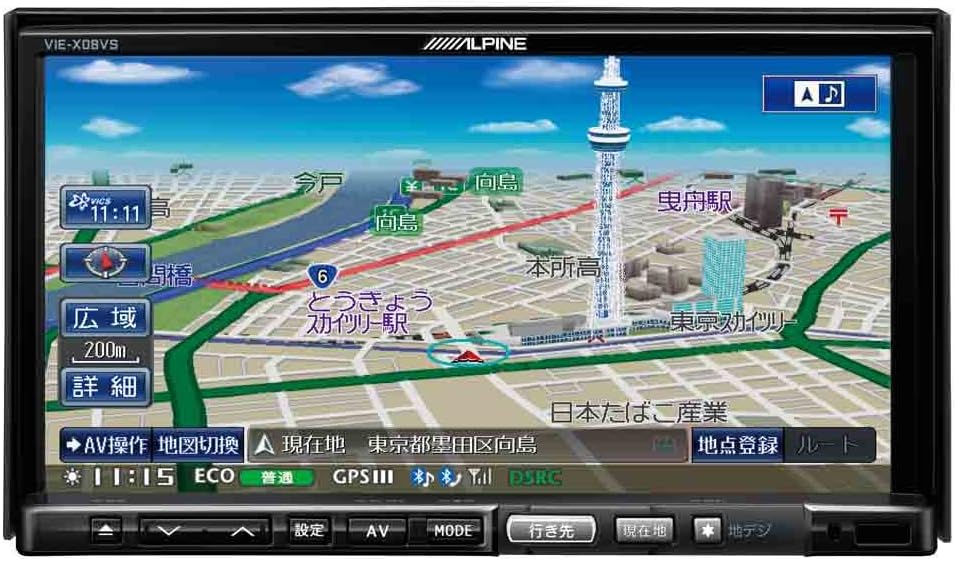
Figura 1: Fronte view of the Alpine VIE-X08VS unit displaying a detailed navigation map with Tokyo Skytree visible.

Figura 2: Angolato view of the Alpine VIE-X08VS unit, showing the navigation map and side profile.
5.1.1. Aggiornamenti delle mappe
The system includes free map updates until the 2015 edition. For information on subsequent map updates, please refer to the Alpine support websito o contattare il rivenditore.
5.2. Audio/Video (AV) Features
The VIE-X08VS integrates various AV sources for your entertainment.
- HDD Music Storage: The built-in 60GB HDD is designed for audio, capable of automatically recording approximately 5,500 songs.
- Tv digitale: Access digital terrestrial TV broadcasts using the easy-to-use one-touch key.
- DVD-V/CD Playback: Insert DVDs or CDs into the disc slot for video and audio playback.
- Connettività Bluetooth: Pair your Bluetooth-enabled devices for audio streaming and hands-free calling.
- Supporti USB/SD: Collega dispositivi USB o inserisci schede SD per riprodurre audio e video compatibili files.
- 5.1ch Decoder: Enjoy enhanced audio quality with the built-in 5.1ch decoder.
- Rear Vision Link: Transmit high-quality video to rear monitors. This function also allows for navigation screen display and operation from the rear, enhancing the overall driving experience for passengers.
- Sony Walkman Compatibility: Connect compatible Sony Walkman devices for music playback.
5.3. Dual-Screen Display
The system supports a dual-screen display, allowing you to view both navigation and AV content simultaneously. This feature can be accessed via the on-screen menu or dedicated buttons.
6. Manutenzione
Regular maintenance helps ensure the longevity and optimal performance of your Alpine VIE-X08VS unit.
6.1. Pulizia del display
Use a soft, dry cloth to gently wipe the display screen. For stubborn smudges, slightly dampen the cloth with water or a screen-cleaning solution specifically designed for electronic displays. Avoid harsh chemicals or abrasive materials.
6.2. Pulizia generale
Pulire l'esterno dell'unità con un panno morbido e asciutto. Evitare che liquidi penetrino nell'unità.
6.3. Disc Slot Care
Keep the disc slot free of dust and debris. Avoid inserting bent, scratched, or dirty discs, as this can damage the disc drive.
7. Risoluzione Dei Problemi
If you encounter issues with your Alpine VIE-X08VS, refer to the following common problems and solutions before contacting support.
| Problema | Possibile causa/soluzione |
|---|---|
| Nessun potere | Check vehicle's fuse box. Ensure all power cables are securely connected. |
| Nessun suono | Verify volume level. Check speaker connections. Ensure audio source is selected correctly. |
| Perdita del segnale GPS | Assicurarsi che l'antenna GPS abbia una visuale libera view del cielo. Spostatevi in un'area aperta, lontano da edifici alti o tunnel. |
| Il dispositivo Bluetooth non si accoppia | Ensure Bluetooth is enabled on both the unit and your device. Place devices close together. Delete previous pairings and try again. |
| Problemi di riproduzione del disco | Ensure the disc is clean and free of scratches. Verify the disc format is supported. |
8. Specifiche
Detailed technical specifications for the Alpine VIE-X08VS unit:
| Caratteristica | Specificazione |
|---|---|
| Produttore | Alpino |
| Nome del modello | VIE X08VS |
| Numero di modello del prodotto | VIE-X08VS |
| Dimensioni del prodotto (LxWxH) | Dimensioni: 18.73 x 17.8 x 10 cm |
| Peso dell'articolo | 3.2 chilogrammi |
| Dimensioni dello schermo | 7 pollici |
| Tipo di visualizzazione | Schermo LCD WVGA |
| Capacità di archiviazione della memoria | 60 GB (HDD) |
| Tecnologia di connettività | Bluetooth, USB |
| Supporti multimediali | DVD-V, CD, USB, SD |
| Tipo di mappa | Strada |
| Tipo di montaggio | Montaggio a pannello |
| Caratteristiche speciali | Hands-free calling, Digital TV, 5.1ch Decoder, Eco-Guide, Rear Vision Link |
| Tipo di veicolo compatibile | Autovettura passeggeri |
9. Garanzia e supporto
Per informazioni sulla garanzia, fare riferimento alla scheda di garanzia inclusa con il prodotto o visitare il sito ufficiale Alpine websito. Conservare la prova d'acquisto per eventuali reclami in garanzia.
9.1. Assistenza clienti
If you require technical assistance, have questions about your product, or need to arrange service, please contact Alpine customer support through their official websito o le informazioni di contatto fornite nella documentazione del prodotto.