
Introduzione
The Jabra Music Street2 Bluetooth Stereo Headset is designed to provide high-quality audio and hands-free communication. This manual provides essential information for the proper use, maintenance, and troubleshooting of your device. Please read it carefully before use.
Impostare
1. Caricare l'auricolare
Before first use, fully charge the headset. Connect the micro-USB charging cable to the charging port on the headset and the other end to a USB power source.
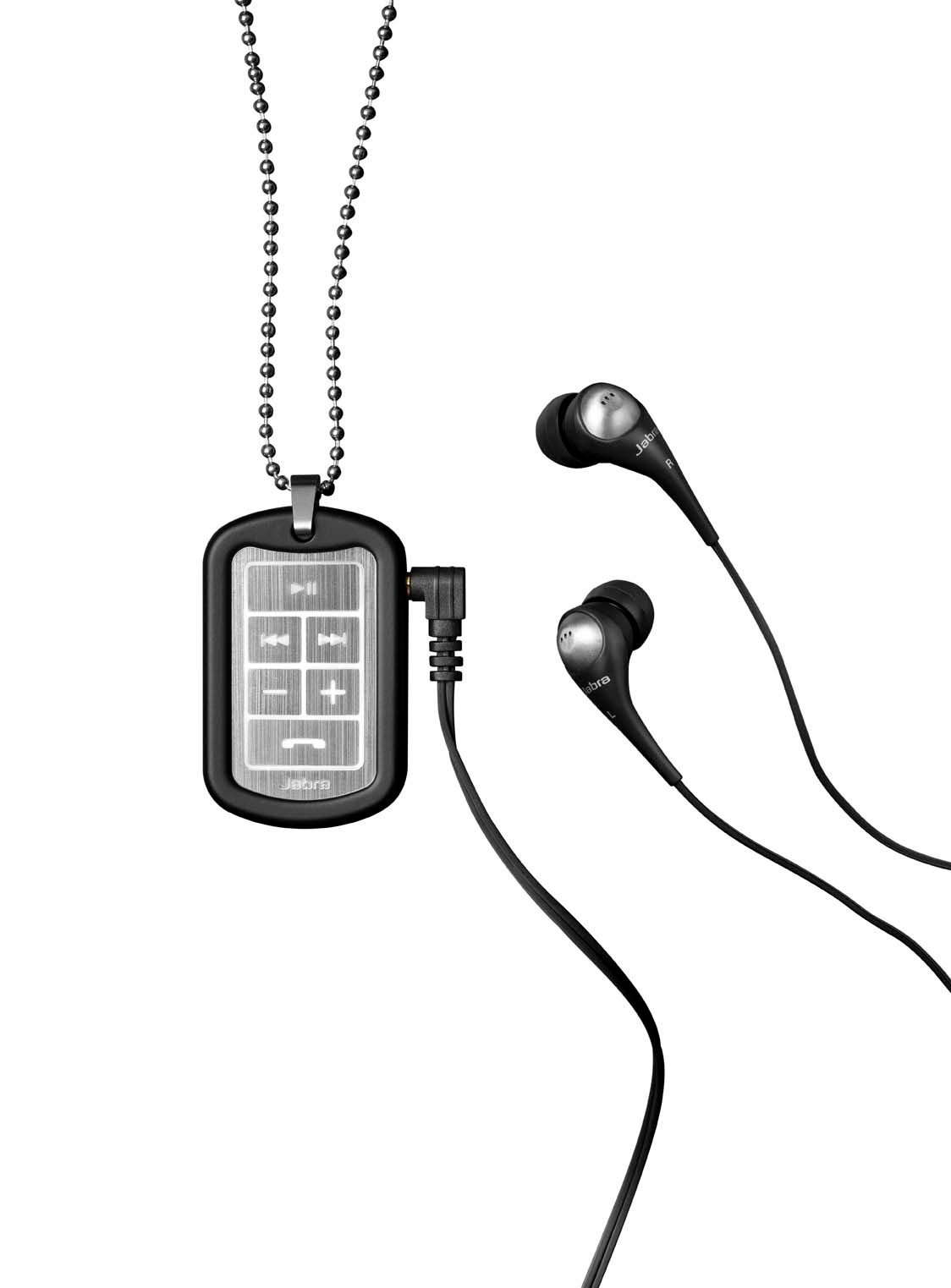
Image: The Jabra Music Street2 headset, highlighting the micro-USB charging port located on the side of the control unit.
- Una carica completa richiede in genere circa 2 ore.
- L'indicatore LED mostrerà lo stato di carica (ad esempio, rosso per la carica, blu per la carica completa).
2. Associazione con un dispositivo Bluetooth
- Assicurati che le cuffie siano spente.
- Press and hold the Multi-function button (usually the play/pause button) for approximately 5-7 seconds until the LED indicator flashes blue rapidly. This indicates pairing mode.
- Sul tuo dispositivo abilitato Bluetooth (smartphone, tablet, ecc.), vai alle impostazioni Bluetooth e abilita il Bluetooth.
- Cercare available devices. "Jabra Street2" should appear in the list.
- Select "Jabra Street2" to connect. If prompted for a passcode, enter "0000" (four zeros).
- Una volta completata l'associazione, l'indicatore LED lampeggerà lentamente in blu.
The headset can remember multiple paired devices but can only be connected to one at a time.
Istruzioni per l'uso
Accensione/spegnimento
- Accensione: Tenere premuto il pulsante multifunzione finché il LED non lampeggia in blu.
- Spegni: Tenere premuto il pulsante multifunzione finché il LED non lampeggia in rosso e poi si spegne.
Controllo della musica
- Riproduci/Pausa: Premi una volta il pulsante Multifunzione.
- Traccia successiva: Press the "Next Track" button (usually marked with a forward arrow).
- Traccia precedente: Press the "Previous Track" button (usually marked with a backward arrow).
- Aumenta volume: Premere il pulsante "+".
- Volume basso: Premere il pulsante "-".
Gestione delle chiamate
- Rispondi alla chiamata: Premi una volta il pulsante Multifunzione.
- Termina chiamata: Premere una volta il pulsante Multifunzione durante una chiamata.
- Rifiuta chiamata: Tenere premuto il pulsante multifunzione per 2 secondi.
- Ricomponi l'ultimo numero: Premere due volte il pulsante Multifunzione quando non si è impegnati in una chiamata.
- La composizione vocale: Press the Multi-function button once when not on a call (if supported by your phone).
The headset automatically switches between music and calls.
Manutenzione
- Keep the headset dry. Moisture can damage the electronic circuits.
- Evitare temperature estreme. Le alte temperature possono ridurre la durata dei dispositivi elettronici, danneggiare le batterie e deformare o fondere alcuni tipi di plastica.
- Do not attempt to open the headset. Unauthorized modifications can damage the unit and void your warranty.
- Clean the headset with a soft, dry cloth. Do not use harsh chemicals or detergents.
- Conservare le cuffie in un luogo fresco e asciutto quando non vengono utilizzate per lunghi periodi.
Risoluzione dei problemi
Nessun potere
- Ensure the headset is fully charged. Connect it to a power source and check the charging indicator.
Impossibile accoppiarsi con il dispositivo
- Make sure the headset is in pairing mode (LED flashing blue rapidly).
- Assicurati che il Bluetooth sia abilitato sul tuo dispositivo e che si trovi nel raggio d'azione (in genere 10 metri o 33 piedi).
- Try turning off and on both the headset and your Bluetooth device.
- If previously paired, try deleting "Jabra Street2" from your device's Bluetooth list and re-pairing.
Nessun suono o scarsa qualità del suono
- Controllare i livelli del volume sia sull'auricolare che sul dispositivo connesso.
- Assicurati che l'auricolare sia collegato correttamente al dispositivo.
- Avvicinati al dispositivo per evitare interferenze.
- Ensure the ear buds are correctly inserted and fit snugly to block external noise.
Calls Not Switching Automatically
- Verify that the headset is the active audio device for calls on your phone's Bluetooth settings.
- Some phone models may require manual selection of the audio output during a call.
Specifiche
| Nome del modello | Jabra Music Street2 |
| Versione Bluetooth | 3.0 + EDR |
| wireless Range | Fino a 10 metri (33 piedi) |
| Tempo di conversazione | Fino a 8 ore |
| Tempo di standby | Fino a 9.5 giorni |
| Tempo di ricarica | Circa 2 ore |
| Connettività | Bluetooth, 3.5 mm Jack (for wired connection if applicable) |
| Caratteristiche | Virtual surround sound, power bass, noise-blocking ear buds, automatic music/call switching |
Garanzia e supporto
Jabra products are covered by a limited warranty. For specific warranty terms and conditions, please refer to the warranty card included with your product or visit the official Jabra websito.
For technical support, frequently asked questions, or to download the latest software/firmware updates, please visit the official Jabra support page:
You may also contact Jabra customer service directly for assistance.