
1. Introduzione
The D-Link GO-SW-5G is a 5-Port Unmanaged Gigabit Desktop Switch designed for home and small office environments. This device provides a simple and cost-effective solution to expand your network connectivity, offering high-speed Gigabit Ethernet ports for reliable data transfer. It incorporates D-Link's Green Technology for energy efficiency, reduced heat generation, and extended product lifespan.
This switch is a plug-and-play device, requiring no complex configuration or software installation, making it easy to integrate into an existing network.
2. Contenuto della confezione
Si prega di verificare che tutti gli articoli elencati di seguito siano inclusi nel pacchetto:
- D-Link GO-SW-5G 5-Port Gigabit Desktop Switch
- Adattatore di alimentazione
- Guida di installazione rapida
Se qualche articolo risulta mancante o danneggiato, contattare il rivenditore per ricevere assistenza.
3. Istruzioni per l'installazione
The D-Link GO-SW-5G switch is designed for easy plug-and-play installation. Follow these steps to set up your device:
3.1. Collegare l'adattatore di alimentazione
- Locate the power input port on the side of the D-Link GO-SW-5G switch.
- Collegare l'adattatore di alimentazione fornito a questa porta.
- Collegare l'altra estremità dell'adattatore di alimentazione a una presa elettrica standard.
- The power LED on the front of the switch will illuminate, indicating that the device is receiving power.

Figura 1: Lato view of the D-Link GO-SW-5G switch with the power input port.
3.2. Connettiti alla tua rete
- Using a standard Ethernet cable (RJ45), connect one end to an available LAN port on your router (not your modem).
- Connect the other end of this Ethernet cable to any of the five available ports on the back of the D-Link GO-SW-5G switch.
- The corresponding LED on the front of the switch will light up, indicating an active connection.
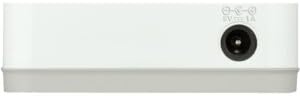
Figura 2: Posteriore view of the D-Link GO-SW-5G switch with five Ethernet ports.
3.3. Connect Network Devices
- Connect your network devices (e.g., computers, gaming consoles, network printers, smart TVs) to the remaining available Ethernet ports on the D-Link GO-SW-5G switch using Ethernet cables.
- Each connected device will have its corresponding LED on the front of the switch illuminate, confirming a successful connection.

Figura 3: Davanti view of the D-Link GO-SW-5G switch showing active port LEDs.
4. Istruzioni per l'uso
The D-Link GO-SW-5G is an unmanaged switch, meaning it operates automatically without requiring user configuration. Once connected as described in the Setup section, it will begin forwarding network traffic between connected devices.
- Negoziazione automatica: The switch automatically detects the network speed (10/100/1000 Mbps) and duplex mode (half/full) of connected devices and adjusts accordingly.
- Auto MDI/MDIX: All ports support automatic MDI/MDIX crossover, eliminating the need for crossover cables when connecting to other switches or hubs.
- Indicatori LED: Each port has an LED indicator on the front panel. A lit LED indicates an active link, and blinking indicates network activity.
5. Manutenzione
To ensure optimal performance and longevity of your D-Link GO-SW-5G switch, consider the following maintenance guidelines:
- Posizionamento: Posizionare l'interruttore in un luogo fresco e asciutto, lontano dalla luce solare diretta, da fonti di calore e da umidità eccessiva. Garantire un'adeguata ventilazione attorno al dispositivo.
- Pulizia: Use a soft, dry cloth to clean the exterior of the switch. Avoid using liquid or aerosol cleaners, as they may damage the device.
- Gestione dei cavi: Mantieni i cavi Ethernet ordinati per evitare grovigli e disconnessioni accidentali.
- Ciclo di alimentazione: If you experience network issues, a simple power cycle (unplugging the power adapter for 10 seconds and then plugging it back in) can often resolve minor problems.
6. Risoluzione Dei Problemi
If you encounter issues with your D-Link GO-SW-5G switch, refer to the following common troubleshooting steps:
- Nessun LED di alimentazione:
- Assicurarsi che l'adattatore di alimentazione sia collegato saldamente sia allo switch sia a una presa elettrica funzionante.
- Verificare che la presa elettrica funzioni collegandovi un altro dispositivo.
- No Link/Activity LED for a Connected Device:
- Verificare che il cavo Ethernet sia collegato saldamente sia alla porta dello switch sia al dispositivo di rete.
- Provare un cavo Ethernet diverso per escludere che si tratti di un cavo difettoso.
- Assicurarsi che il dispositivo connesso sia acceso e che la sua scheda di rete funzioni correttamente.
- Prova a connettere il dispositivo a una porta diversa sullo switch.
- Bassa velocità di rete:
- Verify that all connected devices and cables support Gigabit Ethernet (1000 Mbps) for optimal performance. The switch will operate at the lowest common speed.
- Ensure your router and internet service provider (ISP) plan support the desired speeds.
- Perform a power cycle on the switch and your router.
- Connettività intermittente:
- Verificare la presenza di connessioni dei cavi allentate.
- Ensure the switch is not overheating; provide adequate ventilation.
- Eseguire il test con diversi cavi Ethernet.
7. Specifiche
| Marca | D-Link |
| Numero di modello | GO-SW-5G/B |
| Numero di porte | 5 |
| Tipo di interruttore | Non gestito |
| Velocità di trasferimento dati | 1 Gigabit al secondo (10/100/1000 Mbps) |
| Interfaccia | RJ45 |
| Colore | Bianco |
| Peso dell'articolo | 0.22 libbre |
| Voltage | 100-240 Volt |
| Dispositivi compatibili | PC, Mac, and other Ethernet-enabled devices |
| Tessuto di commutazione | 10 Gbps |
| Codice UPC | 790069365669 |
8. Garanzia e supporto
Garanzia limitata: The D-Link GO-SW-5G switch comes with a 3-year limited warranty. For detailed terms and conditions, please refer to the warranty information included in your package or visit the official D-Link websito.
Supporto tecnico: For technical assistance, product registration, or to download the latest firmware and documentation, please visit the Supporto D-Link Websito oppure contattare il servizio clienti D-Link.